By the SmartToolCompass editorial team · Updated August 28, 2026 · n8n hands-on tested August 23, 2026 · Pabbly Connect hands-on tested August 26, 2026
Disclosure: This article is independently researched and hands-on tested. We currently have no affiliate relationship with either company, and some links on this page may become affiliate links in the future.
Quick Answer
Choose n8n if you want control. Self-hosting is available, expressions and code steps let you shape data however you need, and every node shows you exactly what went in and what came out. You’ll pay for that with a more technical first experience.
Choose Pabbly Connect if you want to automate without learning syntax, and long-term cost matters. Field mapping is the easiest of any tool we’ve tested, only external actions count toward your usage, and one-time lifetime plans exist.
We built the same Google Sheets to Gmail workflow in both, on the same Google account with the same three columns. Both delivered a real email.
The split surprised us. n8n’s Google Sheets trigger was the more direct setup — no add-on, no webhook URL to paste. Pabbly’s field mapping was far easier — type a slash, pick a field, done, versus n8n’s {{ $json.Email }}.
So neither one is simply “the easy one.” n8n asks more of you at the mapping layer and gives more control back. Pabbly asks more during trigger setup and then gets out of your way.
For beginners: Pabbly Connect. For technical flexibility and self-hosting: n8n. For long-term one-time cost: Pabbly Connect.
Try n8n → · Try Pabbly Connect for free →
n8n vs Pabbly Connect at a Glance
| Category | n8n | Pabbly Connect |
|---|---|---|
| Best for | Control, visibility, technical flexibility | Simple mapping, long-term cost |
| Free plan / trial | Trial only, no credit card; no free Cloud tier | Free plan, 100 tasks/mo, no credit card |
| Starting price | €20/mo for 2,500 executions (annual) | $16/mo for 10,000 tasks (annual) |
| Billing unit | Executions, per whole workflow run | Tasks, per external app action |
| Google Sheets setup | Built in, no add-on | Requires a Sheets add-on and webhook |
| Data mapping | Expressions ({{ $json.Email }}) | Slash command |
| Technical difficulty | Higher — terminology and syntax appear early | Lower, once the trigger is configured |
| Visual workflow builder | Node canvas with per-node input/output | Ordered trigger-and-action sequence |
| Self-hosting | Yes — Community Edition available | No |
| Lifetime plan | No | Yes, from $349 one-time |
| Main strength | Per-node visibility and infrastructure control | Task model that excludes internal steps |
| Main drawback | Expression syntax before your first send | Our Sheets trigger needed the most setup |
| Hands-on tested | Yes | Yes |
Note the currencies. n8n prices in euros, Pabbly in dollars, so the headline figures aren’t directly comparable even before you account for the different billing units.
How We Tested n8n and Pabbly Connect
Both builds used the same spreadsheet — Automation Test Workflow, sheet test, columns Name, Email, Message — on the same Google account.
New row in Google Sheets
          ↓
   n8n  |  Pabbly Connect
          ↓
     Gmail send
          ↓
Email   → recipient
Name    → subject line
Message → body
In n8n we used a Google Sheets Trigger into a Gmail Send a message node, built by hand on a Cloud trial without the AI assistant. In Pabbly we used Create from Scratch — no AI builder, no quick builder — with Google Sheets New or Updated Spreadsheet Row into Gmail Send Email, on a free account showing 100 tasks remaining.
The trigger mechanisms differ, and that difference is part of the comparison rather than a flaw in it.
This was a first-workflow test on both platforms. It covers signup, trigger configuration, app authorization, field mapping, testing, and execution. It doesn’t cover self-hosting in production, branching, code steps, AI features, error handling, volume, or support quality on either tool.
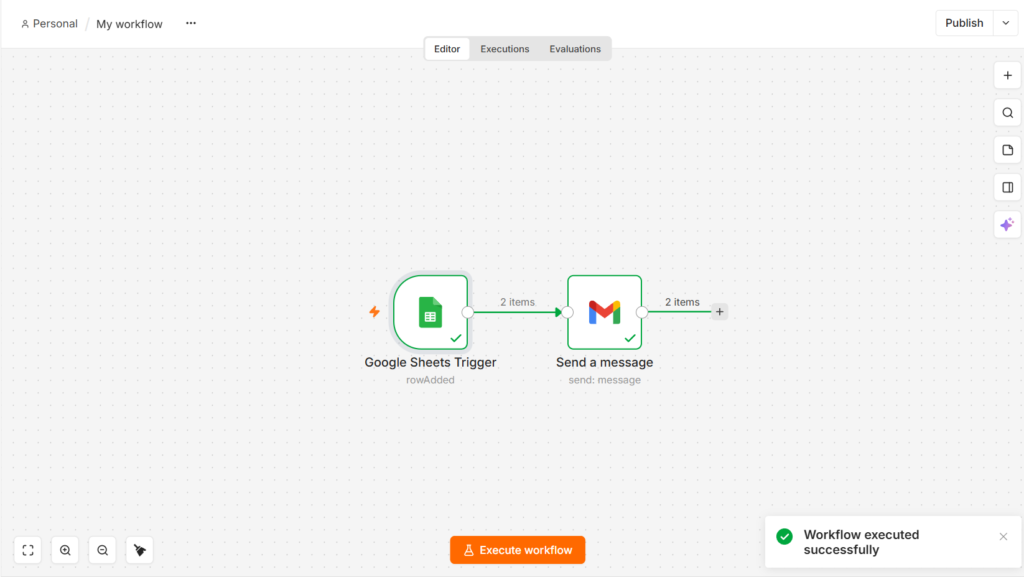
Our n8n test completed the Google Sheets to Gmail workflow successfully, with both nodes reporting success.
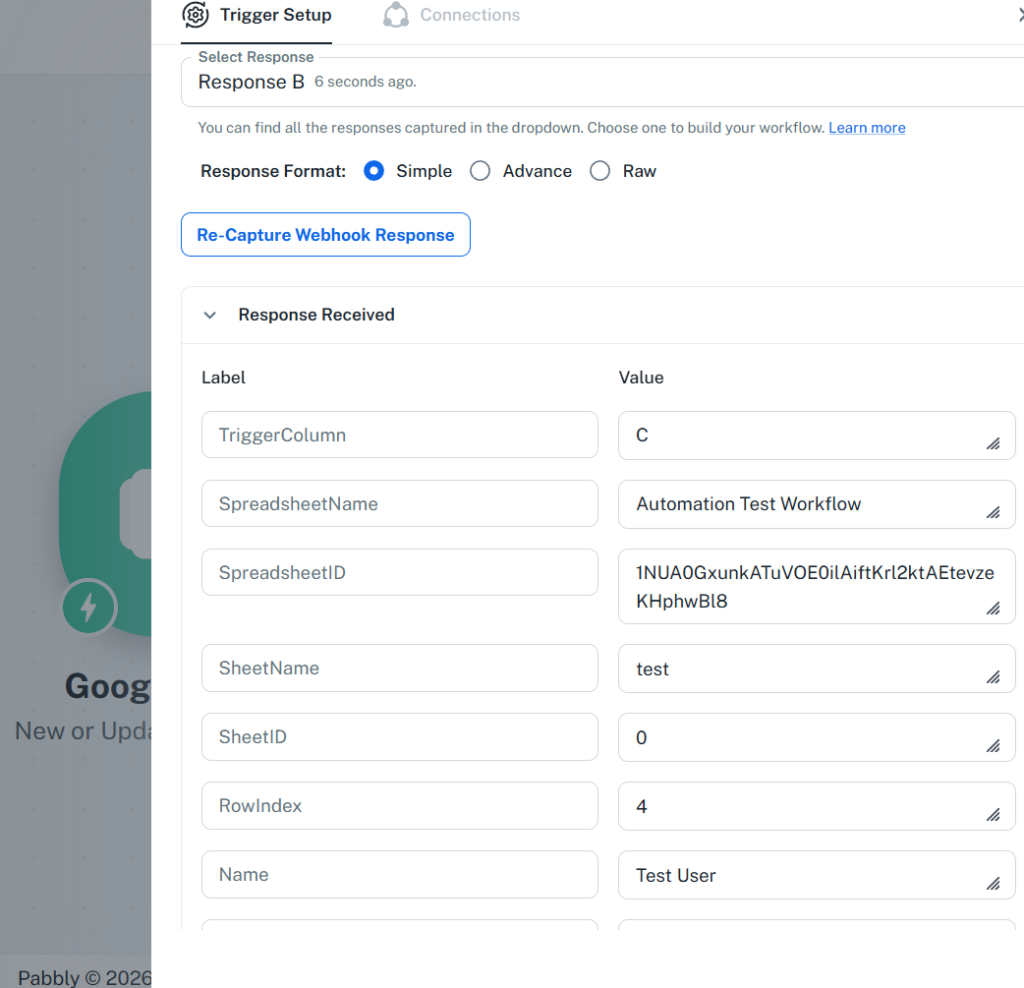
Our Pabbly Connect test captured the same spreadsheet data through its Google Sheets webhook trigger.
Setup: n8n Was More Direct, Pabbly Needed More Steps
n8n handled the trigger inside the platform. We added the Google Sheets Trigger node, created a Google credential through the standard OAuth flow, picked the document and sheet, and set the trigger to fire on a new row. Nothing had to be installed anywhere else.
Two things did read as technical. n8n calls a saved connection a credential, which is the correct term and not the one a first-timer would reach for. And the trigger showed Poll Times already set to Every Minute — informative if you know what polling means, opaque if you don’t. Neither stopped us.
Pabbly Connect required work outside the platform. Selecting the Google Sheets trigger produced a webhook URL and instructions, because Pabbly’s model has the spreadsheet push data out rather than Pabbly reaching in. That meant:
- Open the spreadsheet, go to Extensions → Add-ons
- Install Pabbly Connect Webhooks
- Paste the webhook URL into the add-on’s Initial Setup
- Enter a Trigger Column
- Enable Send On Event
- Turn the workflow on before the response could be captured
Step 4 cost us the most time. We typed Message, the name of the column we wanted watched. Pabbly wants the column letter — ours was third, so the answer was C. Nothing on screen says so.
Step 6 caught us too: attempting to re-capture the webhook response produced a warning that the workflow had to be switched on first. Once we did, the response came back complete, with TriggerColumn, SpreadsheetName, SheetName, SheetID, RowIndex, and our field values.
n8n won initial setup simplicity in this test. The caveat is real though: this is one integration. Pabbly’s add-on requirement is specific to Google Sheets, and a different trigger app could flip the result entirely.
Data Mapping: Pabbly Was Easier
Now the other direction.
n8n uses expressions. The recipient field got {{ $json.Email }}, the subject combined text with a value as New message from {{ $json.Name }}, and the body took {{ $json.Message }}.
To be fair to n8n: you don’t type those from memory. The incoming data sits in a panel on the left, and dragging a value in generates the reference. Better still, n8n shows each expression’s resolved result directly under the field — we could see Test User and the actual email address before sending anything. For transparency, that’s excellent.
But it looks like code, and it assumes you understand that $json means the data item entering this node. For someone building a first automation, that’s a concept to absorb before any email goes out.
Pabbly uses a slash command. Type / in any field, a list of data from previous steps appears inline, pick one. We mapped Email to Recipient, Name into the subject, Message into the content, set the content type to Plain, and left the rest empty.
No syntax, no panel to navigate between, no concept to learn first. It’s the same gesture you already use in Slack or Notion.
Pabbly won ease of use on field mapping, clearly. It’s the smoothest mapping step of the three automation tools we’ve tested with this workflow.
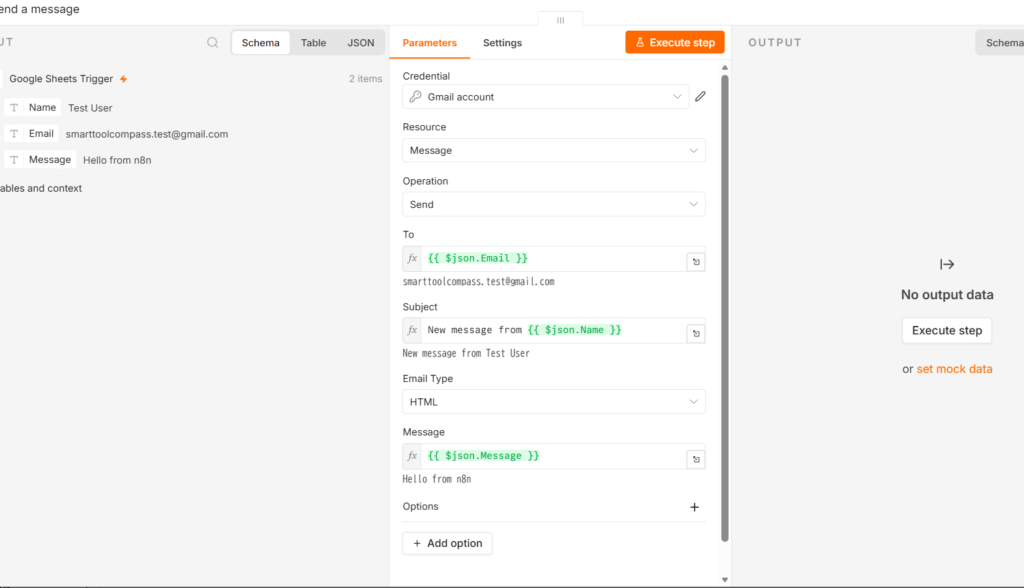
n8n showed the incoming spreadsheet values on the left while we mapped them into Gmail, with each expression’s resolved result displayed under the field.
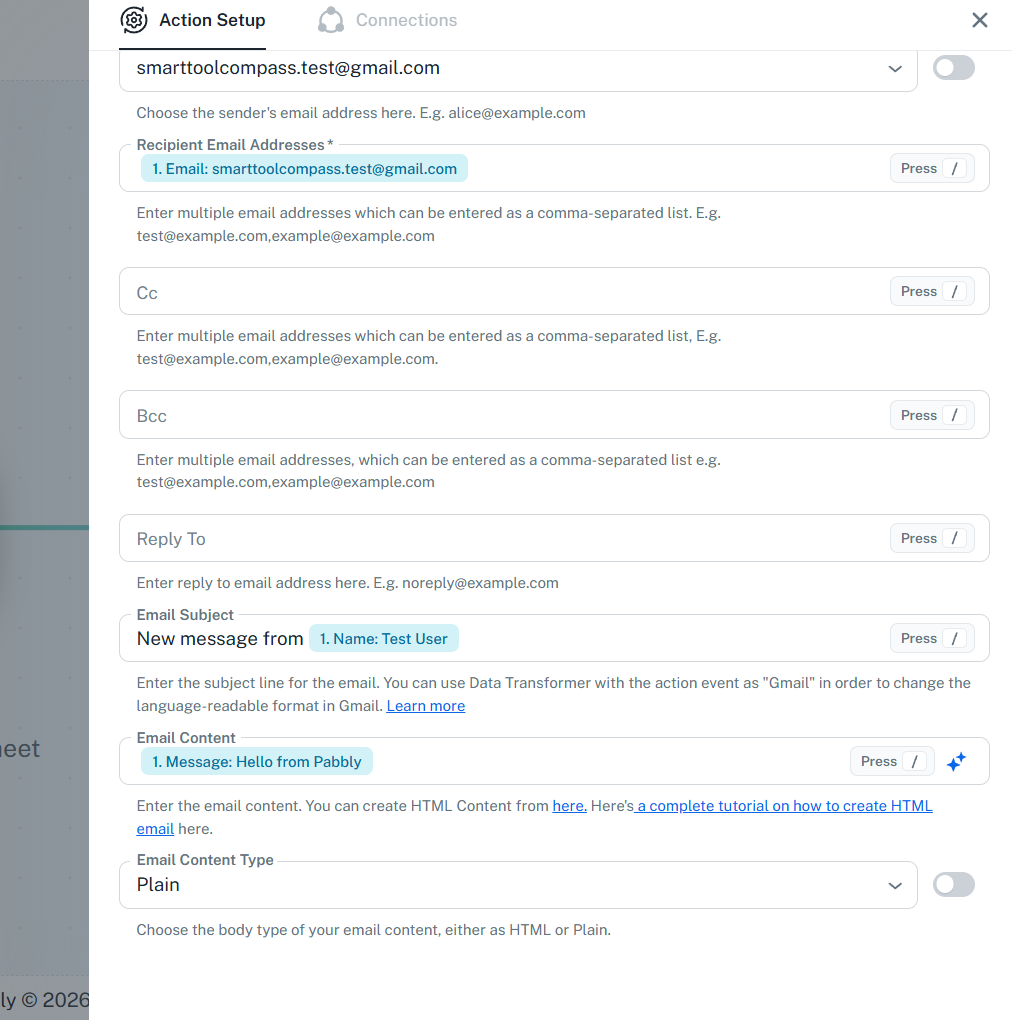
Pabbly’s slash-based mapping let us insert the spreadsheet’s Email, Name, and Message fields directly into Gmail.
Did Both Work?
Yes, both, end to end.
n8n ran with both nodes reporting success and a Workflow executed successfully confirmation. The email arrived with the subject New message from Test User 2 and the body Hello from n8n. It also carried a line reading This email was sent automatically with n8n — per n8n’s documentation, the Gmail node appends that by default, and there’s an Append n8n attribution option to turn it off. Check that before automating anything client-facing.
Pabbly sent successfully too. The email arrived with the subject New message from Test User, the body Hello from Pabbly, and the sender name we’d configured, SmartToolCompass.
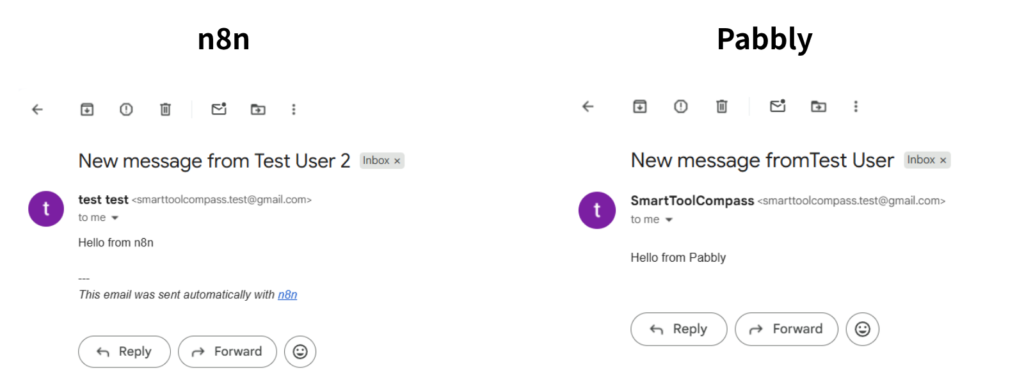
Both automations delivered successfully. n8n sent “Hello from n8n,” while Pabbly Connect sent “Hello from Pabbly” using the same spreadsheet data.
We measured no difference in speed or reliability, and we won’t claim one. Both platforms handled the same workflow correctly.
n8n vs Pabbly Connect: Ease of Use
From our builds:
| Category | n8n | Pabbly Connect |
|---|---|---|
| Account setup | Role and experience questions, then the canvas | Straightforward, timezone set at start |
| First workflow | Built by hand, AI assistant declined | Create from Scratch, clear structure |
| Google Sheets trigger | Built in, configured in one place | Add-on, webhook URL, trigger column |
| Gmail connection | Standard OAuth | Standard OAuth |
| Field mapping | Expressions, resolved preview shown | Slash command, inline |
| Testing | Run a single node, then the workflow | Capture webhook response, then send test |
| Warning clarity | Poll times unexplained, but nothing blocked us | Workflow-ON warning clear, trigger column not |
| Visual clarity | Canvas with per-node input and output | Ordered step list |
| Technical feel | Higher | Lower, after the trigger |
| Overall beginner experience | More to learn | Smoother once configured |
Google Sheets setup: n8n. Field mapping: Pabbly. Technical transparency: n8n. Overall beginner experience: Pabbly.
That last row is a judgment call, and it comes down to this: the trigger is something you configure once, while mapping is something you do in every workflow you ever build.
n8n vs Pabbly Connect Pricing
n8n pricing checked August 23, 2026; Pabbly Connect pricing checked August 26, 2026, on the vendors’ official pricing pages. n8n lists euros, Pabbly lists dollars.
n8n Pricing
| Plan | Price | Executions/mo | Notes |
|---|---|---|---|
| Starter | €20/mo | 2,500 | 5 concurrent executions, 7-day log retention |
| Pro | €50/mo | 10,000 | 20 concurrent, 30-day log retention, workflow history |
| Business | €667/mo | 40,000 | Self-hosted, SSO, Git version control |
Annual billing; n8n states annual saves 17%. There is no free Cloud tier — only a trial, which needs no credit card on Starter and Pro. Every plan includes every integration and unlimited workflows.
Community Edition is the free self-hosted version, published on GitHub under n8n’s fair-code license.
Pabbly Connect
| Plan | Price | Tasks/mo | Notes |
|---|---|---|---|
| Free | $0 | 100 | No credit card; see the note below |
| Standard | $16/mo | 10,000 | $19/mo billed monthly |
| Unlimited | $69/mo | Unlimited | $79/mo billed monthly |
| Standard Lifetime | $349 once | 3,000 | 10 workflows; two-step workflows |
| Ultimate Lifetime | $799 once | 10,000 | Multi-step, all features |
| Ultimate Plus Lifetime | $1,298 once | 20,000 | Plus one year of support |
Lifetime plans can’t be stacked or upgraded later. All plans carry a 30-day money-back guarantee.
A note on plan descriptions. Both companies currently describe some limits inconsistently across their own pages. For n8n, the trial allowance appears as 2,500 executions on the pricing page and 1,000 in the Help Center — and our own trial account displayed 1,000 with a 14-day counter. For Pabbly, the free tier is listed as unlimited and multi-step in one place and as up to 2 workflows with up to 2 steps in another, and the $349 lifetime tier shows a similar split. The lifetime figures in our table come from the current purchase page, since that’s what you actually buy from. Check the plan screen inside your own account before you commit.
See n8n’s plans → · See Pabbly’s plans →
Executions vs Tasks
The billing units are the most important difference here, and they work nothing alike.
n8n counts executions. Per n8n’s definition, one execution is a single run of your entire workflow. Step count and data volume don’t change it — a two-node workflow and a twenty-node workflow each cost one execution per run. What drives the number is how often the workflow runs.
Pabbly counts tasks. Per Pabbly’s published rules, a task is an action performed on an external app. Triggers don’t count. Neither do internal steps: filters, routers, formatters, schedulers, iterators, email parsers. Pabbly also separates tasks from operations — the checks made to see whether new data exists — and doesn’t charge for operations.
Applied to the workflow we built, run once:
- n8n: one workflow execution.
- Pabbly: the webhook trigger is free, the Gmail action counts — one task, based on Pabbly’s published task-counting rules.
We didn’t run either workflow at volume and compare dashboard counters, so treat both as readings of published rules rather than measurements. n8n also has separate handling for things like sub-workflows and retries, so check its documentation if your workflows use them.
Which Is Cheaper?
Different billing units mean headline prices tell you very little. It depends on shape and frequency.
Simple, low-volume workflows. Pabbly has a permanent free plan; n8n Cloud has only a trial. If you want to run one small automation indefinitely without paying, that’s Pabbly — or n8n’s self-hosted Community Edition, which is a different commitment entirely.
Workflows with many internal steps and one external action. Pabbly’s model is friendlier. All that internal logic costs nothing, and only the final action counts.
Workflows with many external actions inside one run. n8n’s model is friendlier. Ten API calls in one workflow is still one execution.
High-frequency workflows. n8n’s own guidance notes that a workflow on a five-minute schedule works out to roughly 8,600–8,900 executions a month, past Starter’s 2,500. Frequency is what burns an execution allowance. On Pabbly, frequency alone doesn’t cost anything — only the actions that fire do.
Long-term, stable workflows. Pabbly’s lifetime plans change the math. A large one-time payment against an indefinite subscription is a bet on your needs staying stable and the company sticking around, but for someone certain of both, it’s a real option n8n doesn’t offer.
Self-hosting. This can shift n8n’s economics substantially, with a caveat we cover next.
Self-Hosting: n8n Has a Major Advantage
n8n explicitly offers self-hosting. Pabbly Connect’s current official product and pricing pages do not list a self-hosted edition. For anyone with a data residency requirement, a client contract that restricts where data is processed, or a preference for owning their infrastructure, that’s decisive on its own.
n8n’s Community Edition is published on GitHub under a fair-code license and runs on your own server, commonly via Docker. Cloud, by contrast, is managed by n8n with data stored in Frankfurt.
Here’s the part that gets oversimplified: self-hosting is not free. For uses permitted under n8n’s Sustainable Use License, Community Edition has no license fee. Running it still costs money. You’re paying for a server, and you’re taking on setup, updates, backups, security patching, and monitoring — either in money or in your own hours. Business features like SSO and Git version control also sit on n8n’s paid Business plan rather than in the standard Community Edition.
For a technically comfortable freelancer who already maintains a VPS, self-hosting can be a substantially cheaper way to run heavy automation. For someone who doesn’t, Cloud is the product being evaluated, and self-hosting is a theoretical advantage rather than a practical one.
We tested n8n Cloud only. Everything in this section comes from documentation.
Which Is More Flexible?
Research-based, apart from what we mapped ourselves.
n8n offers expressions, code steps in JavaScript and Python, an HTTP Request node for any API without a native connector, webhooks, AI nodes, and self-hosting. The design assumption is that you’ll eventually want to do something the interface didn’t anticipate.
Pabbly offers filters, routers, formatters, iterators, an email parser, an API module for services without native integrations, webhooks, and an AI Assistant. It publishes over 2,000 integrations and holds SOC 2 Type 2 and ISO 27001:2022 certifications.
From our hands-on work, all we can say is that n8n felt more technical and more extensible at the mapping layer, and Pabbly felt more approachable. Everything else in this section is documentation, not experience.
Features We Didn’t Test
n8n: self-hosting in production, advanced routing, the Code node, AI nodes, webhooks at scale, team collaboration, enterprise security, high-volume reliability, support.
Pabbly: routers, filters, formatters, the API module, Code by Pabbly, AI Assistant, MCP servers, high-volume reliability, support responsiveness.
Everything we’ve concluded above comes from the workflow we built. Everything else is labeled as research.
n8n Is Better If…
- You want self-hosting, or expect to need it
- You’re comfortable with expressions, or willing to learn them once
- You want per-node visibility into what data each step received and produced
- Your workflows have many external actions inside a single run
- You expect to hit an API or write a code step eventually
- You prefer execution-based billing that doesn’t scale with step count
Pabbly Connect Is Better If…
- You want mapping without syntax
- You prefer a simple trigger-and-action mental model over a canvas
- Long-term cost is a primary concern
- A one-time payment appeals to you more than an indefinite subscription
- Your workflows lean on internal logic that Pabbly doesn’t charge for
- You can tolerate extra setup on certain triggers, Google Sheets included
n8n vs Pabbly Connect for Freelancers: Our Verdict
Best for beginners: Pabbly Connect. Once the trigger is configured, it asks less of you than anything else we’ve tested.
Best for technical users: n8n. Expressions, code, and per-node inspection give you room that Pabbly doesn’t offer.
Best for self-hosting: n8n. Pabbly has no equivalent.
Best for long-term one-time pricing: Pabbly Connect. The lifetime plans have no counterpart on n8n’s Cloud side.
Best overall for most non-technical freelancers: Pabbly Connect.
That last call isn’t a knock on n8n. n8n asks more from you and gives more control back — which is a good trade for the right person and a bad one for someone who just wants a spreadsheet to send an email. If you’re not sure which you are, the answer is usually Pabbly first.
Final Verdict
Choose Pabbly Connect if you want to automate without learning expression syntax, and long-term cost matters to you more than technical ceiling.
Choose n8n if you’re comfortable with a more technical interface and want the flexibility of expressions, code, and self-hosting.
Our hands-on test showed both completing the same Google Sheets to Gmail workflow successfully. The real difference is what each platform asks from you during setup, and how much control it hands back.
Pabbly’s free plan and n8n’s trial both cost nothing, so build the workflow you actually need on each and see which one you finish faster.
More from our automation testing: our full n8n review, Pabbly Connect review, and Make review, plus the head-to-head comparisons in Make vs n8n and Make vs Pabbly Connect. Best Automation Tools for Freelancers, Best n8n Alternatives, and Best Make Alternatives are coming next.

Comments