Updated: October 2, 2026
Originally tested: Make August 23, 2026 · Latenode September 26, 2026
Clean unattended run measured: Latenode September 26, 2026 · Make October 2, 2026
Pricing checked on: October 2, 2026
Testing status: Hands-on tested (both on their free plans, both run unattended)
Disclosure: SmartToolCompass may earn a commission if you sign up through our links, at no extra cost to you. We built and paid for nothing beyond the free plans described below, and the commission does not change which tool we say did what.
Latenode vs Make: Quick Answer
We built the same two-step automation in both — a new row in Google Sheets sends an email through Gmail — on the same Google account and the same spreadsheet. Both worked. The difference that matters is not a feature list; it is what each one charges for.
Make charges per module operation. For the standard app modules we tested, one operation cost one credit: our clean unattended run used 2 credits, one for the Google Sheets check and one for the Gmail send. The catch is what it costs while nothing is happening. Watch New Rows is a polling trigger, and Make documents an operation as a module run that processes data or checks for new data — so every scheduled check costs a credit whether or not a row appeared.
Latenode charges for runtime. The same job cost 2 CPU seconds out of a documented 10,000 a month. The number of nodes does not directly set the charge; total compute time does. Our Latenode build used an instant trigger, so it was not running on a schedule to look for work. Both successful runs reported 2 operations and took 1 second — but a credit and a CPU second are not the same unit, so that is not a tie on price.
Both ran unattended. Make fired from its own schedule with the scenario switched on and nothing pressed; Latenode ran deployed and Active in production. So the question is not whether either works. It is the builder, the trigger model, the data mapping, the billing model and the free-plan ceilings — and on the first of those, Make was markedly easier to build in.
Latenode vs Make at a Glance
| Item | Latenode | Make |
|---|---|---|
| Plan we tested on | Free plan | Free plan |
| What we built | The same Google Sheets → Gmail automation, same account, same spreadsheet | |
| Connecting Google | Two separate OAuth connections, one per app | One OAuth connection, reused by both modules |
| Field mapping | Open a Data panel and click the value; the field fills with $1.data.event.row_parsed.B | Click the field from the previous module’s output; no syntax at all |
| Trigger in our build | Instant — pushed when the row appeared | Polling — Watch New Rows |
| Cost of waiting | Nothing scheduled in our build | Every scheduled check is an operation, new row or not |
| Did the email arrive? | Yes, from a deployed production run | Yes, from a scheduled run with nothing pressed |
| Ran unattended? | Yes — deployed, set Active, ran with nothing pressed | Yes — scenario on, Schedule trigger, nothing pressed |
| What one clean run used | 2 operations / 2 CPU seconds, 1s, from the run history | 2 operations / 2 credits, 1s, from the run history |
| Billing unit | CPU seconds of runtime | One credit per module action |
| Free plan | 10,000 CPU seconds/mo, 5 active workflows, 3-day history | 1,000 credits/mo, 2 active scenarios, 15-min minimum interval |
| Entry paid price | No subscription tiers; pay as you go from $0.00012 per CPU second | Core — $9/mo on annual billing for 10,000 credits; $10.59/mo billed monthly |
| Easier first build | Make (editorial judgment, from these two builds) | |
How We Tested Both
One spreadsheet called Automation Test Workflow, one sheet called test, three columns: Name, Email, Message. A new row sends an email, with the address from one column and the message from another. Same Google account in both tools. We built both by hand and declined both products’ AI builders.
The full builds are in our Latenode review and our Make.com review.
Both were taken through to an unattended run, on different dates. Latenode on September 26, 2026, deployed and set Active. Make on October 2, 2026, with the scenario switched on and the Schedule trigger left to fire — we did not press Run once. The builds themselves were five weeks apart, so interface details may have moved between them.
Why we re-tested Make. Our earlier Make reading was 3 operations and 3 credits, from a run whose log showed the Gmail module firing twice. That spreadsheet still had older rows in it. For the October 2 re-test we cleared the sheet down first, added one new row, and filled columns A to C in a single paste, so the run had exactly one row to act on. That is the run this comparison uses.
Setup: Make Guided the First Build, Latenode Did Not
Make’s onboarding asked what we already knew and which apps we cared about, then opened a canvas with Google Sheets and Gmail already in reach instead of a search box over 3,000 options. Latenode opened on an empty canvas and left the first move to us.
Connecting Google went differently in a way worth counting. Make took one OAuth authorisation and reused it for both the Sheets and the Gmail module. Latenode wanted two, one per app. On a two-app build that is a few extra seconds; on Latenode’s free plan, which documents a ceiling of 10 connected authorisations, it is also a resource you are spending twice as fast.
Neither required an API key, a Google Cloud project or anything pasted from a developer console. That step — the one that ends a lot of first automations — is solved in both.
Data Mapping: Clicking a Field vs Writing a Path
This was the single biggest difference in the two builds, and it is the reason we would hand Make to a beginner.
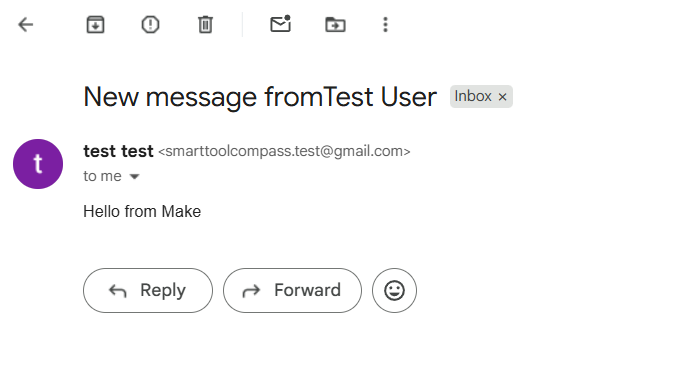
In Make, the Gmail module lists the fields the Google Sheets module actually produced. You click the one you want and it goes in. There is no syntax, no variable format, nothing to get wrong — you cannot mistype something you never type. It also means the interface tells you what data you have: if a field is not in the list, it does not exist.
In Latenode, the value comes from a Data panel on the right of the editor. You open it, expand the earlier node’s output, and click the value; what lands in the field is $1.data.event.row_parsed.B. Read it and it is perfectly logical — first node, then the path down to the parsed column. The problem is the first time: nothing in the To field suggests the answer is in a panel somewhere else on the screen.
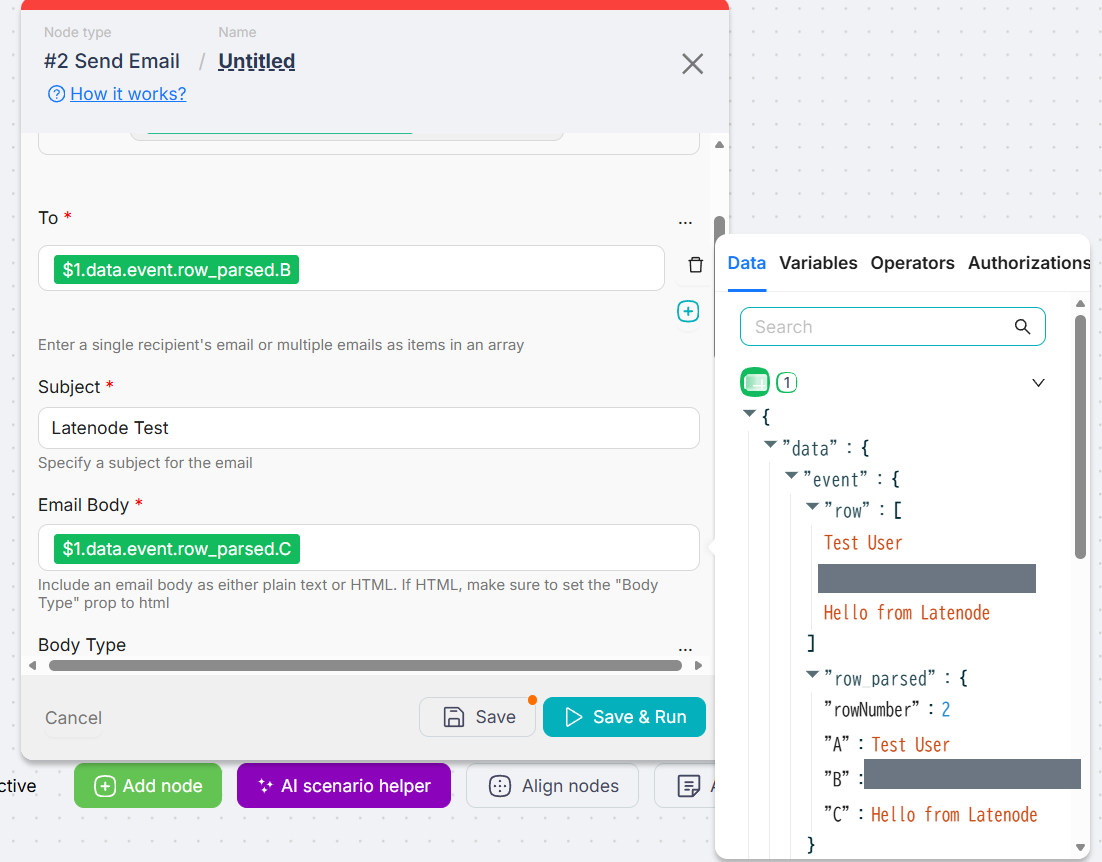
There is a trade hiding in that. Make’s reference is a field the interface chose; Latenode’s points at a column letter, so inserting a column into the sheet later will quietly aim the automation at different data. Neither of us broke it on purpose — that follows from how the reference is written.
Triggers: Make Polls on a Schedule, Latenode Pushed Instantly
We used Make’s Watch New Rows, a polling trigger, and Latenode’s instant version of New Row Added, which Latenode documents as the external service pushing the event “the moment it happens.”
That is a plan-level difference on the free tiers, not a preference. Make’s pricing page documents a 15-minute minimum interval between scheduled runs, so on the free plan a polling scenario checks four times an hour at best. Latenode’s 10-minute figure is a floor for polling triggers only — its own pricing page says “webhooks still fire instantly.”
For an invoice reminder or a nightly digest, fifteen minutes is irrelevant. For anything a client is waiting on, it is the whole answer. This is the documented schedule rather than a stopwatch reading.
And on Make’s free plan, polling is not free to wait on. Three of Make’s own pages join up here. A polling trigger “checks for new data in a service account since the last scenario run, based on the scenario’s schedule”. An operation is “a single module run to process data or check for new data“. And by default “1 operation equals 1 credit”. A scheduled run that finds nothing even has a name in Make’s documentation — a check run.
Put the free plan’s 15-minute minimum through that and the arithmetic is uncomfortable: four checks an hour is 96 a day, and about 2,880 a month — past the free plan’s 1,000 credits on checks alone, before a single email is sent. That is arithmetic from a documented rate and a documented interval, not a counter we watched climb. An always-on polling scenario is not what Make’s free plan is sized for: you would slow the schedule, switch it on when you need it, or pay.
Our Latenode build sidestepped that by using an instant trigger, which is pushed rather than scheduled. This is a difference between the two builds we made rather than a claim that Latenode never pays to wait: Latenode’s documentation does not state what a scheduled check that finds nothing consumes.
Did Both Run Unattended? Yes, Both Did
Both delivered a real email carrying the spreadsheet’s own values, and both did it with nobody pressing anything.
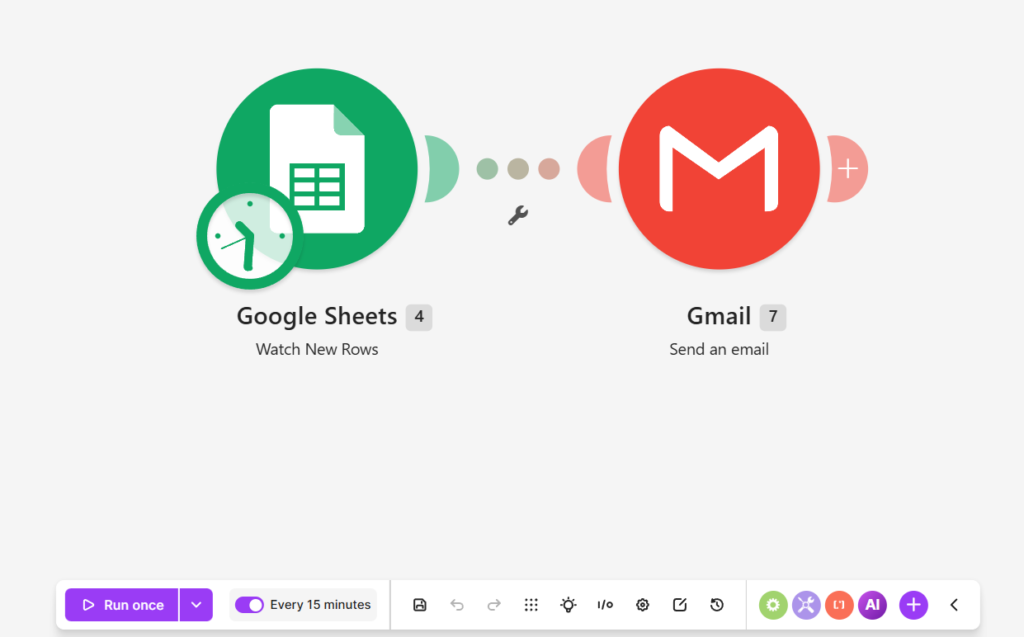
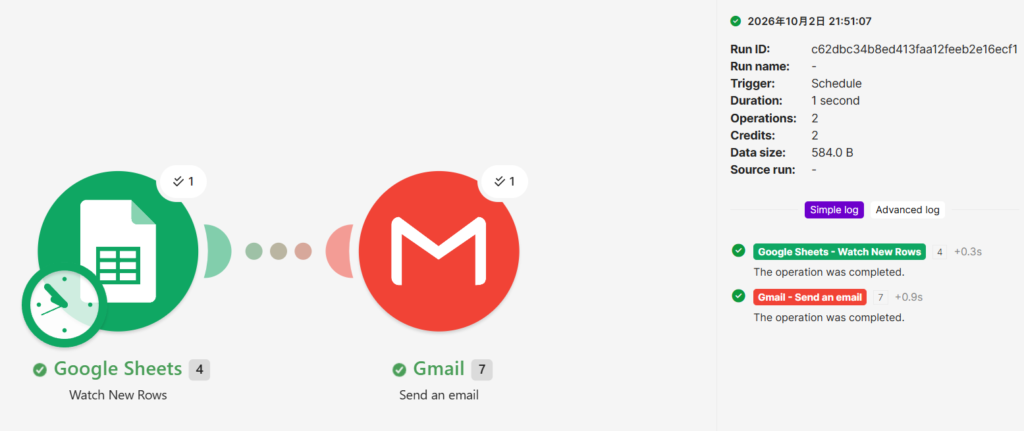
Make: scenario switched on, the Watch New Rows trigger left on its schedule, Run once untouched. We added the row and waited. The run appeared in the history by itself — Trigger Schedule, Status Success — and both modules reported success separately on the canvas. That separation means a run’s two steps are visible on their own rather than as one banner. We did not engineer a failure in either tool, so what each one shows when a step fails is untested.
Latenode: we ran it manually, then deployed it, set it Active, and added a row without pressing anything. It ran on its own. And the first production run failed. Gmail returned Recipient address required, because the recipient field had resolved to nothing.
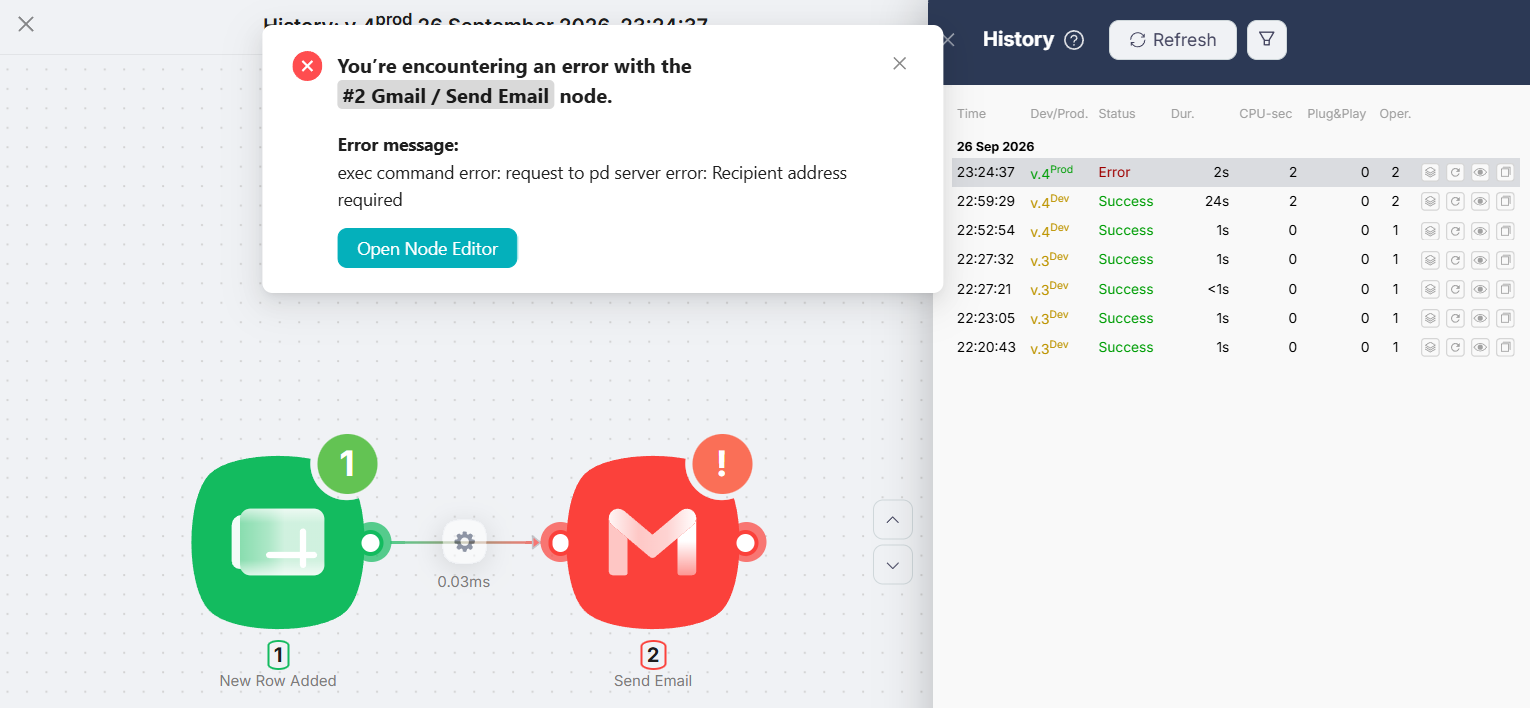
We had typed the row one cell at a time. The reading that fits is that the instant trigger fired once the row existed but before the email column was filled — we did not reproduce it deliberately, so that stays a reading rather than a cause. What happened next: we pasted the whole row at once, and the run succeeded — Duration 1s, CPU-sec 2, Operations 2. We filled A to C in one paste in the Make re-test too, for the same reason.
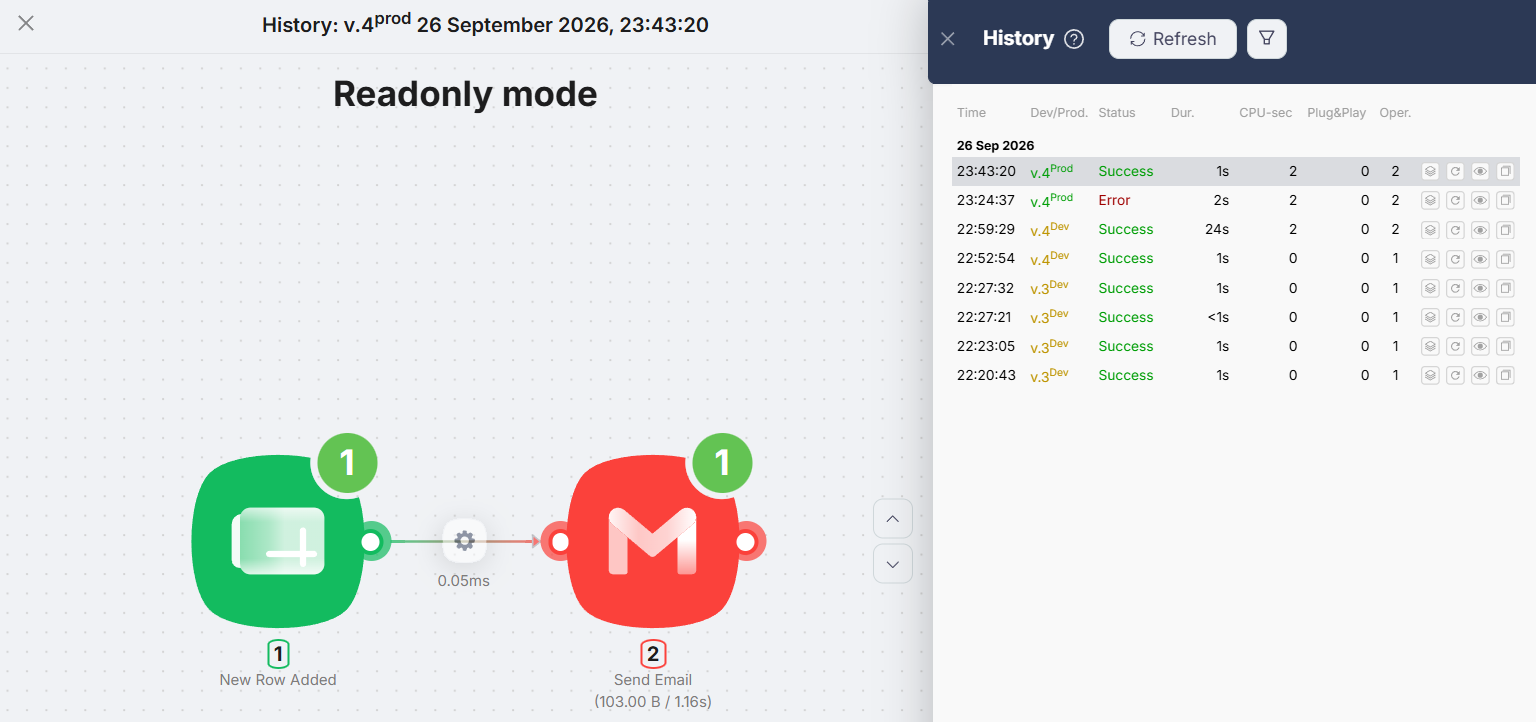
One caveat on reading that: it is not a verdict on error handling. We saw one error, in one tool, likely related to how we entered our own data, and every Make run we have logged succeeded. Neither tool was tested against a failure we engineered.
What One Clean Run Used
One new row, one email, in each tool, read from each tool’s own run history.
| One clean unattended run | Latenode | Make |
|---|---|---|
| Date | September 26, 2026 | October 2, 2026 |
| How it started | Prod, deployed and Active | Schedule trigger, scenario on |
| Status | Success | Success |
| Duration | 1s | 1 second |
| Operations | 2 | 2 |
| Billed amount | 2 CPU seconds | 2 credits |
| Emails delivered | 1 | 1 |
The two operations counts match. The billed amounts do not mean the same thing. Make’s 2 credits came off a monthly allowance of 1,000 credits; Latenode’s 2 CPU seconds came off 10,000 CPU seconds. One counts module actions, the other counts runtime, so these two 2s cannot be added, divided or ranked against each other. Nothing here says one tool is cheaper than the other — it says both did this job at the smallest size each one bills in.
Make: 2 operations, 2 credits. Google Sheets Watch New Rows one operation, Gmail Send an email one operation, 584.0 B of data. Make’s pricing page states that “Each module action in your scenario … counts as one credit”, so a two-action run costing two credits is exactly the published rule.
Latenode: 2 operations, 2 CPU seconds. That is what its run history reported for the successful production run, against a documented 10,000 a month on the free plan. Its documentation adds that CPU seconds are consumed “during a scenario execution (from start to finish of the run)”, that running a single node while you configure it is free, and that the minimum billable execution is 1 CPU second per run.
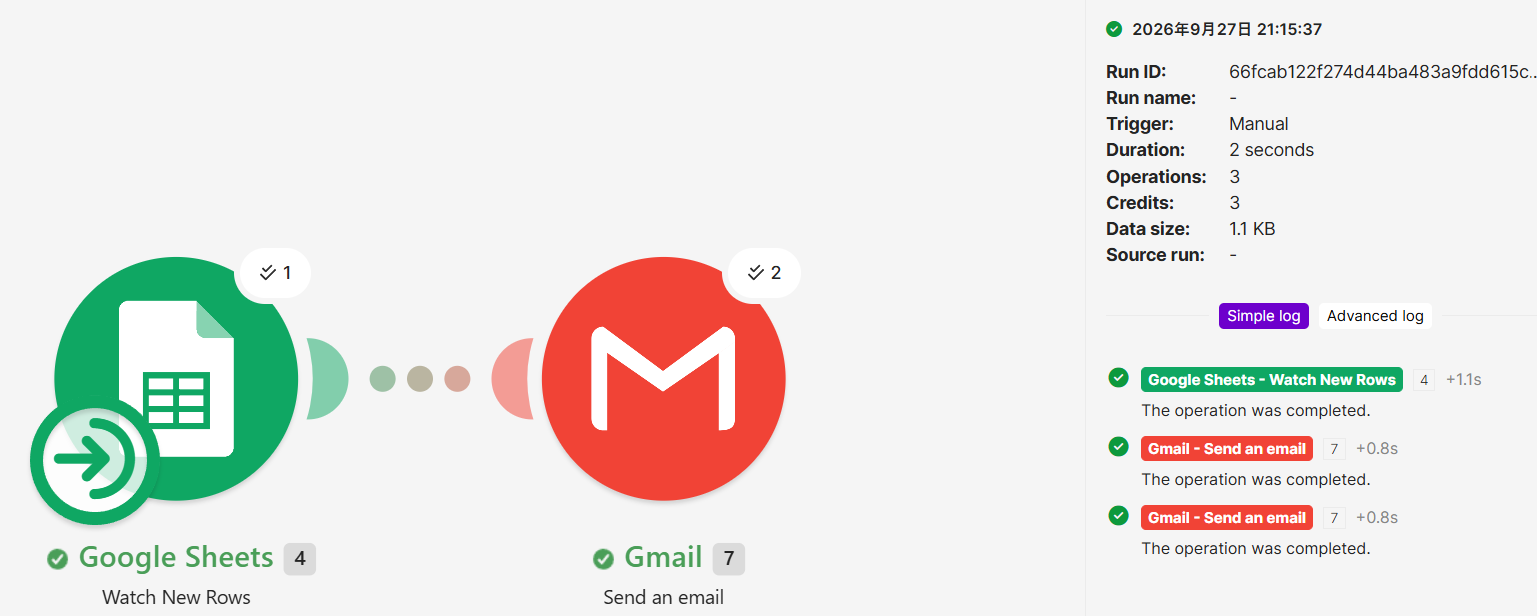
What the earlier Make reading was, and what the docs say about it. Before we cleared the sheet, the same scenario logged 3 operations and 3 credits with the Gmail module firing twice. Make’s own documentation describes why a run can look like that: an operation is “a single module run to process data or check for new data”, modules “process each bundle separately, meaning each bundle triggers its own module run”, and trigger modules are the exception, running “once to check for or retrieve data, regardless of the number of bundles returned”. A Watch New Rows trigger that returns two unprocessed rows is therefore one operation, and a Gmail module that sends two emails is two. That is consistent with what we saw, but we did not re-run the earlier conditions to prove it, so it stays an explanation the documentation permits rather than a confirmed cause.
Neither number is a monthly capacity. Two credits is what the run that did the work cost; Make’s scheduled checks in between cost a credit each as well, so dividing 1,000 by 2 would describe a scenario that never waits. Latenode bills in CPU seconds, a different unit, and our build there was not polling.
Latenode vs Make Pricing
Every figure below was read from the vendors’ own pages and re-checked on October 2, 2026. Latenode’s free-plan and pay-as-you-go figures were unchanged from our September checks.
| Item | Latenode | Make |
|---|---|---|
| Free plan | 10,000 CPU seconds/mo, 5 active workflows, 10 connected authorisations, 3-day run history | 1,000 credits/mo, 2 active scenarios, 15-min minimum interval |
| Entry paid | No subscription tiers. Pay as you go, no base fee | Core — $9/mo for 10,000 credits. See the note below on the billing period |
| Usage rate | $0.00012 per CPU second above the free 10,000, falling by tier to $0.00005 | Included in the tier; extra credits sold in bundles |
| What you are billed for | Runtime | Each module action |
| Other one-off offers | A lifetime deal quoted in Execution Credits, converted at 1 credit to 30 CPU seconds | None |
One note on Make’s $9. The pricing page prints “$9/mo” next to “Price for 10k credits/mo” with a Pay monthly / Pay annually toggle and a “Save 15% or more!” label, and it does not print the two periods side by side. Make’s own comparison page states that “Make’s most affordable paid plan is $9/month for 10,000 credits on annual billing”. Billed monthly, Core was $10.59/mo when we read the pricing page on September 30, 2026 — 15% above the $9. We quote $9/mo as the annual-billing figure on that basis.
The structural difference is the one to notice. Make has a subscription ladder; Latenode does not have one at all. With Make you pick a tier and get its credits. With Latenode you use the free allowance and then pay for what you run, with no monthly floor.
Which Is Cheaper?
Not from one run each. What we can say is where each free plan runs out first, and the two allowances run out for different reasons.
On the free plans, the thing that decides it is not the size of the allowance but what each one spends while idle. A polling scenario on Make’s free plan spends credits on its 15-minute checks whether or not there is work, which is around 2,880 a month against an allowance of 1,000 — so the plan suits a scenario you run on a slower schedule or switch on when needed, not one left watching a sheet all month. Latenode’s free plan is 10,000 CPU seconds a month, and the run we measured was billed 2 of them — but our build was pushed by an instant trigger rather than scheduled, and Latenode’s documentation does not state what a scheduled check that finds nothing consumes. Once a workflow grows, the two models move in opposite directions: Make charges for every added action, Latenode for the time the run takes.
For most freelancers the ceiling that bites first is not the allowance at all. Make’s free plan caps you at 2 active scenarios, Latenode’s at 5. Running an intake automation, an invoice reminder and a follow-up, you meet Make’s limit at the third one regardless of volume.
Once you are paying, the models stop lining up at all. Make’s Core is $9/mo for 10,000 credits — a fixed bill you can forecast by counting steps before you build. Latenode has no tier to buy: you pay $0.00012 per CPU second beyond the free allowance, with no monthly floor, which you can only size by running the thing. A credit and a CPU second are counted differently, so 10,000 of one is not comparable to 10,000 of the other, and the paid figures here are quoted from the pricing pages rather than billed to us.
What This Comparison Covers
- One two-step workflow. A new spreadsheet row sends one email — no branching, routers, filters or error handling.
- Both free plans. Paid tiers are quoted from the vendors’ pricing pages rather than used.
- Both left to run unattended. Latenode deployed and Active in production; Make switched on with its Schedule trigger and nothing pressed.
- One clean run each, as each tool counts it. Latenode’s 2 CPU seconds and Make’s 2 credits are readings from the tools’ own run histories, for the runs described above.
- Trigger behaviour as documented. The intervals above are published schedules, not stopwatch readings.
- Free-plan and pricing research. Every figure in the pricing tables comes from the vendors’ own pages on the dates given.
- Nothing past that shape. Volume and long-term reliability, the AI features on either side — we declined both builders and built by hand — code nodes, HTTP and custom authentication, team collaboration and support quality all sat outside this comparison.
Latenode Is Better If…
Your automations are short and you expect a lot of them. One run of this workflow used 2 of 10,000 CPU seconds, and the free plan allows 5 active workflows to Make’s 2. Both of those are ceilings you meet sooner on Make.
You want the automation to fire the moment something happens — and to stop paying to wait. The instant trigger we used pushed on the event. Make’s free plan documents a 15-minute minimum between checks, and each of those checks is an operation, so a scenario left watching a sheet spends its allowance on looking. Our Make run did go through unattended; it waited for its schedule first.
You do not want a subscription. There is no tier to buy. You use the free allowance and then pay per CPU second.
Make Is Better If…
This is your first automation. The mapping step is the one place a first build stalls, and Make turns it into clicking a field from a list. Latenode turns it into finding a panel and reading a path. That was the clearest difference between the two builds.
You need to forecast the bill. Credits are counted per module action, so you can price an automation by counting its steps before you build it — our two-action run cost exactly two. CPU seconds you can only really learn by running the thing.
Someone else will have to read the workflow. The canvas shows what is connected to what and carries each module’s result, so the shape of the workflow is readable without opening each step.
Latenode vs Make for Freelancers
If you are choosing your first automation tool, take Make. The build is smoother in the one place it counts, and $9/mo billed annually for 10,000 credits is a bill you can explain to a client.
If you already know what an automation is and are looking at the running cost of several, Latenode’s free plan leaves more of them running: 5 active workflows to Make’s 2.
What we would not do is choose on the free-plan headline numbers. 1,000 credits and 10,000 CPU seconds are different units of different things, and our two runs both reporting 2 operations does not make them the same price.
Final Verdict
Both tools did the job, unattended, in one second, for two operations and one email. On the evidence we have: Make is the easier build, because its mapping step removed the thing beginners get wrong, and Latenode’s free plan is the better place to leave something running — it allows 5 active workflows to Make’s 2, it bills runtime rather than steps, and the build we made there waits for a push instead of paying for a scheduled check.
The honest limits: one clean run each, on different dates, on free plans, with no deliberate failure in either. The two billing units are not convertible, so nothing here ranks them on price. And nothing here says which one holds up over months, at volume, or when support is involved.
FAQ
Is Latenode cheaper than Make?
Not from one run each. Both used 2 operations, billed as 2 credits in Make and 2 CPU seconds in Latenode — different units, so they do not convert. What does separate them on the free plans is idle cost: Make’s polling trigger spends a credit on every scheduled check, while our Latenode build used an instant trigger and ran only when a row arrived. The arithmetic is in the triggers section above. On paid plans Make sells tiers and Latenode sells runtime, and we have not used either paid plan.
Which one is easier for a beginner?
Make, on these two builds. Its field mapping is clicking a value out of a list, with no syntax to learn. Latenode’s mapping works once you find the Data panel, but nothing in the interface points you to it.
How does Make count credits?
Per module operation, and by default “1 operation equals 1 credit”. Our clean run had two — one Google Sheets check, one Gmail send — and cost two credits. Two details matter beyond that. An operation is a module run to process data or check for new data, so a polling trigger consumes one on every scheduled check, including the ones Make calls check runs because they find nothing. And a module processes each bundle separately, so a module acting on two rows is two operations, while a trigger counts once however many rows it returns. Make documents exceptions for some AI modules, which consume more than one credit per operation.
How does Latenode count CPU seconds?
By how long the scenario runs. Its documentation says CPU seconds are consumed “during a scenario execution (from start to finish of the run)”, that running a single node while configuring is free, and that the minimum billable execution is 1 CPU second per run.
Can both run without me watching?
Both did. Latenode ran deployed and Active in production; Make ran from its Schedule trigger with the scenario switched on and Run once untouched. Each delivered one email with nobody watching.
How fast does each one react to a new row?
What is documented: Make’s free plan has a 15-minute minimum interval between scheduled runs, and Latenode’s 10-minute figure applies to polling triggers only — the instant trigger we used is pushed when the event happens. On Make that interval is also a cost, because each scheduled check is an operation.
Sources & Verification
Hands-on tests: the same Google Sheets to Gmail automation, built by hand on one Google account and one spreadsheet, both on free plans. Make built August 23, 2026; clean unattended re-test October 2, 2026 — sheet cleared down to one new row, columns A to C pasted at once, scenario on, Schedule trigger, Run once not pressed: Status Success, Duration 1 second, Operations 2, Credits 2, Data size 584.0 B, one Google Sheets Watch New Rows operation, one Gmail Send an email operation, 1 email received. An earlier Make run, before the sheet was cleared, logged Operations 3 and Credits 3 with the Gmail module firing twice. Latenode September 26, 2026, taken through deploy: one failed production run (Recipient address required), then a successful one at Prod, Success, Duration 1s, CPU-sec 2, Operations 2, 1 email received. Both were confirmed running unattended, on the two different dates above.
Official sources (checked October 2, 2026):
- Make pricing — “Up to 1,000 credits/mo”, 2 active scenarios, “15-minute minimum interval between runs”, Core at “$9/mo” against “Price for 10k credits/mo” with a Pay monthly / Pay annually toggle and “Save 15% or more!”, and “Each module action in your scenario, like adding a Google Sheet row or fetching Gmail account data, counts as one credit”. On September 30, 2026 the same page showed $10.59/mo for Core on monthly billing
- Make Help Center: operations — an operation is “a single module run to process data or check for new data”, modules “process each bundle separately, meaning each bundle triggers its own module run”, and trigger modules “only run once to check for or retrieve data, regardless of the number of bundles returned”
- Make Help Center: types of modules — “A polling trigger checks for new data in a service account since the last scenario run, based on the scenario’s schedule”, “With an instant trigger, the service notifies Make when new data arrives, starting the scenario immediately”, and “A scheduled scenario run that checks for new data in a service, but returns no data, is called a check run”
- Make Help Center: credits — by default “1 operation equals 1 credit”, with documented exceptions where some AI modules “consume 2 or 10 credits per operation” and some AI apps bill dynamically on tokens or runtime
- Make Apps documentation: Google Sheets modules — Watch New Rows “Triggers when a new row is added”, with a Limit field that sets “the maximum number of results that Make will work with during one execution cycle”
- Make’s own comparison page — “Make’s most affordable paid plan is $9/month for 10,000 credits on annual billing”, which is what settles the billing period the pricing page does not print
- Latenode pricing — “10,000 CPU seconds every month”, “5 active workflows”, 10 connected authorisations, 3-day run history, pay as you go from “$0.00012 / CPU sec” down to “$0.00005 / CPU sec” with no monthly base fee, and the 10-minute “minimum polling frequency for scheduled and app-polling triggers” where “Webhooks still fire instantly”. All unchanged from our September checks when re-read on October 2, 2026
- Latenode docs: CPU seconds — consumed “during a scenario execution (from start to finish of the run)”, “Running a single node does not consume CPU seconds, so you can test and configure nodes on the canvas for free”, “Minimum billable execution time is 1 CPU second per run”
- Latenode docs: how it works — instant triggers, where “the external service pushes the event to your scenario’s webhook the moment it happens”
What each figure rests on: both run figures are readings from the tools’ own run histories, each from one clean unattended run — Latenode 2 CPU seconds on September 26, Make 2 credits on October 2. The 2,880-checks-a-month figure is arithmetic from a documented interval against Make’s documented free allowance, not a counter we watched accumulate. Latenode’s documentation does not state what a polling trigger consumes while it waits; our Latenode build used an instant trigger. The reading of why the earlier Make run logged 3 is what Make’s documentation permits, not a cause we reproduced. Pricing on both sides comes from the vendors’ own pages on the dates above. The two builds were five weeks apart, so interface details may have moved.


Comments