Updated: October 28, 2026
Originally tested: n8n August 23, 2026 · Zapier September 5, 2026
Pricing checked on: October 28, 2026
Testing status: Hands-on tested (Zapier on a Pro trial, n8n on the n8n Cloud free trial — neither on a free plan)
Disclosure: SmartToolCompass earns nothing from this comparison. We are not enrolled in an affiliate programme with either Zapier or n8n, and the links below are plain links to their own pages. Other articles on this site do carry affiliate links and say so.
Zapier vs n8n: Quick Answer
We built the same two-step automation in both — a new row in Google Sheets sends an email through Gmail — on the same Google account and the same spreadsheet. Both delivered the email. What separates them is not the feature list.
Zapier has a free plan. n8n Cloud does not. Zapier’s pricing page lists its free tier at 100 tasks a month, two-step Zaps only, and a 15-minute polling time. This workflow is exactly two steps, and we measured what one run of that shape costs on our Pro trial: publishing the Zap and running it once more moved the task counter from 1 to 2. One task per run. n8n Cloud offers a trial instead, and its free route is the self-hosted Community Edition — which means running it on your own server.
The second difference shows up in the build. In our build, Zapier asked one question at a time and would not let us publish a step we had not tested. n8n hands you expressions: the recipient field holds {{ $json.Email }}, which you do not type — you drag the value from the panel beside the field and n8n writes the reference. It then previews the resolved value underneath, so our subject line read New message from Test User before anything was sent. The Zapier editor we built in showed no resolved value under the field.
One detail worth knowing before you point either at a client: the email n8n delivered carried the line This email was sent automatically with n8n underneath our message. The Zapier one did not.
Zapier vs n8n at a Glance
| Item | Our take | Status |
|---|---|---|
| Plan we tested on | Zapier on a Pro trial, n8n on the n8n Cloud free trial. Neither was a free plan | Hands-on tested |
| Free plan | Zapier: 100 tasks/mo, two-step Zaps only, 15-minute polling time. n8n Cloud: none — the self-hosted Community Edition is the free route | Researched |
| What one run of this workflow used | Zapier: 1 task — we watched the counter move from 1 to 2. n8n: our run was manual, which n8n’s docs exclude from the quota; in production a polling trigger counts one execution when it finds new data | Zapier hands-on tested, n8n researched |
| Field mapping | Zapier: pick the field from the previous step’s output. n8n: drag the value and it writes {{ $json.Email }}, with the resolved result shown under the field |
Hands-on tested |
| Confirmed running unattended | Zapier yes — we published the Zap and watched it fire live. n8n no — our delivery came from a run we triggered | Hands-on tested |
| Branding in the delivered email | n8n’s email carried This email was sent automatically with n8n. Zapier’s did not | Hands-on tested |
| Trigger in our builds | Both polled. Zapier’s free plan documents a 15-minute polling time, and its Help Center says polls never use tasks. n8n’s build polled too, and its docs say a poll that finds nothing counts as no execution | Hands-on tested (the builds), researched (what each charges for) |
| Billing unit | Zapier counts tasks. n8n counts executions: “a single run of your entire workflow” | Researched |
| Entry paid price | Zapier Professional, 750 tasks/mo: $19.99/mo on annual billing, $29.99/mo billed monthly. n8n Starter: 20€/mo on annual billing, 24€/mo billed monthly | Researched |
| Easier first build | Zapier (editorial judgment, from these two builds) | Editorial judgment |
How We Tested Zapier and n8n
One spreadsheet called Automation Test Workflow, one sheet called test, three columns: Name, Email, Message. A new row sends an email, with the address from one column and the message from another. Same Google account in both tools, built by hand in both, with both products’ AI builders declined. The full builds are in our Zapier review and our n8n review, and all five tools we have put through this workflow sit side by side in our Google Sheets to Gmail guide.
Three things about these two tests are not equal, and they change how you should read everything below.
- Neither ran on a free plan. Zapier’s build ran on a Pro trial, n8n’s on the n8n Cloud free trial. Both were free to us; neither is the tier a reader would be on a month later. The reason differs, and it is the heart of this comparison: Zapier has a free plan we did not use, and n8n Cloud has none to use.
- Only Zapier was confirmed running unattended. We published the Zap and watched a row produce a delivered email with nothing pressed in between. In n8n we confirmed delivery from a run we triggered ourselves. Those prove different things and we have not merged them.
- The builds are two weeks apart — n8n on August 23, Zapier on September 5, 2026 — so interface details may have moved between them. Every price and plan limit on this page was re-read on the vendors’ own pricing pages on October 28, 2026 rather than carried over from the earlier reviews.
Setup: Zapier Made Us Prove Each Step, n8n Let Us Build Freely
Zapier gives you one decision at a time: pick the trigger app, pick the event, pick the action app, map the fields. It made us test each step before it would let us publish. For a first automation that removes most of the guesswork about whether the thing is wired up correctly — you do not get to the end and wonder whether it will work, because you have already seen each half work.
n8n puts the whole workflow on a canvas and does not stand in the way. You add nodes, connect them, and run what you have. Nothing forces a test before you move on, which is faster when you know what you are doing and quieter about mistakes when you do not.
Neither of our Google Sheets-to-Gmail builds needed an API key, a Google Cloud project, or anything pasted from a developer console. Both handled the Google authorisation inside their own editor.
Data Mapping: Picking a Field vs Writing an Expression You Can Preview
This is where the two tools feel least alike, and it is the step a first build usually stalls on.
In Zapier, the Gmail step lists the fields the Google Sheets step produced. You click the one you want and it goes in. There is no syntax and nothing to mistype, and the list doubles as a statement of what data you actually have: if a field is not there, it does not exist.
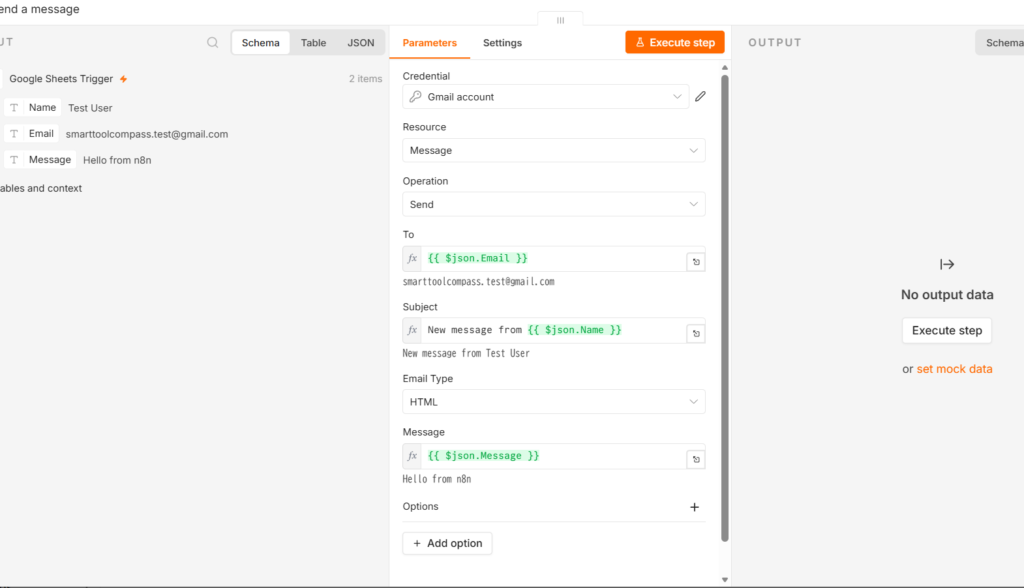
In n8n, the recipient field ends up holding {{ $json.Email }}. The expression looks like code, but you do not write it — you drag the value from the panel beside the field and n8n writes the reference for you. What you get in return is something Zapier’s editor did not do: n8n resolves the expression underneath the field while you are still editing, so our subject line showed New message from Test User before a single email had been sent. In Zapier you confirm the mapping by running the step; in n8n you can read the result first.
One structural note: n8n’s expression references the field name rather than a column position.
Did Both Work?
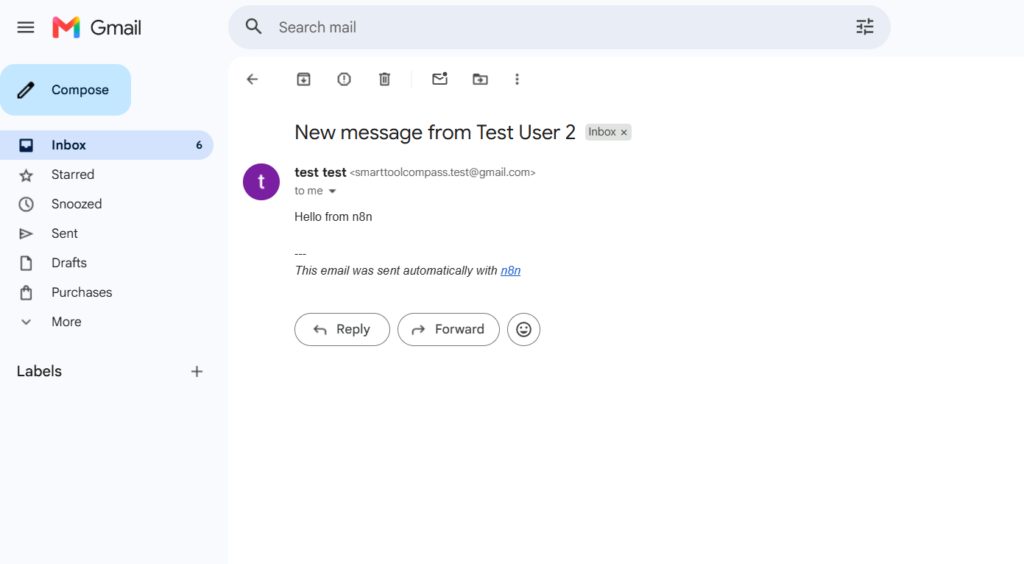
Both delivered a real email carrying the spreadsheet’s own values.
Zapier went further: we published the Zap, added a row, and the email arrived with no manual step in between. Then we ran it once more deliberately to watch the meter, and the task counter moved from 1 to 2. That is the only per-run figure we measured on Zapier, and it applies to this two-step shape rather than to Zaps in general.
n8n delivered too, from a run we triggered. Two things about that run are worth knowing before you copy it. The execution processed two items — an earlier test row alongside the new one — which is a good argument for checking what your trigger is holding before you point a send action at real recipients. And the delivered email carried the line This email was sent automatically with n8n underneath our message, which matters if the recipient is a client rather than you.
What an n8n run costs depends on how it was started. n8n’s pricing page defines an execution as “a single run of your entire workflow”, and its documentation is explicit that only production executions count towards a plan’s quota. In production, a polling trigger counts one execution when it finds new data, whatever the workflow’s shape. Our own n8n run was manual and processed two items in that single run, so it did not consume the plan quota.
Zapier vs n8n: Ease of Use
On these two builds, Zapier is the easier first automation and n8n is the more informative one. Zapier’s guard rails meant we could not reach the end with an untested step; n8n’s resolved preview means you can see what a field will contain before anything leaves. Which of those you want depends on whether your difficulty is getting it working at all, or being sure of what it will send.
Both of those are judgments from a two-step workflow built once in each tool. Neither says anything about what either feels like at ten workflows, with branching, or six months later.
Zapier vs n8n Pricing
Pricing below was checked on October 28, 2026 on both vendors’ own pages.
| Item | Zapier | n8n |
|---|---|---|
| Free plan | 100 tasks/mo, two-step Zaps only, 15-minute polling time | None on n8n Cloud. The self-hosted Community Edition is the free route, and n8n’s docs print its cost as “Free” |
| Trial | Pro trial (the plan our build ran on) | n8n Cloud’s free trial. Our trial account showed a limit of 1,000 executions, the same number the pricing page prints; the docs describe the trial as Pro features for 14 days |
| Entry paid plan | Professional, 750 tasks/mo: $19.99/mo on annual billing, $29.99/mo billed monthly | Starter, 2,500 workflow executions: 20€/mo on annual billing, 24€/mo billed monthly |
| What you are billed for | Tasks | Executions — “a single run of your entire workflow”, regardless of how many steps it has |
| Limit on how many automations you keep switched on | “Unlimited Zaps, Tables, and Forms” on the free plan; Professional is described as “unlimited access to Zaps, Tables, and Forms” | “Max active workflows: Unlimited” |
One note on n8n’s 20€. n8n’s pricing page prints one figure beside a monthly/annual toggle, so we read it in both states on October 28, 2026. With the toggle on Annually, Starter reads 20€/mo, billed annually; with it on Monthly, the same plan reads 24€/mo, billed monthly, and the toggle itself is labelled Save 17%. So the 20€ is the annual-billing figure. So this page now prints both tools’ entry prices in both forms, billed monthly and billed annually.
And a note on the units. A task and an execution are counted differently. Zapier counts an action; n8n counts a whole workflow run however many steps it has. For a two-step workflow those happen to land close together, but 750 of one is not 2,500 of the other, and nothing on this page ranks the two on price. Neither tool caps how many automations you may keep switched on, so what you run out of on either side is usage allowance, not workflow slots. Where each of the five puts the meter on its AI features, which is a separate question from the task and execution counts here, is in how five automation tools charge for AI.
Which Is Cheaper?
Not from one run each, and not across units that do not convert. What we can say is where each one runs out first, and the answer is unusually clear because only one of them has a free tier at all.
On Zapier’s free plan the published allowance is 100 tasks a month, and a two-step Zap bills one task per run, so this shape fits about 100 runs a month. Those 100 tasks are the account’s allowance rather than each Zap’s — the free plan lists “Unlimited Zaps”, so a second automation draws on the same pool. That is arithmetic from a measured figure and a documented allowance — one task per run, which we watched, against 100 tasks a month, which the pricing page prints — not a counter we watched climb to 100. The division only works because of what Zapier does not charge for: its Help Center states that polling triggers “poll an app or check for new trigger events at a regular interval, but these polls never use tasks”, and that “Zap triggers never use tasks”. A free plan that billed for the 15-minute checks would run out long before the hundredth row arrived. Two steps is also the free plan’s ceiling on Zap shape, so this workflow fits exactly and anything you add later moves you to a paid plan.
On n8n Cloud, it does not run free at all. There is no free plan to run out of. The free route is the self-hosted Community Edition, which has no licence fee — but you still provide the infrastructure and maintenance.
For the polling triggers both builds used, a check that finds nothing costs nothing on either side — but the counting rules are not the same shape. Zapier’s Help Center states that polls never use tasks, and that is the side we watched: on our published Zap the counter moved when a row arrived, not while it was looking. n8n’s documentation states that a polling node counts one execution only when it finds new data, and that polls returning no results do not count at all — while a Schedule Trigger counts one execution every time it fires, whatever it finds. Both builds here used a polling trigger. For n8n that counting rule comes from the documentation: our own run was manual, and manual runs sit outside the quota.
The units underneath are still different: Zapier counts each successful action, while n8n counts the production run however many rows it carries — our own n8n run processed two items in one execution. Once you are paying, the shapes differ. For standard action steps like the Gmail send we tested, each successful action uses a task; some AI, code and connector features use different task rates. n8n sells executions, which means a workflow with ten steps costs the same as one with two — so the more a single workflow does, the better that unit treats you.
Zapier Is Better If…
You want to run an automation without paying and without a server. This is the whole of it for a lot of freelancers. Zapier’s free plan takes two-step Zaps, which is this workflow’s shape, and one run costs one task against an allowance of 100 a month.
This is your first automation. In our build Zapier made us test each step before it would publish, which is slower and leaves less room to get it wrong.
The email goes to a client. The message Zapier sent carried nothing but our text.
n8n Is Better If…
You can self-host. That is the free route, and it is a real one — it is also the only way to run n8n without a subscription, so this is less a preference than a condition.
You want to see what a field will contain before it sends. The resolved preview under each expression was the single most useful thing either tool showed us while building.
Your workflows are long rather than many. An execution covers a whole run however many steps it has, so a workflow that does ten things costs what a two-step one costs. Zapier’s tasks are counted per action, so the same growth is charged for.
Zapier vs n8n for Freelancers
If you want one automation running this week and you are not going to administer a server, take Zapier. The free plan fits this workflow exactly, the build makes mistakes hard, and the message it sent in our test carried nothing but our text.
If you already run your own infrastructure, or you expect workflows that do many things per run, n8n’s shape fits better — the self-hosted edition removes the subscription, and the execution unit stops charging you for growth inside a single workflow. Both of those come with work we did not do and therefore cannot price for you.
Final Verdict
Both tools did the job. On the evidence we have, the decision is not about which builds a nicer automation — it is about what you are willing to run and pay for. Zapier is the one you can use for nothing without owning a server, and it is the easier first build. n8n is the one that shows you what your mapping resolves to before it sends, and whose billing unit does not grow with the workflow — but on the cloud it has no free tier, so its free version is a thing you host.
Both were trials rather than free plans, so the free-tier figures on this page come from the vendors’ pricing pages rather than from accounts we ran on.
FAQ
Is n8n free?
Not on n8n Cloud, which offers a trial rather than a free plan. The free route is the self-hosted Community Edition, available on GitHub, which you run on your own server. n8n’s docs list that edition’s cost as “Free”, with “almost the complete feature set”. We tested n8n Cloud on its free trial and have not run the self-hosted edition. This build used no AI step; what the four with free plans did when we tried their built-in AI, and why there was nothing to try on n8n, is in which of these run AI on a free plan.
Is Zapier’s free plan enough for a Google Sheets to Gmail automation?
For this workflow, on the numbers: the free plan takes two-step Zaps and this automation is two steps, and we measured one task per run against a documented allowance of 100 tasks a month. Add a third step and you are on a paid plan.
How does n8n count executions?
n8n’s pricing page defines an execution as “a single run of your entire workflow. It doesn’t matter how many steps are in the workflow or how much data it processes. It’s still a single execution.” For plan quota purposes its documentation is narrower: only production executions count. A production polling trigger uses one execution when it finds new data; empty polls and manual runs in the editor do not count at all.
Which is easier for a beginner?
Zapier, on these two builds. It asked one question at a time and would not let us publish a step we had not tested. n8n is quicker if you already know the shape you want, and its expressions are dragged rather than typed, but nothing stops you from building something that has never run.
Does n8n add its own branding to emails?
The email our n8n build delivered carried the line This email was sent automatically with n8n under our message. The Zapier one did not. We saw this on the n8n Cloud free trial and have not checked whether it appears on paid or self-hosted installs.
Can I move a Zap to n8n later?
We did not test migration. What we can say from building the same workflow twice is that the pieces have different shapes: Zapier’s field mapping is a choice from a list and n8n’s is an expression, so rebuilding the same automation in the other tool means wiring the fields again by hand.
Which one is cheaper?
Nothing here ranks them on price. A task and an execution are counted differently, so the allowances do not convert. The one comparison that does hold is availability: Zapier has a free plan this workflow fits, and n8n Cloud has none.
Sources & Verification
Hands-on tests: the same Google Sheets to Gmail automation, built by hand on one Google account and one spreadsheet. n8n on August 23, 2026 on the n8n Cloud free trial: the delivered email arrived from a run we triggered, the execution processed two items, and the message carried an n8n line beneath our text. Zapier on September 5, 2026 on a Pro trial: the Zap was published, a row produced a delivered email with nothing pressed, and a further deliberate run moved the task counter from 1 to 2. n8n’s per-run figure on this page is the published rule rather than a counter reading.
Official sources (checked October 28, 2026):
- Zapier pricing — “100 tasks/mo”, two-step Zaps and a 15-minute polling time on the free plan; Professional “Starting from 750 tasks for $19.99/month” on annual billing and “$29.99” billed monthly, where 750 tasks is Professional’s entry tier and the price rises as the page’s task slider moves (the slider itself starts at 100 tasks a month), under a toggle labelled “Pay yearly (Save 33%)”; “Unlimited Zaps, Tables, and Forms” listed on the free plan, re-read October 28, 2026
- Zapier Help Center: what counts as a task — “Zap triggers never use tasks”, and polling triggers “poll an app or check for new trigger events at a regular interval, but these polls never use tasks”
- n8n pricing — read in both toggle states on October 28, 2026: no free cloud plan, a trial instead; Starter at “20€ /mo, billed annually” and “24€ /mo, billed monthly”, under a toggle labelled “Annually (Save 17%)”, with “2.5k workflow executions” and “Max active workflows: Unlimited”; the trial’s limits printed as “1,000 executions, 5 concurrent executions, a 180-second execution timeout, and 1 team project”; an execution defined as “a single run of your entire workflow. It doesn’t matter how many steps are in the workflow or how much data it processes. It’s still a single execution.”; the self-hosted Community Edition offered on GitHub
- n8n docs: choose how to use n8n — read October 28, 2026: the Community edition’s cost printed as “Free”, for “Self-hosting with almost the complete feature set”, and the cloud free trial listed as “Trying n8n Cloud with Pro features for 14 days”
- n8n docs: executions — read October 28, 2026: “Only production executions count towards this quota”; manual runs and polls that return no results do not count, and a Schedule Trigger counts one execution every time it fires
What each figure rests on: Zapier’s one task per run is a counter reading. n8n’s production-execution rule is its published definition rather than a reading; our n8n run was a manual one, which its documentation excludes from the quota, and it processed two items rather than one, which n8n’s definition says does not change the count. The 100-runs-a-month figure for Zapier’s free plan is arithmetic from that measured task against the documented allowance, not a limit we ran to. The n8n trial’s 1,000-execution limit is what our own trial account showed, and n8n’s pricing page prints the same number; the 2,500 figure belongs to the paid Starter plan. Neither tool was tested on its paid plan, and n8n was not self-hosted. n8n’s documentation states that only production executions count towards a plan’s quota, that a polling node counts one only when it finds new data, and that manual runs do not count — our n8n run was manual.


Comments