Updated: September 27, 2026
Originally tested: Make and n8n August 23, 2026 · Pabbly Connect August 26, 2026 · Zapier September 5, 2026 · Latenode September 26, 2026
Per-run cost measured: Make and Pabbly Connect September 27, 2026
Pricing checked on: September 27, 2026
Testing status: Hands-on tested (see the plan we used for each tool below)
Disclosure: There are no affiliate links on this page — every outbound link here goes to a vendor’s own pricing page. Some of the reviews we link to do carry affiliate links, and SmartToolCompass may earn a commission if you sign up through those, at no extra cost to you. It does not change which tool we say worked.
The Short Answer
You want a new row in a Google Sheet to send an email. No tool needs you to write code for that, and all five we tried did it. The question is not whether it works — it is which one you can finish, and what it costs you once it is running.
We built the same two-step automation in Zapier, Make, n8n, Pabbly Connect and Latenode, on the same Google account and the same spreadsheet, and received a real email at the end of every one of them. Here is the shortest version of what we found:
- Easiest to finish: Pabbly Connect. Its field mapping is a slash command, and there is no syntax to learn.
- Easiest to follow while building: Zapier. It walks you through one step at a time and makes you test each one.
- Largest free-plan run count we could estimate from our own per-run measurement: Latenode. One run was billed at 2 CPU seconds against a documented 10,000 a month.
- Not free at all on the cloud: n8n, which has a trial rather than a free plan.
That is the summary. The rest of this page is the evidence, including the plan each test actually ran on — which is not the free plan in two of the five cases, and matters more than any feature.
The Automation We Built
One spreadsheet, three columns, one email. Every tool got the identical job:
New row added in Google Sheets
            ↓
   the automation tool notices
            ↓
      Gmail sends an email
            ↓
Email column   → recipient
Name column    → subject line
Message column → body
The spreadsheet was called Automation Test Workflow, the sheet inside it test, and the columns Name, Email, Message. We used the same Google account throughout, so the builds are directly comparable rather than five separate experiments.
In every case we built it by hand. Each of these tools now offers an AI builder that will assemble a workflow from a sentence, and we declined all of them. The point was to find out what the platform is like when a freelancer puts the pieces together, because that is what you will be doing the second time, when the AI’s version needs changing.
How We Tested — and Where the Tests Are Not Equal
This is the part most round-ups skip, and it changes how you should read everything below.
Two of the five tests did not run on a free plan. Our n8n test ran on a Starter free trial of n8n Cloud, and our Zapier test ran on a Pro trial. Both were free to us, neither is the free tier a reader would be on a month later. Make, Pabbly Connect and Latenode were tested on their actual free plans.
Three of the five were confirmed running unattended. We published the Zapier Zap and watched it fire live, we deployed the Latenode workflow and watched it run in production with nothing pressed, and on October 2, 2026 we re-ran Make with the scenario switched on and its Schedule trigger left to fire. In n8n and Pabbly Connect we confirmed delivery from a run we triggered ourselves. Those prove different things, and we have not merged them.
The tests are spread over five weeks, from August 23 to September 26, 2026, with the Make and Pabbly Connect cost measurements added on September 27. What none of the five tests covers: anything past two steps — no branching, routers, filters or error handling — every tool’s AI builder, which we declined on purpose, behaviour at volume, long-term reliability, support, teams and paid plans. Interfaces move. Every price and plan limit on this page was re-checked against the vendors’ own pricing pages on September 27, 2026, rather than carried over from our earlier reviews.
The Same Workflow in Five Tools, at a Glance
Every cell in this table is something we did or watched, not something we read. The trigger column is the mechanism each tool used in our build.
| Tool | Plan we tested on | How the trigger fires | Email arrived? |
|---|---|---|---|
| Zapier | Pro trial — not the free plan | Polling | Yes, live after publishing |
| Make | Free plan | Polling | Yes, from a scheduled run (October 2, 2026) |
| n8n | Starter free trial — cloud has no free plan | Polling | Yes, on a run we triggered |
| Pabbly Connect | Free plan | Webhook, pushed from the sheet | Yes, on a test send |
| Latenode | Free plan | Instant trigger | Yes, deployed and unattended |
Zapier: Easiest to Follow, Tightest Free Tier
Zapier gives you one decision at a time: pick the trigger app, pick the event, pick the action app, map the fields. It made us test each step before it would let us publish, which for a first automation removes most of the guesswork about whether the thing is wired up correctly.
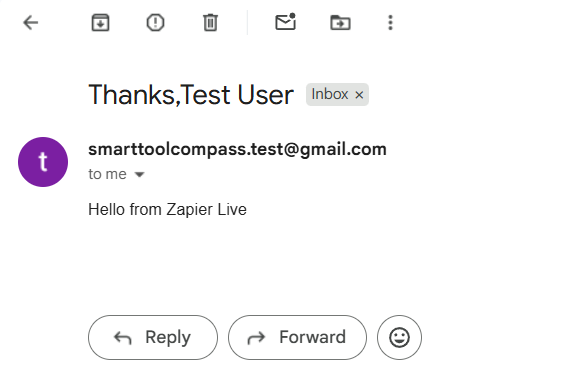
We published the Zap and confirmed a live run, then ran it once more deliberately to watch the meter. One successful run moved the task counter from 1 to 2 — one task for this workflow. That is the only per-run figure we measured on Zapier, and it applies to this two-step shape, not to Zaps in general.
The catch is the free plan. Zapier’s pricing page lists it at 100 tasks a month, two-step Zaps only, and a 15-minute update interval. Two steps is exactly this workflow, so it fits — but at one task per run, 100 runs is the ceiling, and anything you add later is a paid plan.
Our full Zapier review covers the Pro trial build in detail.
Make: The Canvas Tells You Which Half Broke
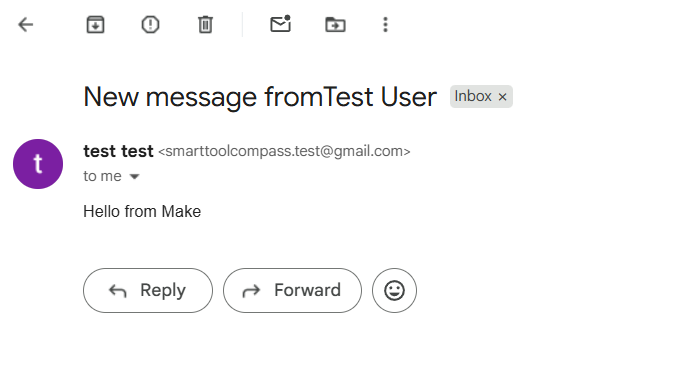
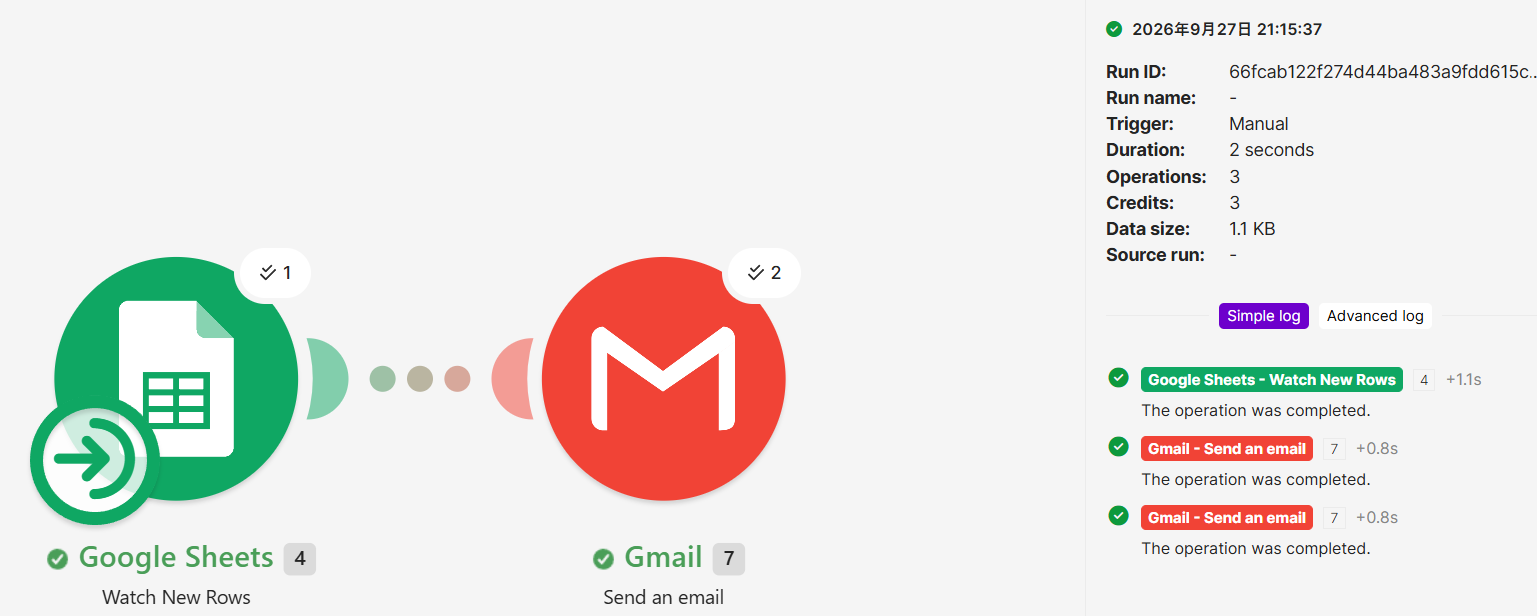
Make lays the workflow out as connected modules. We used Watch New Rows into Gmail’s Send an email, mapped three fields by clicking them out of a panel, and ran it. The email arrived with the subject and body we had mapped.
The detail worth stealing: success was not one green banner. Each module carried its own result on the canvas, so we could see the trigger had fired and that the send had gone through. When an automation eventually misbehaves, that is the difference between knowing it failed and knowing which half failed.
Make’s pricing page lists the free plan at up to 1,000 credits a month, 2 active scenarios, and a 15-minute minimum interval between runs. Our clean re-test on October 2, 2026 — an emptied sheet, one new row, the columns filled in a single paste — consumed 2 credits: one Google Sheets operation and one Gmail operation. Make’s pricing page says “Each module action in your scenario … counts as one credit”, so a two-action run costing two credits is what the rule predicts.
The figure that decides a monthly estimate is not that one. Watch New Rows is a polling trigger, and Make documents an operation as a module run that processes data or checks for new data — so every scheduled check costs a credit even when no row has arrived. At the free plan’s 15-minute minimum that is four checks an hour, about 2,880 a month against an allowance of 1,000, before a single email is sent. That is arithmetic from a documented rate and a documented interval, not a counter we watched climb; our Latenode vs Make comparison works through it.
Our full Make.com review has the build step by step.
n8n: The Most Technical Mapping, and No Free Cloud Plan
n8n was the only tool where mapping looked like code. The recipient field takes {{ $json.Email }} — though you do not type it, you drag the value from the panel beside the field and n8n writes the reference for you. It then previews the result underneath, so our subject line showed New message from Test User before anything was sent — the only one of the five builds where we could confirm a mapping was right before sending.
Two things from that run are worth knowing before you copy it. The execution processed two items — an earlier test row alongside the new one — which is a good argument for checking what your trigger is holding before you point a send action at real recipients. And the delivered email carried the line This email was sent automatically with n8n underneath our message.
Then the thing that decides it for most freelancers: n8n Cloud has no free plan. Its pricing page offers a 14-day trial, and the entry paid plan is listed at 20€/mo, billed annually — 24€/mo if you pay by the month. The free route is the self-hosted Community Edition, which means running it on your own server. Our trial account showed a limit of 1,000 executions, which matches the trial limit n8n publishes; the 2,500 figure on that page belongs to the paid Starter plan.
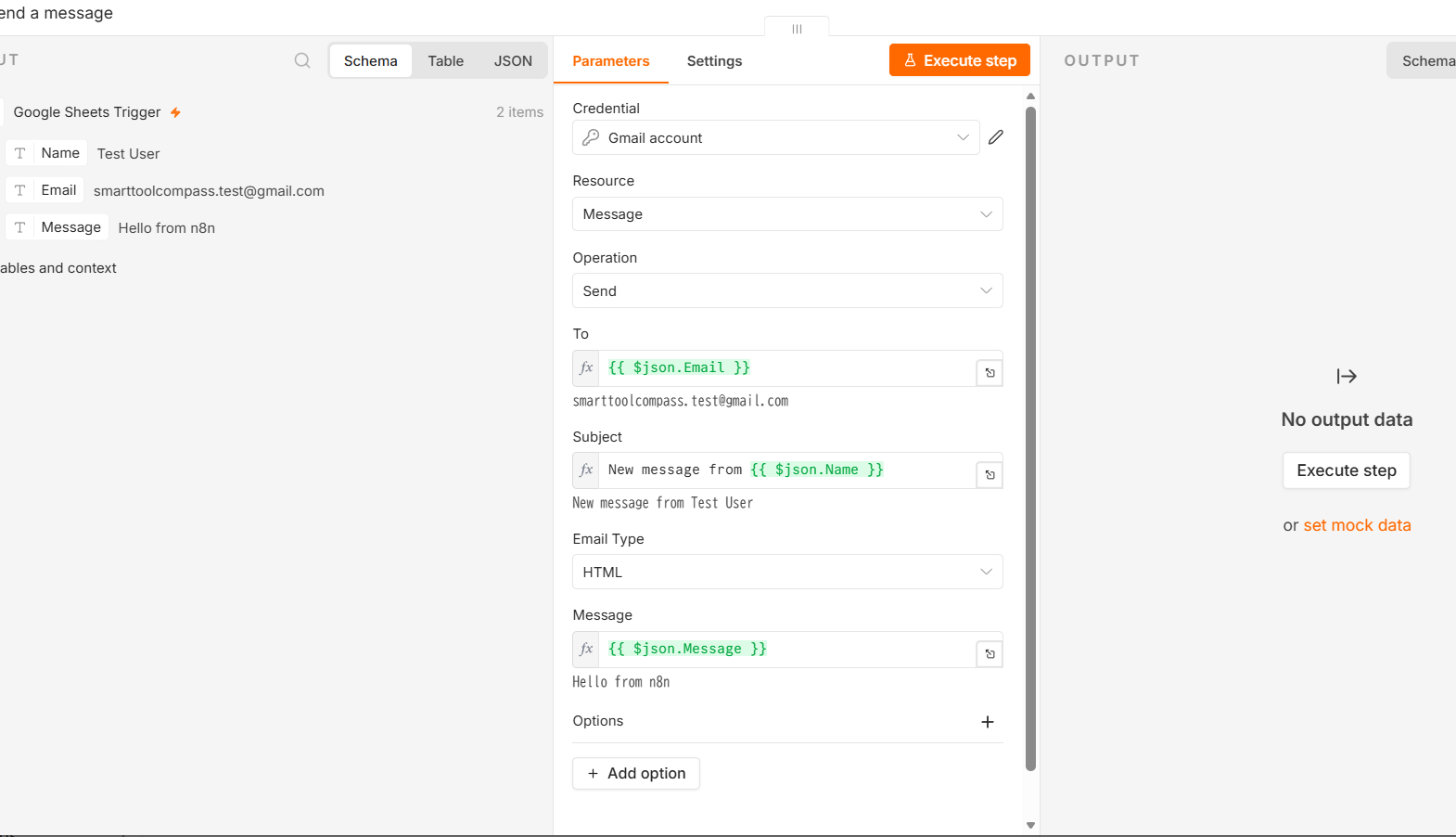
Our full n8n review goes into cloud versus self-hosted, and our Latenode vs n8n comparison puts this build against the one tool here whose free route is a hosted plan rather than your own server.
Pabbly Connect: The Mapping Step Nobody Else Matched
Pabbly was the easiest build of the five, and one interface decision is why. To map a field you type /, and a list of data from the previous step appears. You pick one and it drops in. No syntax, no side panel to hunt for — the same gesture you already use in Notion or Slack.
It also let us set a sender name, which showed up as the sender on the delivered email. That is a small control that matters as soon as the automation is writing to clients rather than to you.
The trade is at the other end. Pabbly’s Sheets trigger is a webhook — the sheet pushes to Pabbly rather than Pabbly checking on a schedule — which means no polling delay, but more setup than Make’s or n8n’s trigger, including turning the workflow on before it will capture anything.
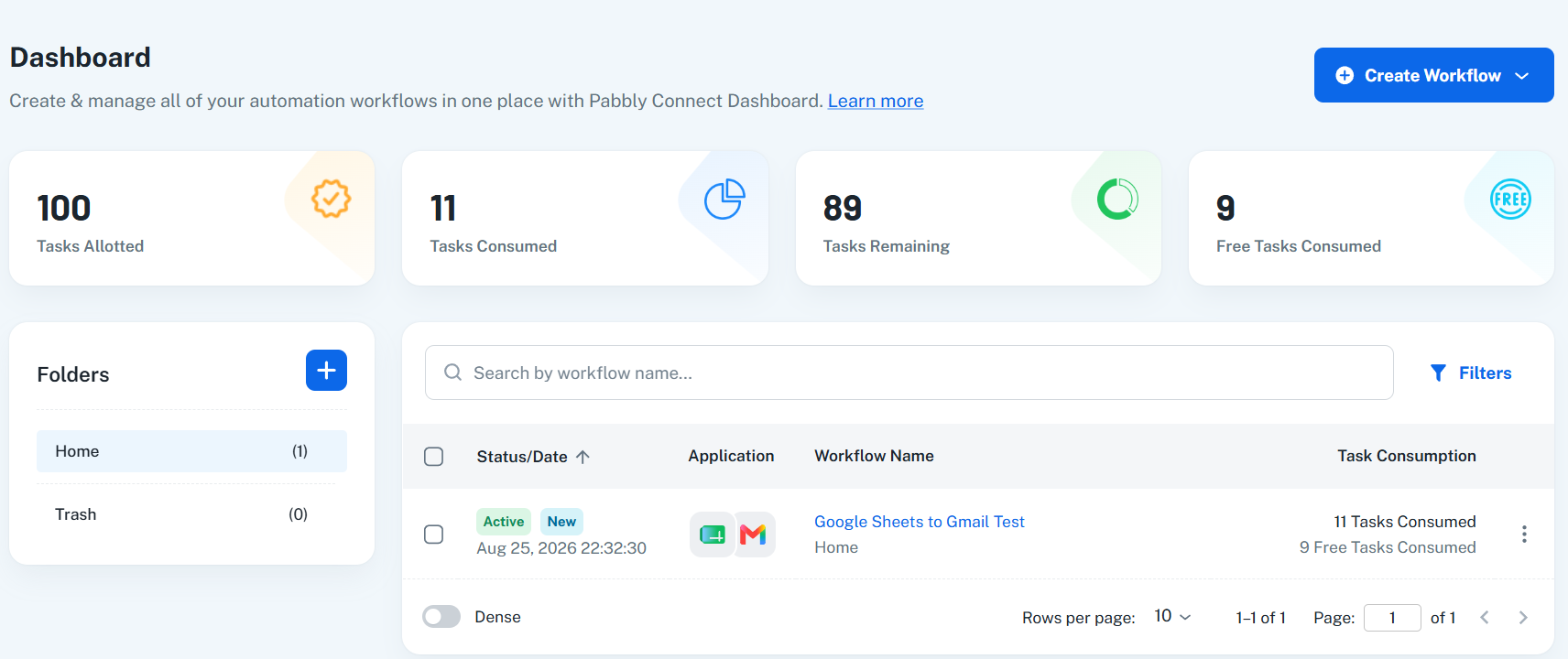
Its free plan is listed at 100 tasks a month, unlimited workflows, and multi-step workflows. The counting rule is unusually favourable and is stated on the pricing page: triggers are free, and internal steps such as filters, routers and formatters are not counted as tasks — only actions against external apps are. Its paid route is priced in US dollars on Pabbly’s own purchase page, which listed one-time plans at $349 for 3,000 tasks a month, $799 for 10,000 and $1,298 for 20,000 when we read it on October 7, 2026.
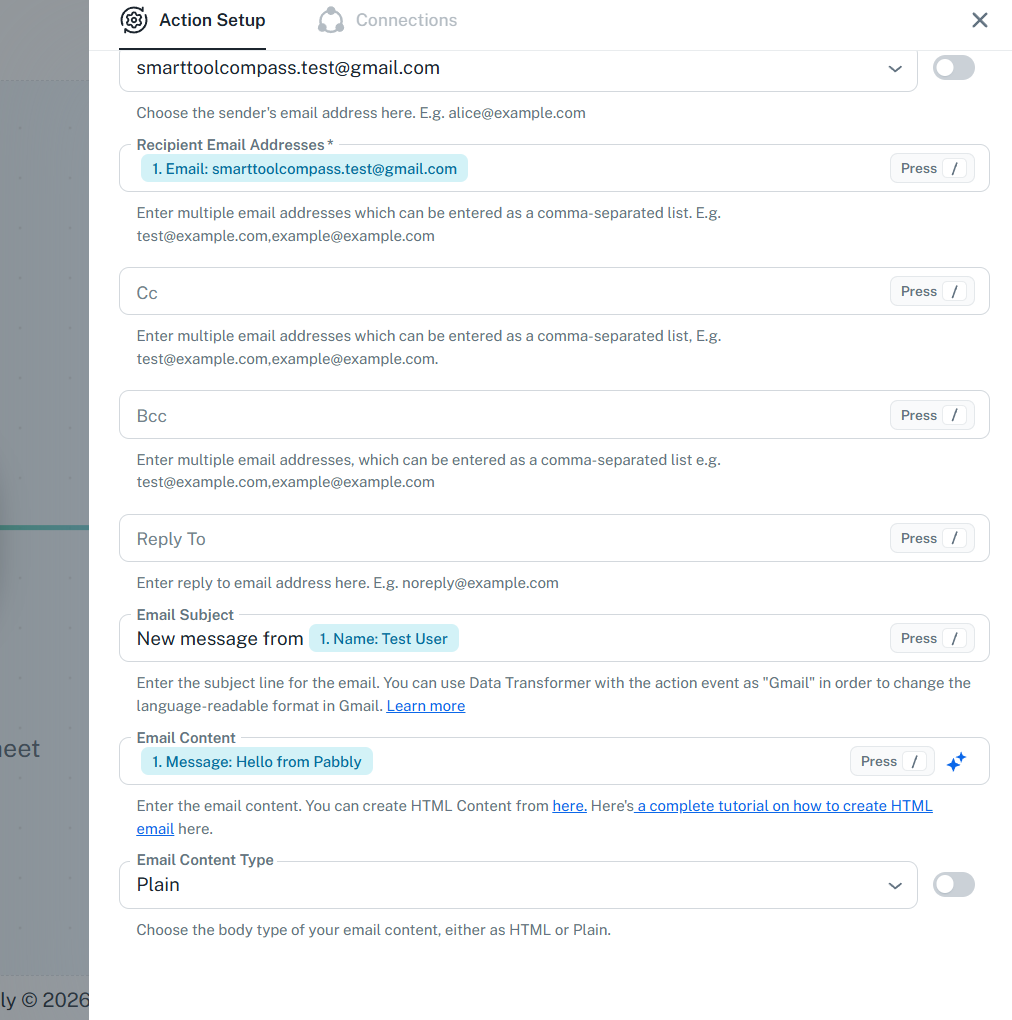
Our full Pabbly Connect review covers the webhook setup.
Latenode: The Only One We Watched Fail, and Fix
Latenode was the newest build and the only one where we took the automation all the way through deploy. We used the instant version of its New Row Added trigger, mapped the recipient and body, ran it once manually, then deployed it and set it active.
The first production run failed. Gmail returned Recipient address required, because the recipient field had resolved to nothing. The next run, after we changed how we entered the row, succeeded and the email arrived — Duration 1s, CPU-sec 2, Operations 2 in the run history. Why that happened is the next section, because it is the one mistake in this whole exercise that could bite you too.
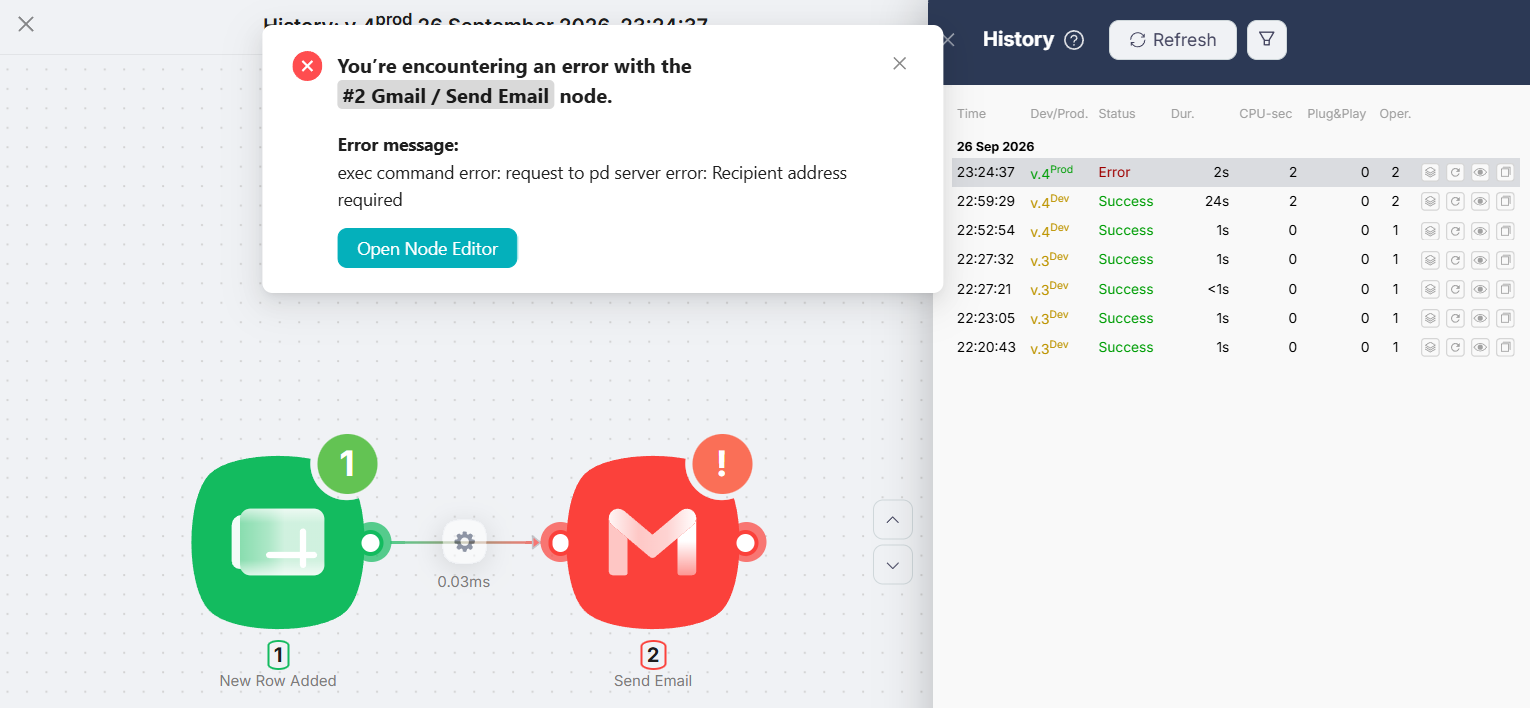
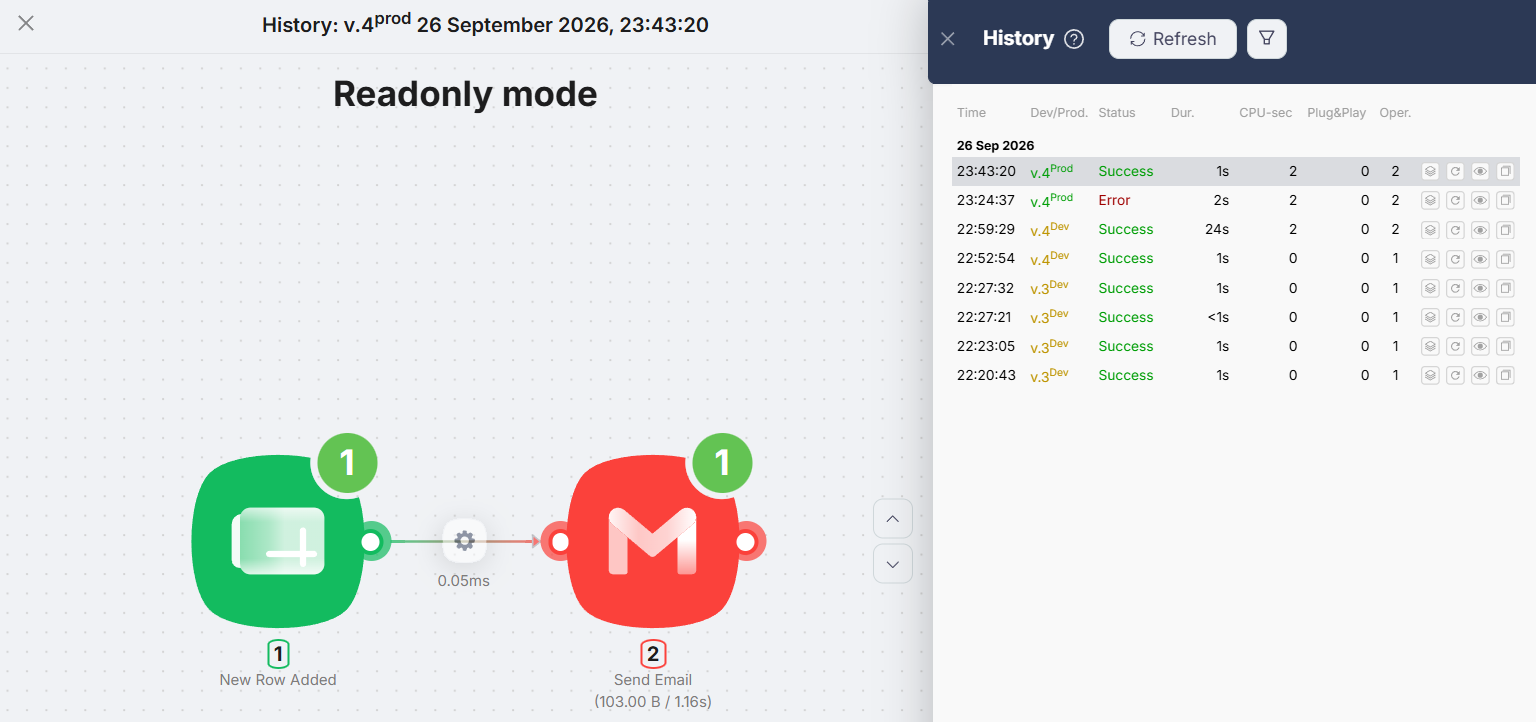
Mapping was the slowest part. Values are inserted from a Data panel on the right of the screen and land in the field as $1.data.event.row_parsed.B. It is logical once you have seen it and quick after that, but nothing in the field itself tells you where to go looking.
Latenode’s free plan is listed at 10,000 CPU seconds a month with 5 active workflows, and the run we measured was billed 2 CPU seconds.
Our full Latenode review covers the deploy and the failure in detail.
The Failure We Hit — and What Worked Next
This is the most useful thing in this article and it is not about any one tool.
When we tested Latenode’s deployed workflow, we added the row by typing the cells one at a time — name, then email, then message. The automation fired, Gmail was handed an empty recipient, and the run failed. When we pasted all three cells at once instead, it worked.
We did not deliberately reproduce the failure, so we cannot call that the confirmed cause — only the reading that fits what we saw. But the lesson stands whichever tool you pick: a row that is still being typed is a row the automation may already have read. An instant or webhook trigger can catch it mid-edit, and a polling trigger can land in the same gap.
What worked in our retest was pasting the whole row at once. Another way to avoid a half-entered row is to populate the sheet from a form rather than by hand. If people will be typing directly into the sheet, that is the risk to design around before you point the automation at real recipients.
What It Costs to Keep Running
Free tiers are where this decision actually gets made. Every figure below is from the vendor’s own pricing page, checked September 27, 2026.
| Tool | Free tier | What one run of this workflow cost |
|---|---|---|
| Zapier | 100 tasks/mo, two-step Zaps only, 15-min interval | 1 task — we watched the counter move |
| Make | Up to 1,000 credits/mo, 2 active scenarios, 15-min minimum interval | 2 credits for one row — 1 Google Sheets operation + 1 Gmail operation (clean re-test, October 2, 2026). A polling scenario also spends 1 credit on every scheduled check |
| n8n Cloud | No free plan. 14-day trial; entry plan 20€/mo billed annually, 24€/mo billed monthly | 1 execution — n8n counts a whole workflow run as one |
| Pabbly Connect | 100 tasks/mo, unlimited workflows, multi-step workflows | 1 task — we watched the counter move from 10 to 11 |
| Latenode | 10,000 CPU seconds/mo, 5 active workflows | 2 CPU seconds — from the run history |
Two warnings about reading that table. The units are not comparable. A task, a credit, an execution and a CPU second are counted differently, so 100 and 1,000 and 10,000 cannot be ranked by size. And the readings are not all from the same day: Zapier, Pabbly Connect and Latenode were measured in the first round of tests, while Make’s 2 credits come from a clean re-test five weeks later, on October 2, 2026.
What the table does settle is shape. Both Zapier and Pabbly Connect cap their free tiers at 100 tasks a month, and both run this workflow on that tier. On Zapier that is 100 runs, because we measured one task per run. On Pabbly it is also 100, and that is measured too: one successful run moved its task counter from 10 to 11. Both figures are for this workflow, not for those tools in general. If you expect more volume or more steps later, Latenode gave us the largest run count we could estimate from our own test, and n8n is not a free option unless you self-host.
Which One Should You Use?
If this is your first automation and you want to be walked through it: Zapier. Its one-decision-at-a-time editor and forced step testing made it the easiest to follow while building, and two steps is exactly what its free plan allows.
If the mapping step is what you are dreading: Pabbly Connect. Typing / to insert a field was the single easiest interaction in the whole exercise, and its free tier does not charge you for triggers or internal steps.
If you want room to grow without paying: Latenode. Its free plan gave us the largest run count we could estimate from our own test, it allows 5 active workflows, and the instant trigger we used is pushed rather than polled — so it is not spending its allowance on scheduled checks the way a Make polling scenario does. Budget your first hour for finding the Data panel.
If you want to see and reason about the data: Make, for the per-module results on the canvas, or n8n if you are comfortable with expressions and either have a server or will pay. n8n was the only one of the five that previewed the mapped value under the field, which we missed everywhere else; its lack of a free cloud plan is the price.
What we would not do is choose on integration counts. All five connected Google Sheets and Gmail in a few clicks, which is the only part of their catalogues this test touched.
FAQ
Can I send an email from Google Sheets without any tool?
Google Apps Script can do this without a third-party automation platform. This article covers the five no-code tools we built the workflow in. It is worth knowing that it is not unlimited: Google documents a daily cap on email recipients for Apps Script, 100 a day on a consumer account and 1,500 on Google Workspace. It also requires writing and maintaining code. We have not compared it with the five tools here.
How fast does the email go out?
It depends on the trigger type, not the tool’s speed. Zapier’s and Make’s free plans both document a 15-minute minimum check interval for polling triggers, and on Make each of those checks is a billed operation. Pabbly’s Sheets trigger is a webhook and Latenode’s instant trigger is pushed, so neither waits for a poll. We did not time delivery on any of them.
Which of these is genuinely free?
Make, Pabbly Connect and Latenode have free plans, and we built on them. Zapier has a free plan that fits this two-step workflow, though our own test ran on a Pro trial rather than on it. n8n Cloud has no free plan — only a trial — so the free route there is self-hosting.
Will it send an email for rows that are already in the sheet?
It can. Our n8n run processed two items — a row from an earlier test alongside the new one. Check what the trigger is holding before you point the action at real recipients; that is the cheapest mistake to avoid in this whole build.
Do these tools add their own branding to the email?
One did. The email n8n sent carried This email was sent automatically with n8n below our message body. We did not see added branding on the emails sent through the other four in our tests.
How many emails a month can I send on a free plan?
On Zapier, 100 runs — we measured one task per run against a documented 100-task allowance. On Latenode the answer is in a different unit: our run was billed 2 CPU seconds of a documented 10,000 a month, so the count depends on how much compute each run takes. On Pabbly Connect, also 100: we watched its counter move from 10 to 11 after one successful run, against a documented 100-task allowance. For Make, one row cost 2 credits of a documented 1,000 — but a polling scenario also spends a credit on every scheduled check, so the monthly count depends on how often it is set to look, not on the 2.
Sources & Verification
Hands-on tests: the same Google Sheets to Gmail workflow, built by hand on one Google account and one spreadsheet. Make and n8n on August 23, 2026, Pabbly Connect on August 26, 2026, Zapier on September 5, 2026, Latenode on September 26, 2026. Plans used: Make, Pabbly Connect and Latenode on their free plans; n8n on a Starter free trial of n8n Cloud; Zapier on a Pro trial. Zapier and Latenode were confirmed running after publishing and deploying, and Make was confirmed on October 2, 2026 from a scheduled run with nothing pressed; n8n and Pabbly Connect were confirmed from runs we triggered. Per-run cost: Pabbly’s task counter moved from 10 to 11 after one successful run (September 27, 2026), and Make’s clean re-test on October 2, 2026 reported Operations 2 and Credits 2 with one Google Sheets module action and one Gmail module action. An earlier Make run, on a sheet that still held older rows, had reported Operations 3 and Credits 3 with the Gmail module firing twice. Zapier (1 task) and Latenode (2 CPU seconds) were measured earlier.
Official sources (checked September 27, 2026):
- Zapier pricing — “100 tasks/mo”, two-step Zaps, 15-minute update interval, unlimited Zaps
- Make pricing — “Up to 1,000 credits/mo”, 2 active scenarios, “15-minute minimum interval between runs”, and “Each module action in your scenario … counts as one credit”
- Make Help Center: operations — an operation is “a single module run to process data or check for new data” (checked October 2, 2026)
- Make Help Center: types of modules — a polling trigger checks “based on the scenario’s schedule”, and a scheduled run that returns no data “is called a check run” (checked October 2, 2026)
- n8n pricing — trial rather than a free cloud plan, entry plan “20€/mo, billed annually” and “24€/mo, billed monthly” (both read October 4, 2026), and “An execution is a single run of your entire workflow”
- Pabbly Connect pricing — 100 tasks a month, unlimited workflows, multi-step workflows, “if a action is being performed on an external app, it will be considered as a task”, and the statement that internal apps such as Filter and Router are not counted as tasks
- Latenode pricing — “10,000 CPU seconds every month”, “5 active workflows”
- Google Apps Script quotas — email recipients per day, “100 / day” on consumer accounts and “1,500 / day” on Google Workspace
Not verified by us: why the earlier Make run fired the Gmail module twice, unattended running on n8n and Pabbly Connect, delivery speed on any of the five, anything beyond two steps, the AI builders, behaviour at volume, long-term reliability, support quality, paid plans, and Google Apps Script as an alternative route.


Comments