Updated: September 18, 2026
Originally tested: August 30, 2026 · Re-verified: September 18, 2026
Pricing checked on: September 18, 2026
Testing status: Hands-on tested (Free plan)
Disclosure: SmartToolCompass may earn a commission if you sign up through our links and later purchase a paid Systeme.io plan, at no extra cost to you. Our verdict is based on the hands-on test described below.
Quick Verdict
Systeme.io is a good fit for freelancers and solopreneurs who want an opt-in page and automated email in one account, and want to try that setup before paying. On the Free plan, we built an opt-in page from a template, submitted the live form, confirmed the new contact in the dashboard, and received the automated welcome email in Gmail. That opt-in → contact → email path worked end to end in our test.
There are trade-offs. Our Free plan screen lists a limit of one automation rule, and after submitting the form we saw Systeme.io’s default “thank you page was not defined” message instead of our own page. We also tested only this one workflow. Payments, courses, webinars, and paid plans were outside our test.
Compare it with a specialist tool first if advanced email automation, detailed CRM workflows, or maximum page-design flexibility are central to your business.
Systeme.io Review at a Glance
| Item | Our take | Status |
|---|---|---|
| Best for | Freelancers who want opt-in pages and email automation in one account | Editorial judgment |
| Free plan | We ran the whole test on it; official pages say no credit card is required | Hands-on tested / Researched |
| Funnel builder | We built and published an opt-in page from a template | Hands-on tested |
| Contact capture | A live form submission created a new contact | Hands-on tested |
| Email automation | One rule: form subscribed → send email | Hands-on tested |
| Welcome email received | Yes, in our Gmail inbox (one test) | Hands-on tested |
| Courses | Listed as a platform feature | Not tested |
| Payments | Listed as a platform feature | Not tested |
| Webinars | Listed with the Webinar plan | Not tested |
| Paid plans | Startup, Webinar, Unlimited | Not tested |
| Starting price | $0 (Free); paid plans from $17/month | Researched (Sept 18, 2026) |
What Is Systeme.io?
Systeme.io is an all-in-one platform for running a small online business. According to its official site, one account covers sales funnels, email marketing, marketing automation, a website builder, online courses, communities, a booking calendar, checkout and payments, and an affiliate program you can run for your own products.
That scope is worth noticing before you compare it against an email marketing tool. You’re not only choosing where your list lives. You’re choosing where your landing pages, and eventually your products, might live too.
The practical question for a freelancer is whether the parts you actually need work well enough together. That’s what we set out to check.
What We Actually Tested
We wanted to know whether a freelancer could use the Free plan to build a real lead-capture and welcome-email flow without connecting several different tools. So we built one.
Plan: Free
Originally tested: August 30, 2026
Re-verified: September 18, 2026
Opt-in Page
↓
Form Submission
↓
Contact Created
↓
Automation Rule
↓
Welcome Email
↓
Real Inbox
Here’s what that involved:
- We used a Systeme.io template for the opt-in page.
- We configured an automation rule in the Systeme.io interface.
- We submitted the public form with a real email address we control.
- We checked that the contact appeared in the Systeme.io dashboard.
- We checked that the welcome email arrived in Gmail.
What we didn’t test: paid plans, payments, course hosting, webinars, communities, email campaigns at volume, multi-step workflows, the API, webhooks, the migration service, or long-term support and reliability. Where this review mentions those areas, it’s based on Systeme.io’s official documentation, not our own use.
Building the Opt-in Funnel
We created a funnel called SmartToolCompass Test Funnel. It has two steps: an opt-in page and a Thank You / Download Page. That’s the basic shape of most lead-magnet funnels: someone gives you their email address on the first page and lands on a confirmation page after.
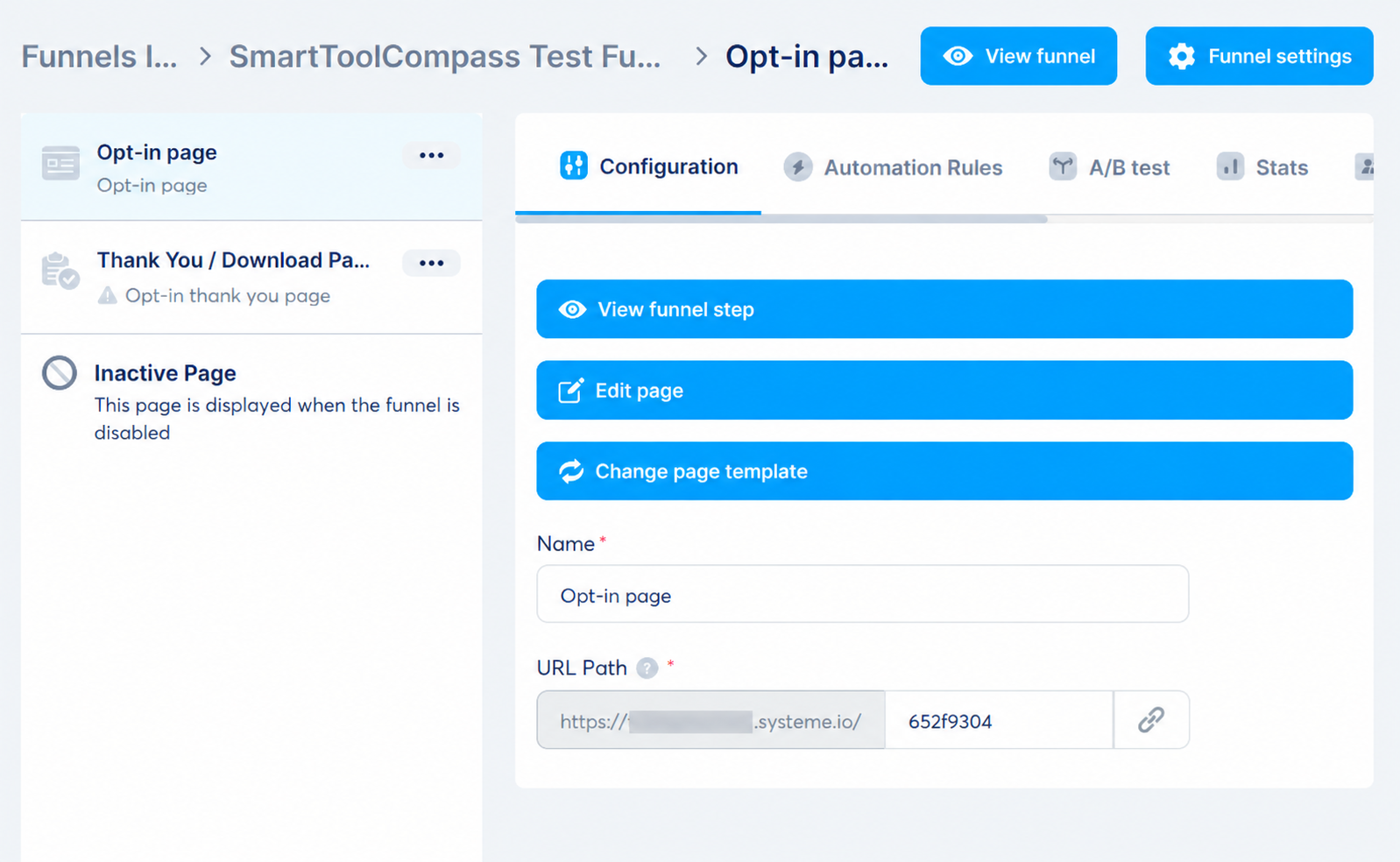
We didn’t design the opt-in page from a blank canvas. We started from one of Systeme.io’s templates, which already included an email form, then published the page so it was reachable at a public URL.
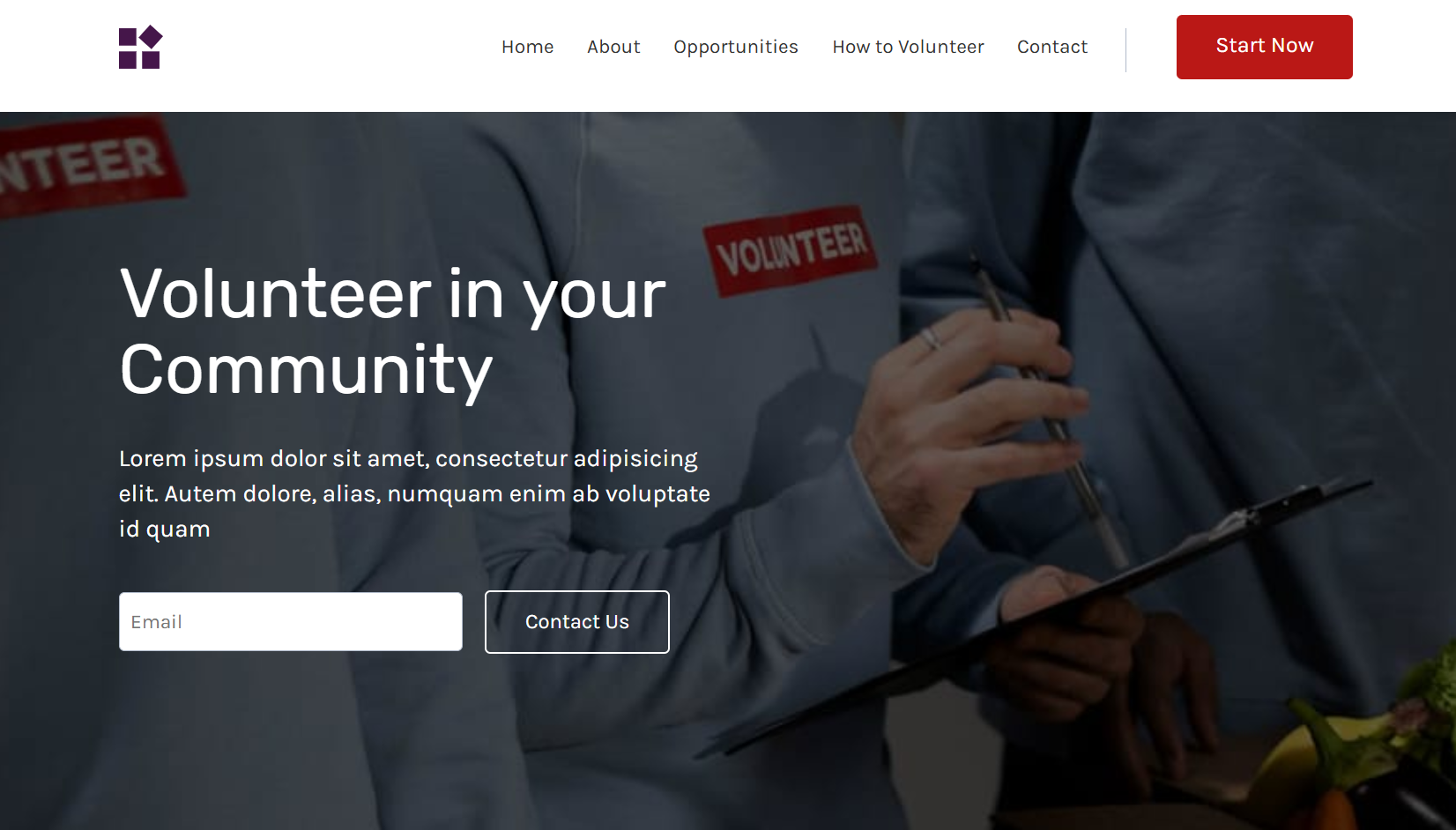
The distinction between the editor and the published page matters here. What we needed to know was whether a visitor could reach this page and use the form, which is what the next two sections cover.
Setting Up the Welcome Email Automation
A form that collects email addresses is only half a lead-capture setup. Someone who signs up should get something back, usually a welcome email or a download link. In Systeme.io, we handled that with an automation rule.
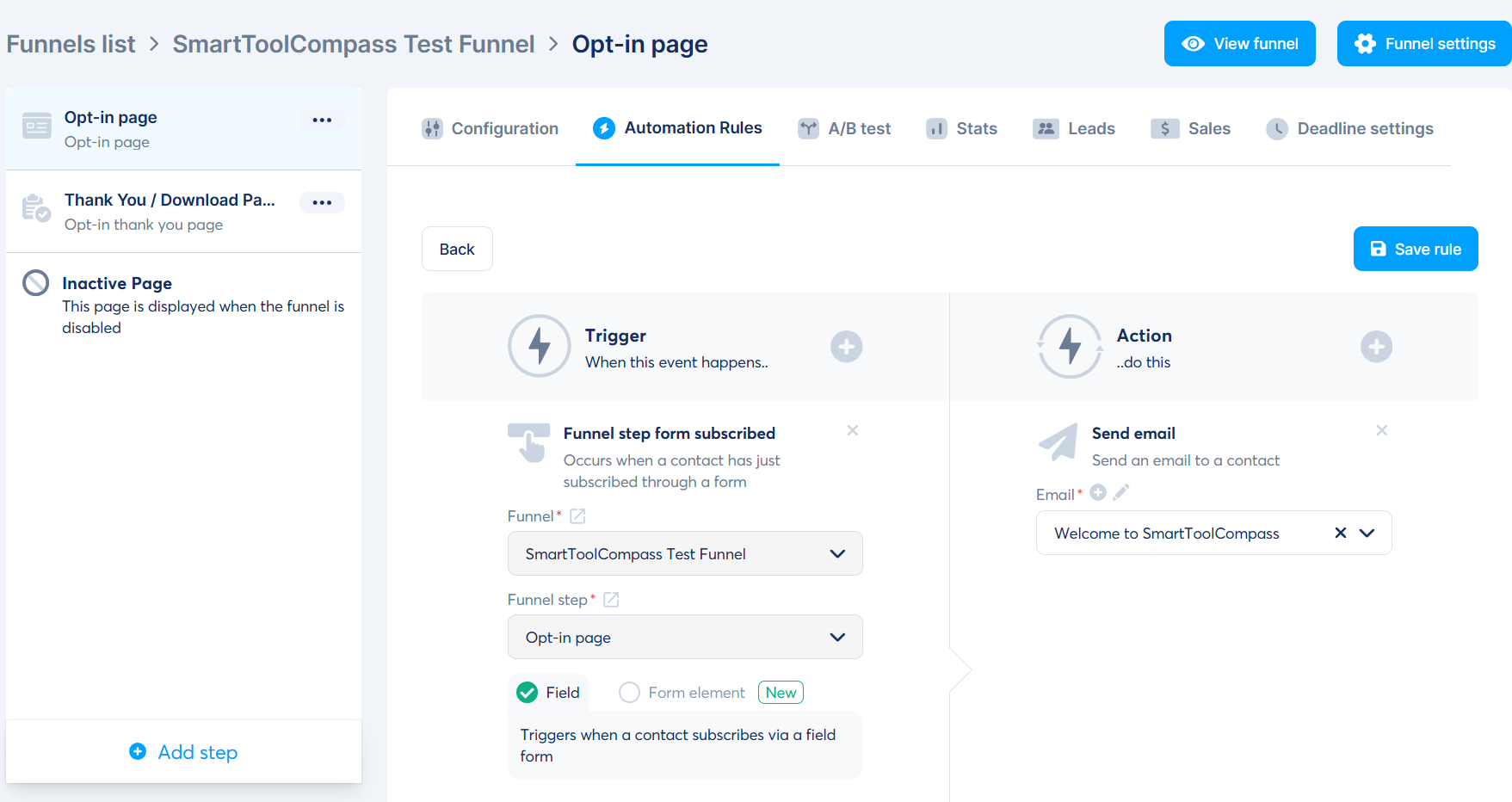
Here’s the exact rule we configured:
| Setting | Value |
|---|---|
| Trigger | Funnel step form subscribed |
| Funnel | SmartToolCompass Test Funnel |
| Funnel step | Opt-in page |
| Action | Send email |
| Welcome to SmartToolCompass |
In plain terms: when someone submits the form on the opt-in page, Systeme.io sends them the welcome email. The rule uses one trigger and one action, and both the trigger and the email live inside Systeme.io. We didn’t need Zapier, Make, or any other external automation tool for this workflow.
The email we received was sent from hello@smarttoolcompass.com. According to Systeme.io’s Help Center, any address you send from has to be confirmed first, and authenticating your own domain is recommended for deliverability. We’re pointing you to that documentation rather than walking through it, because our test records don’t cover that part of the setup.
Did It Actually Work?
Setting up a rule and seeing it fire are two different things. Here’s the evidence, step by step.
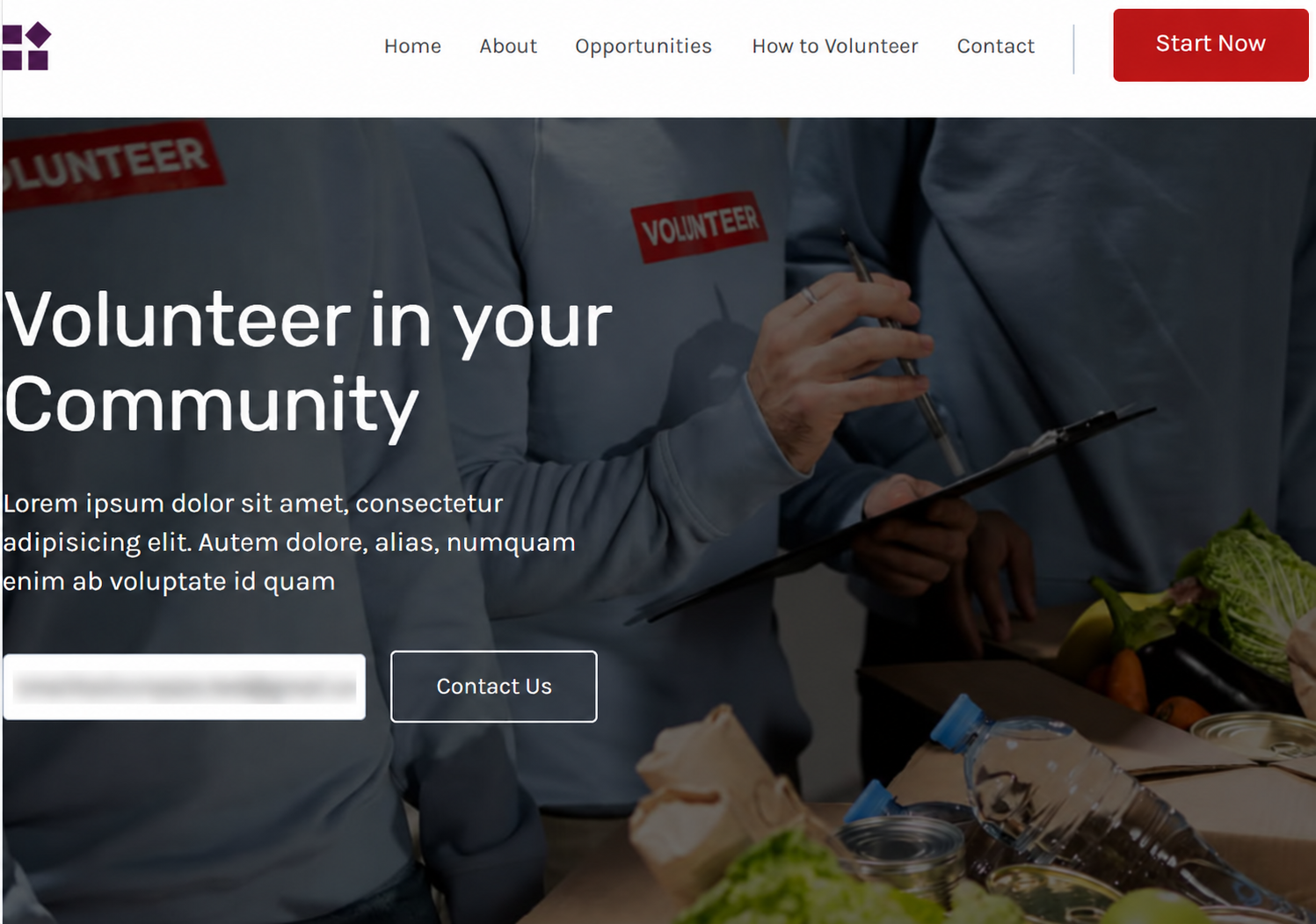
1. We submitted the live form
We opened the published opt-in page as a visitor would and submitted the form with a real email address we control.
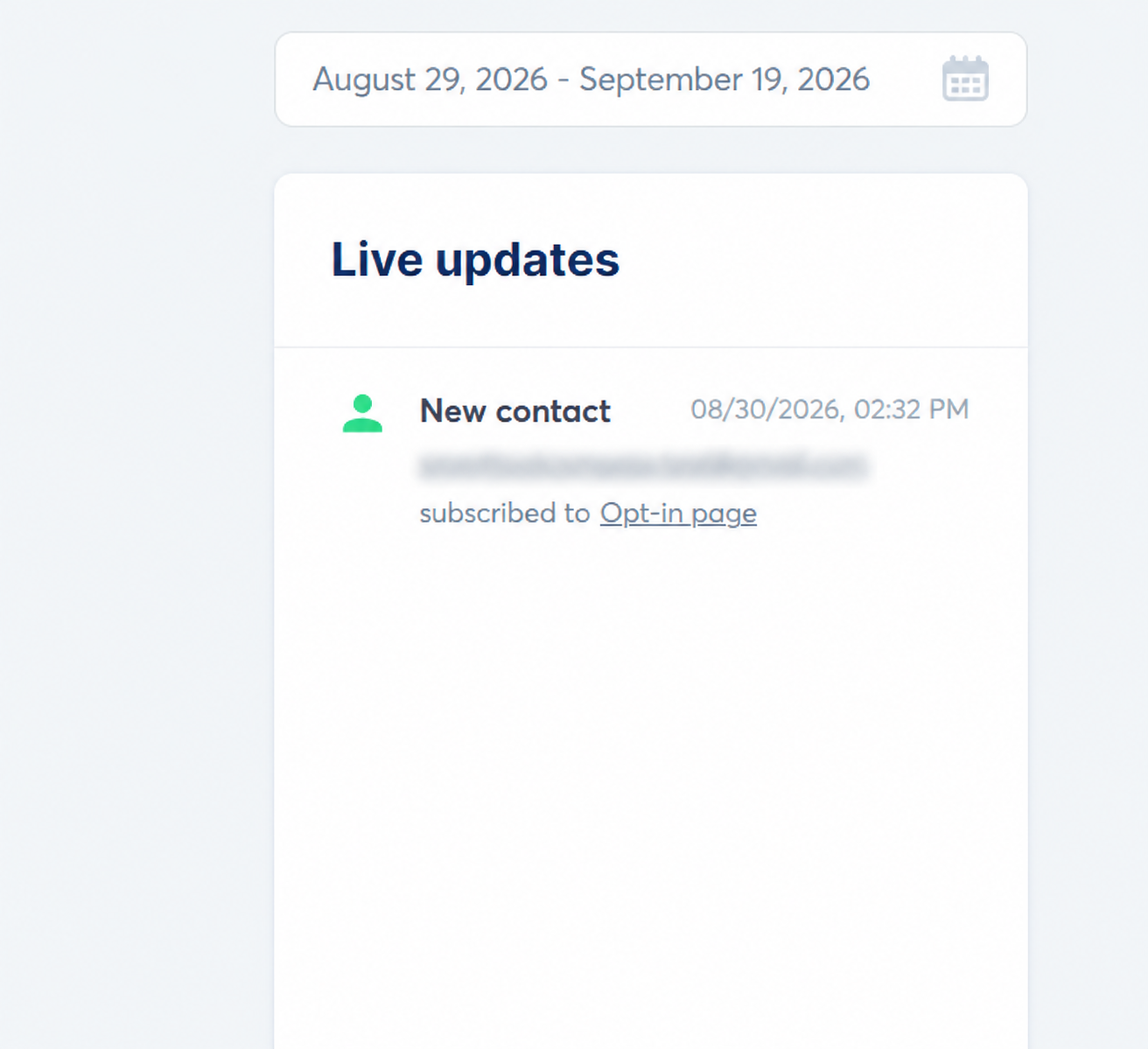
2. The contact appeared in Systeme.io
The submission showed up in the Systeme.io dashboard as a new contact who had subscribed on the opt-in page. That’s the event our automation rule was waiting for.
3. The email reached Gmail
The welcome email arrived in our Gmail inbox. The subject was “Welcome to SmartToolCompass,” the sender was hello@smarttoolcompass.com, and the body read: “Thanks for signing up. This is a test email from SmartToolCompass.” At the bottom was a “Sent with Systeme.io” footer. More on that footer below.
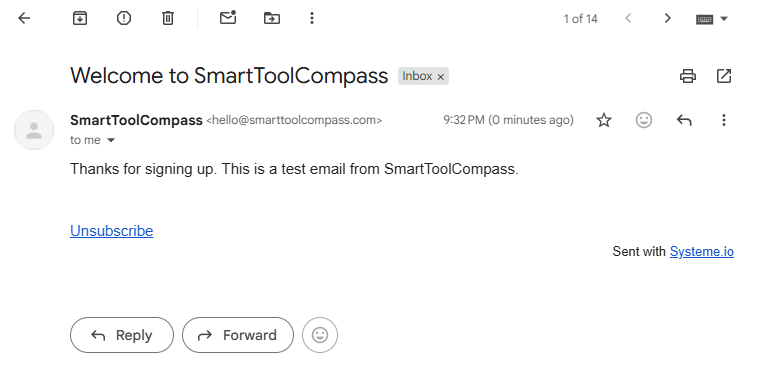
To be clear about what this shows: this was one test, with one email, sent to one Gmail inbox. It isn’t evidence about how Systeme.io emails perform at volume or with other email providers, and we’re not making that claim.
What it does show is that the Free plan let us go from a public opt-in form to a delivered automated email without paying and without a second tool.
The Setup Problem We Hit
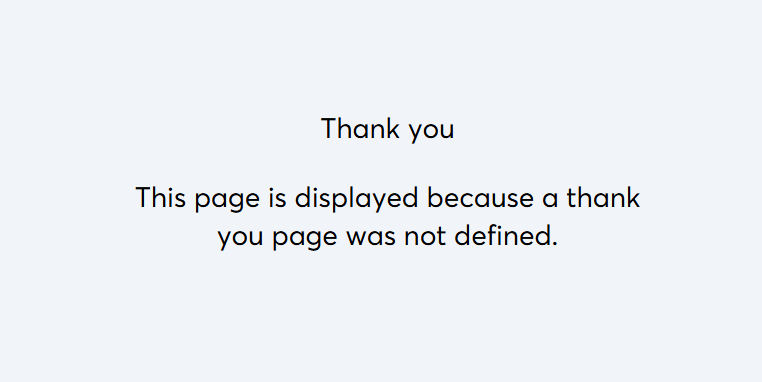
Not everything went as planned. After we submitted the form, instead of our thank-you page, Systeme.io displayed this message:
“This page is displayed because a thank you page was not defined.”
During our test, the form submission led to Systeme.io’s default message saying a thank-you page had not been defined. We did not isolate the exact configuration that caused it. Our funnel did include a thank-you step, as the funnel structure screenshot above shows.
From Systeme.io’s documentation (not our test result): The Help Center says the button on an opt-in form should be set to submit the form and redirect “to the next step,” and that when a funnel has no custom thank-you page, Systeme.io shows a default version. If you run into the same message, that’s the first place to check.
This is the argument for testing a funnel the way a subscriber will use it. Before you share an opt-in page with anyone, submit the form yourself and follow it all the way to the page your subscribers land on next.
Systeme.io Free Plan: What You Actually Get
Here’s the plan screen from our test account.
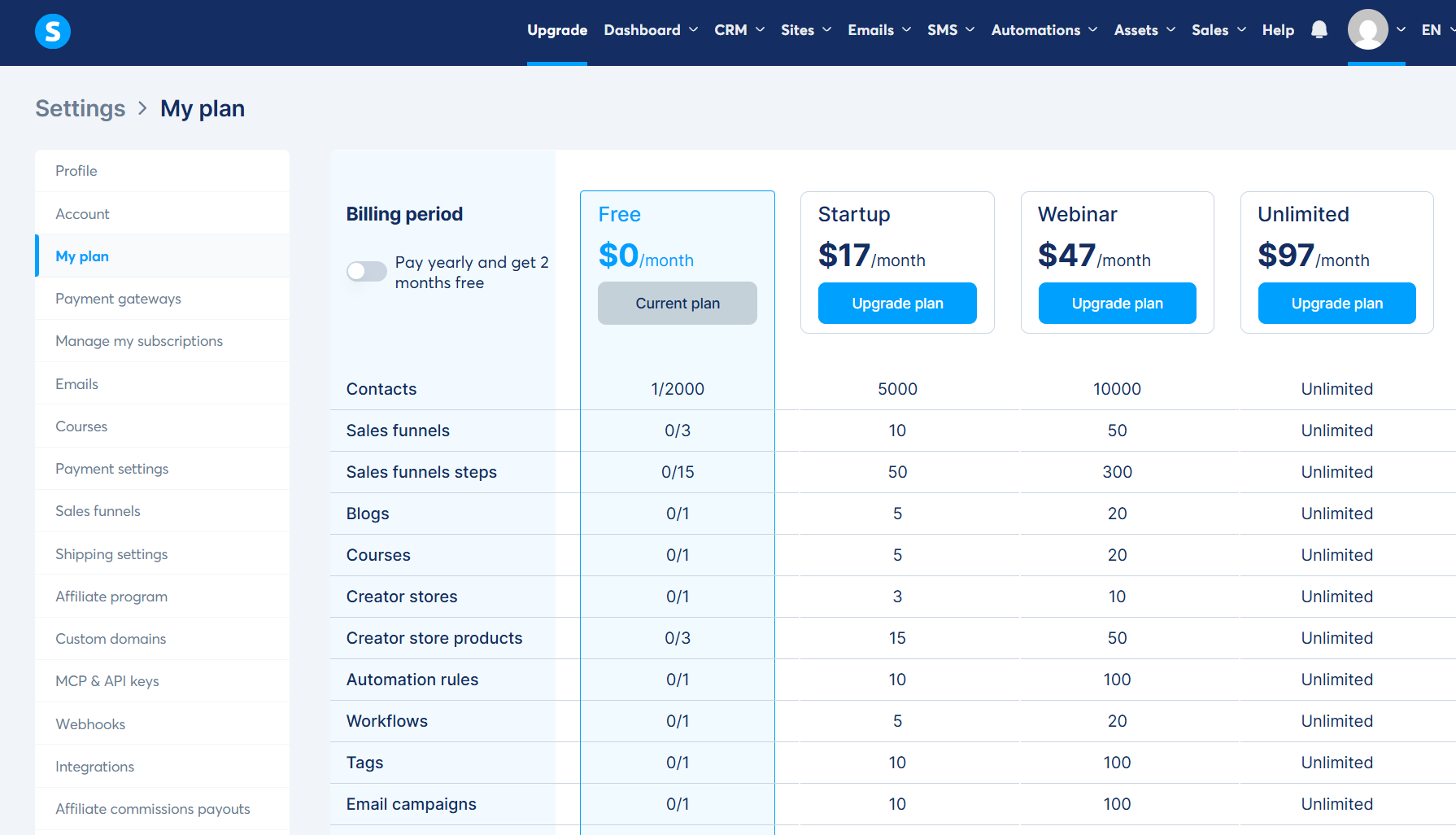
The limits listed on that screen include:
| Limit | Free plan (as shown in our account) |
|---|---|
| Price | $0/month |
| Contacts | 2,000 |
| Sales funnels | 3 |
| Funnel steps | 15 |
| Automation rules | 1 |
| Workflows | 1 |
| Tags | 1 |
| Email campaigns | 1 |
Systeme.io’s official pricing FAQ adds that the Free plan includes 1 blog, 1 course, and 1 custom domain, that email sending is unlimited, that no credit card is required, and that the plan doesn’t expire.
The same FAQ describes funnels and courses as the Free plan’s only meaningful limits. Our account screen also lists the single automation rule, workflow, tag, and email campaign shown above, so it’s worth looking at both before deciding the Free plan covers your needs.
Our editorial judgment: For a freelancer, a one-rule limit may become restrictive before the 2,000-contact limit. One welcome-email rule may be enough for a first lead-magnet funnel. But if you want a second, independent automation, such as a different welcome email for a second opt-in page, you may outgrow the Free plan before your list reaches 2,000 contacts.
There’s one more Free plan detail worth knowing. According to Systeme.io’s Help Center, the “Sent with systeme.io” line at the bottom of emails is an affiliate link promoting Systeme.io, and users on the Free plan can’t remove it. Removing it requires a paid plan (Startup, Webinar, or Unlimited). If you’re emailing clients or prospects, decide whether you’re comfortable with that line in every message.
Systeme.io Pricing
Pricing checked on September 18, 2026, from Systeme.io’s official pricing page and affiliate program page.
| Plan | Monthly | Annual | Contacts | Best fit |
|---|---|---|---|---|
| Free | $0 | — | 2,000 | First funnel |
| Startup | $17 | $170 | 5,000 | Outgrowing Free |
| Webinar | $47 | $470 | 10,000 | Evergreen webinars |
| Unlimited | $97 | $970 | Unlimited | Larger operations |
Systeme.io describes annual billing as “2 months free.” Every plan lists unlimited email sends and a 0% Systeme.io transaction fee. Your payment processor may still charge its own fees, so check those separately.
One caution on the finer print: Systeme.io’s own pricing pages contain some inconsistent descriptions of individual feature limits, so if a specific limit decides your plan choice, confirm it on the live comparison table before you upgrade.
Which plan makes sense for freelancers?
We didn’t test any paid plan, so treat this as use-case guidance based on official plan information, not a ranking.
- Free: You’re testing the platform or building your first lead-magnet funnel. This is where we’d start.
- Startup: The Free plan’s funnel or automation limits start getting in your way, or you want the “Sent with systeme.io” footer gone from your emails.
- Webinar: Automated evergreen webinars are part of how you sell.
- Unlimited: Your list is past 10,000 contacts, or you manage several brands or clients.
What We Liked
The Free plan supported the core flow we tested. The opt-in submission created a contact, triggered the automation, and delivered the welcome email to our inbox on the $0 plan.
Funnels and email automation live in the same platform. The trigger (a form submission on a funnel step) and the action (sending an email) were both configured inside Systeme.io.
No external automation tool was needed. For this workflow, we didn’t have to connect a form tool to an email tool through Zapier or Make.
The opt-in page started from a template. We didn’t have to build the page or its form from scratch before we could test the flow.
What We Didn’t Like
From our hands-on test:
- The thank-you page didn’t behave as intended. After the form submission, we saw Systeme.io’s default message instead of our thank-you page, and we did not isolate the cause. A subscriber hitting that screen would see a generic message instead of your delivery page.
- The Free plan lists only one automation rule, which leaves little room for adding a second independent automation.
- Our welcome email carried a “Sent with Systeme.io” footer. Per Systeme.io’s documentation, it’s an affiliate link and can’t be removed on the Free plan.
Who Systeme.io Is For
- Freelancers building an email list who want a sign-up page and a welcome email running without stitching tools together.
- Solopreneurs who prefer one account over several subscriptions for landing pages, email, and automation.
- Anyone offering a lead magnet, like a checklist, template, or guide, in exchange for an email address.
- People who may sell digital products or courses later. Systeme.io includes course and checkout features, though those weren’t part of our hands-on test.
Who Should Skip Systeme.io
- You need sophisticated email segmentation or branching logic. We only tested a single trigger-and-action rule, and the Free plan lists one automation rule. If complex automation is central to your business, verify that the plan you’d pay for supports it before committing.
- You need a full CRM. Systeme.io stores contacts and lists CRM pipelines as a feature, but if your work depends on detailed sales-pipeline management, evaluate a dedicated CRM.
- Page design freedom is your priority. We built our page from a template and did not test the limits of the editor, so test the page builder yourself before committing if design flexibility is central to your business.
- You’re already deep into a specialist email platform such as Kit or beehiiv. Moving your list and automations is a real cost, and Systeme.io’s main advantage, consolidation, matters less if your email setup already works.
Systeme.io vs Alternatives
We haven’t run the same hands-on test on these tools yet, so we’re not declaring a winner here. The short version is that they’re built around different jobs.
- Kit: An email marketing platform aimed at creators. Look here if email is the center of your business rather than one part of a broader funnel setup.
- beehiiv: A newsletter platform. Look here if publishing a regular newsletter is the main thing you want to do.
- MailerLite: An email marketing tool with its own landing pages and automation. Look here if you want a dedicated email tool rather than an all-in-one platform.
- ClickFunnels: A funnel builder. Look here if sales funnels are your main priority.
We plan to publish direct comparisons using the same test scenario.
Is Systeme.io Worth It for Freelancers?
The strongest reason to consider Systeme.io isn’t the length of its feature list. It’s that, in our test, the Free plan let us build and run a real opt-in → contact → automated email flow before paying anything.
That matters for freelancers. You can find out whether the platform works for your first lead magnet with your own page, your own form, and your own inbox, instead of judging it from a sales page.
Keep the limits in view. Our Free plan screen lists one automation rule. Our test hit a thank-you page problem we didn’t fully diagnose. And we didn’t test payments, courses, webinars, or any paid plan.
If you need an opt-in page and a welcome email running without connecting several tools, Systeme.io is worth trying on the Free plan. If your business depends on advanced email automation or polished page design, compare it against a specialist tool first.
FAQ
Is Systeme.io really free?
Yes. Systeme.io offers a Free plan that, according to its pricing page, doesn’t expire and doesn’t require a credit card. We ran our entire test on it.
How many contacts can I have on the free plan?
2,000. That’s the limit shown in our account and in Systeme.io’s official pricing FAQ. According to that FAQ, if you cancel a paid plan and your list is over 2,000, contacts above the limit are archived rather than deleted.
Does Systeme.io have email automation on the free plan?
Yes. We built an automation rule on the Free plan that sent a welcome email after a form submission, and it worked in our test. Our Free plan screen lists a limit of one automation rule and one workflow.
Does Systeme.io charge transaction fees?
Systeme.io says it charges 0% transaction fees on every plan, including Free. Your payment processor may charge its own fees. We didn’t test payments.
How much does Systeme.io cost after the free plan?
As of September 18, 2026, paid plans are Startup at $17/month, Webinar at $47/month, and Unlimited at $97/month. Annual billing is $170, $470, and $970 per year.
Is Systeme.io good for beginners?
For a basic lead-capture flow, it can work. We built ours from a template with a single automation rule. But we did hit a thank-you page issue we didn’t fully diagnose, so plan to test your own funnel from start to finish before sharing it.
Is Systeme.io good for freelancers?
In our judgment, yes, if you want an opt-in page and email automation in one account and want to test that before paying. If you need advanced automation or a full CRM, look at specialist tools.
What are the main disadvantages of Systeme.io?
From our test: the Free plan lists only one automation rule, Free plan emails carry a “Sent with systeme.io” footer you can’t remove, and we ran into a thank-you page problem.
Sources & Verification
Hands-on test: SmartToolCompass Free plan account. Originally tested August 30, 2026. Re-verified September 18, 2026.
Official sources (checked September 18, 2026):
- Systeme.io Pricing page and pricing FAQ
- Systeme.io Affiliate Program page (annual plan pricing)
- Systeme.io Help Center: How to remove “Sent with systeme.io” and customize your email footer
- Systeme.io Help Center: How to configure links between funnel pages
- Systeme.io Help Center: How to confirm your email sender address
- Systeme.io Help Center: How to authenticate your domain name for email sending


Comments