By the SmartToolCompass editorial team · Updated September 21, 2026 · Zapier hands-on tested September 5, 2026 · Make hands-on tested August 23, 2026
Disclosure: We may earn a commission if you sign up through some links on this page, at no additional cost to you. Affiliate relationships never affect our testing or recommendations.
Zapier vs Make: Quick Answer
Choose Zapier if you want the platform that shows you your own data before you build anything, or if you need a connector that only its larger app directory carries. Choose Make if you need more than one action without paying, or if you want to see the whole workflow on a canvas rather than as a list of steps.
We didn’t reach that from spec sheets. We built the same Google Sheets to Gmail automation in both platforms, using the same Google account, the same spreadsheet structure, and the same shape of workflow. Both finished. Both delivered a real email. The difference wasn’t whether they worked.
One structural difference outranks everything else here, and it only shows up if you plan to stay on a free plan: Zapier’s Free plan caps a Zap at two steps — one trigger, one action. Make’s Free plan lets a scenario run multiple modules. For a freelancer whose second automation needs to send an email and log the result, that is a categorical difference, not a matter of degree.
Try Zapier free → · Try Make free →
Zapier vs Make at a Glance
| Item | Our take | Status |
|---|---|---|
| Best for | Zapier: first builds, the larger app directory. Make: multi-step work on a small budget | Editorial judgment |
| Our test scenario | The same Google Sheets to Gmail workflow, built by hand in both, no AI builder | Hands-on tested |
| Did the email arrive | Yes, in both | Hands-on tested |
| Plan we tested on | Zapier: Pro trial. Make: Free plan. Not a like-for-like plan comparison | Hands-on tested |
| Where we got stuck | Make: the screen asking which row counts as the first new one. Zapier: nowhere in this build | Hands-on tested |
| What one run cost | Zapier: exactly 1 task, watched on the counter. Make: we did not measure it | Hands-on tested / Not tested |
| Free plan steps | Zapier: two-step Zaps. Make: multi-module scenarios, 2 active at a time | Researched |
| Free plan volume | Zapier: 100 tasks/mo. Make: 1,000 credits/mo | Researched |
How We Tested Zapier and Make
We ran both builds as close to identical as we could:
Google Sheets (Name / Email / Message) ↓ Zapier | Make ↓ Gmail send
Same Google account. Same spreadsheet with the same three columns. Same shape of workflow — a trigger that watches for a new row, and an action that sends an email built from that row. In Zapier we used the New Spreadsheet Row trigger into a Gmail Send Email action; in Make, Watch New Rows into Send an email.
In both cases we declined the AI builder. Zapier offers Copilot; Make offers Maia. We built by hand in both, because the question we wanted to answer is what the platform asks of you when you assemble a workflow yourself. We also configured both accounts as a non-technical user would: in Zapier we answered Business Owner during onboarding, and in Make we selected the beginner path, “Personal productivity,” and “Just me.”
One thing this comparison is not. Our Zapier build ran on the Pro trial that a new account starts on, and our Make build ran on the Free plan. So this is an apples-to-apples comparison of the first-workflow experience, and it is not a test of the two free plans against each other. Everything we say about free plan limits below is read from official documentation and labeled as such. The full detail of each build is in our Zapier review and our Make.com review.
It is also one simple two-step automation in each tool. We did not test routers, filters, webhooks, code steps, AI agents, error handling, complex branching, high volume, or long-term reliability on either platform. Where we discuss those below, we say plainly that we are reading documentation, not reporting experience.
Setup: Zapier Showed Us Our Own Data, Make Showed Us the Whole Shape
Both onboardings did real work, and they did different work.
Zapier asked what our role was, and we selected Business Owner. It answered with a “Top apps for Business Owner” screen, and we picked Google Sheets and Gmail from that list. Then it put us in a vertical stack of steps: app, event, account, spreadsheet, worksheet, test. You complete one before the next becomes configurable.
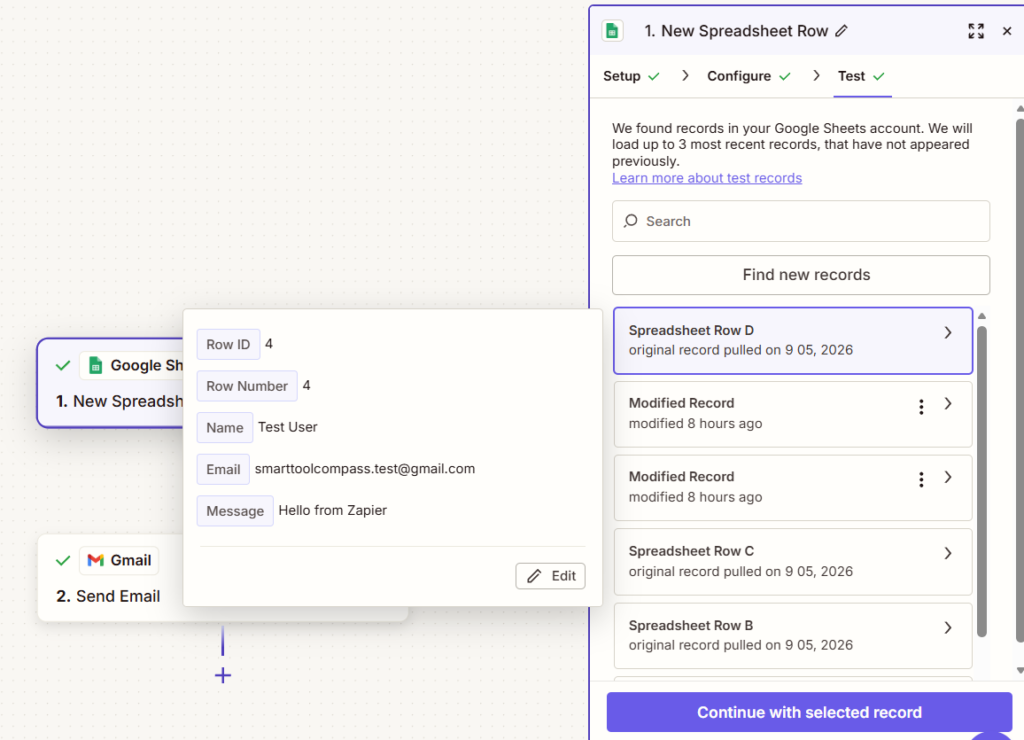
The part worth describing precisely is Zapier’s trigger test. When we ran it, Zapier retrieved actual records from our spreadsheet and showed them to us as named fields carrying our real values — Test User, smarttoolcompass.test@gmail.com, Hello from Zapier. You are not asked to imagine the data that will flow through the automation. You see it, named, before you build anything on top of it.
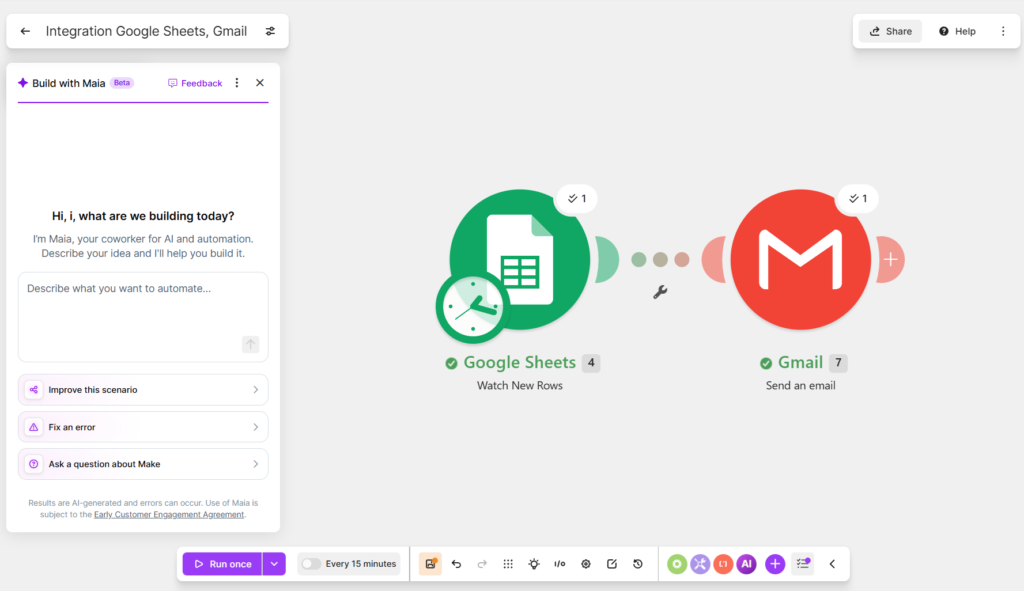
Make’s onboarding narrowed things a different way. Declaring ourselves beginners and naming our apps meant the canvas opened with two relevant modules instead of a search box. And the canvas itself is what Make is known for: each module is a circle you click to configure, and the line between them shows which direction data travels. With two modules on screen it was immediately clear what was connected to what, without opening anything.
One difference is small until you hit it. Zapier asked us to authorize Google twice — once for the Sheets trigger and once for the Gmail action — even though both used the same Google account. In Make, the Google connection we made for Sheets was reusable for the Gmail module. Neither is hard. Make’s is one less consent screen.
Data Mapping: Both Click-Based, and Zapier Mixed Text With Fields
Neither tool made us write expressions. This is worth stating because it is where automation platforms most often lose first-time users, and it is the axis on which we found the biggest gap when we compared Make with n8n. Against Zapier, Make has no such advantage — both are click-based.
Here is what we mapped in Zapier:
| Gmail field | What we mapped |
|---|---|
| To | Email field from Google Sheets |
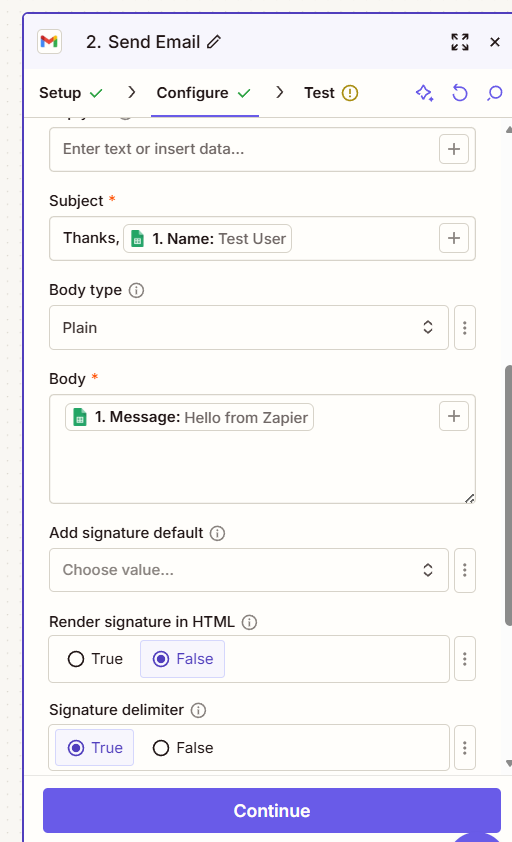
| Subject | Thanks, [Name] — static text plus the Name field |
| Body | Message field from Google Sheets |
The Subject line is the useful example. Zapier let us combine literal text and a mapped field in the same input, so a static “Thanks,” could sit in front of a dynamic name with no formatting step in between. In Make we mapped the same three columns — Email to the recipient, Name into the subject, Message into the body — as a series of choices rather than typed syntax.
On this axis the two are closer than their reputations suggest. If you have heard that Make is the one that doesn’t make you write code, that is true, and it is equally true of Zapier.
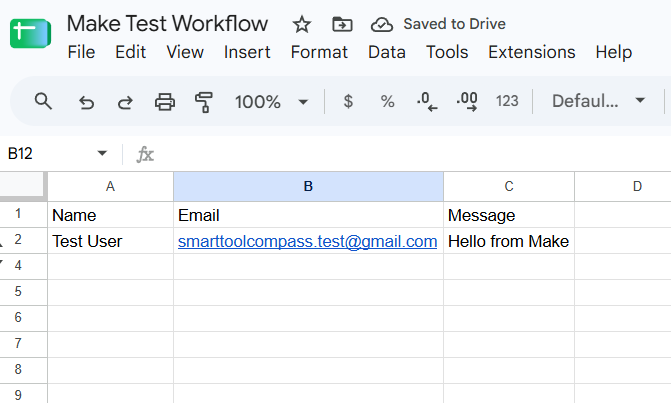
Did Both Work?
Yes. Both delivered a real email built from real spreadsheet values, and each told us so in its own way.
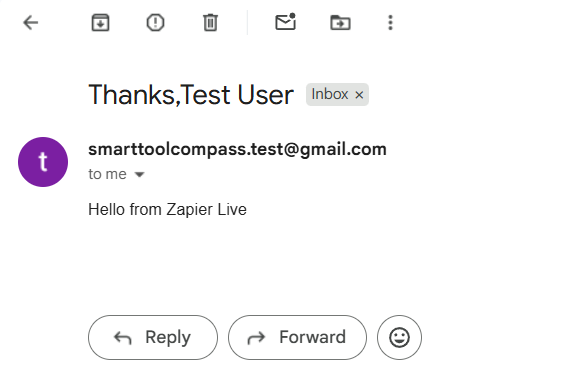
Zapier. We tested the Gmail step in the editor first — Zapier would not let us publish without it — and that test sent an actual message rather than simulating one. Then we published, added a row to the spreadsheet, and let the live Zap run. Zapier’s Run Details reported Found 1 new Spreadsheet Row in Google Sheets and Sent 1 new Message to Gmail, and its “Data In” panel showed exactly what was handed to Gmail: the resolved recipient, the subject Thanks, Test User, and the body. The email arrived.
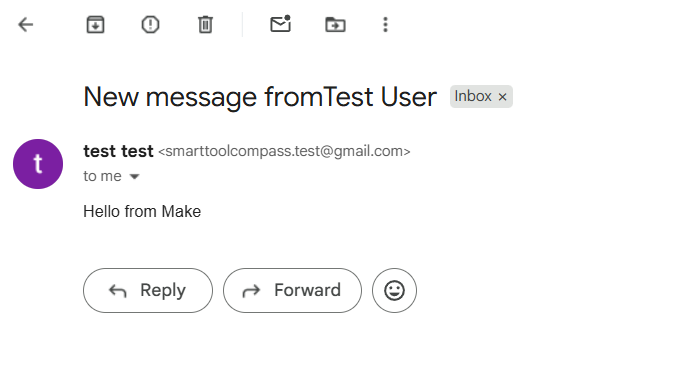
Make. We added a row with the name Test User and the message Hello from Make, and ran the scenario. Both modules reported success on the canvas — the trigger picked up the row, Gmail sent the message — and the email arrived with the subject New message from Test User and the mapped body.
The difference is in what each one shows you afterward. Zapier’s Run Details gave us resolved values — not just that the step succeeded, but what was actually passed into Gmail. Make’s canvas gave us per-module status — which half of the scenario ran. Both of our runs succeeded, so this describes what each tool put on screen after a successful execution. We did not make either automation fail, so we cannot tell you how they compare when something breaks.
Zapier vs Make: Ease of Use
Both builds finished without us opening documentation. That is the headline, and it is worth saying before the differences, because the popular framing of this matchup — Zapier is the easy one, Make is the powerful one — did not survive our test.
We got stuck exactly once, and it was in Make. Before the scenario would run, Make asked us to choose where the trigger should start reading from — essentially, which existing row counts as “the first new one.” The underlying logic is sensible, since a trigger pointed at a populated spreadsheet would otherwise fire on every row already in it. But the screen doesn’t carry that reasoning, and it was the one moment in our build where the interface stopped teaching and started assuming.
Zapier had no equivalent moment in this build. It did make us test the Gmail step before it would let the Zap go live, which is a constraint rather than a convenience — and a constraint we appreciated, because it catches mapping mistakes at the point where they are cheap to fix.
The deeper difference is the mental model. Zapier hands you one decision at a time and hides the rest until you get there. Make shows you the whole shape from the start and expects you to place things in it. For a first automation, the first model has fewer ways to go wrong. For an automation you will come back to in three months, or hand to a client, the second is easier to read.
Neither of those is “easier” in the abstract. They are easier at different moments.
Zapier vs Make Pricing
Pricing checked on September 21, 2026, on the official pricing pages for Zapier and Make. Both show a monthly/annual toggle. The figures below are the monthly-billing prices for both tools, so the two columns can be read against each other; the annual discount is listed separately.
| Tier | Zapier | Make |
|---|---|---|
| Free | $0 — 100 tasks/mo, two-step Zaps, 15-min polling, 1 user | $0 — up to 1,000 credits/mo, 2 active scenarios, 15-min minimum interval |
| Entry paid | Professional — $29.99/mo billed monthly ($19.99/mo on annual billing). From 750 tasks/mo, multi-step Zaps, 2-min polling | Core — $12/mo billed monthly ($9/mo on annual billing). 10,000 credits/mo, unlimited active scenarios, 1-min interval |
| Next tier | Team — $103.50/mo billed monthly ($69/mo annual), 2,000 tasks, 25 users, 1-min polling | Pro — $21/mo billed monthly ($16/mo annual), 10,000 credits. Teams — $38/mo billed monthly ($29/mo annual) |
| Enterprise | Custom, quoted by sales | Custom |
| Annual discount | Advertised as saving 33% | Advertised as saving 15% or more |
On monthly billing, Make’s Core plan starts at $12, compared with $29.99 for Zapier Professional. Make includes 10,000 credits, while Zapier includes 750 tasks. Because credits and tasks are counted differently, these allowances are not directly comparable.
Tasks vs Credits: The Difference That Actually Matters
This is the part that decides which one is cheaper for your work, and it is not visible on either pricing page.
Zapier bills a task for every successful action step (researched — Zapier Help Center). Per that page, what does not count is the interesting half: triggers, polling, Filter steps, Paths steps, Formatter, Delay, Looping, Digest, Storage, Zapier Manager, Tables and Forms steps, and any action that errors or is halted. Some products bill at different rates — Zapier MCP charges 2 tasks per successful tool call, Lead Router charges 5 per routed lead, and AI by Zapier varies by model tier.
Make bills a credit per module operation (researched — Make Academy), and the exception runs the other way: a trigger module uses a credit each time it runs even when it returns no new data. Make’s own training material puts it plainly: whether a check returns 0 items or 50, “this would always count as one operation.” Routers and filters don’t consume credits.
So the two platforms charge for opposite things. Zapier charges for work done and gives away the checking. Make charges for the checking as well as the work.
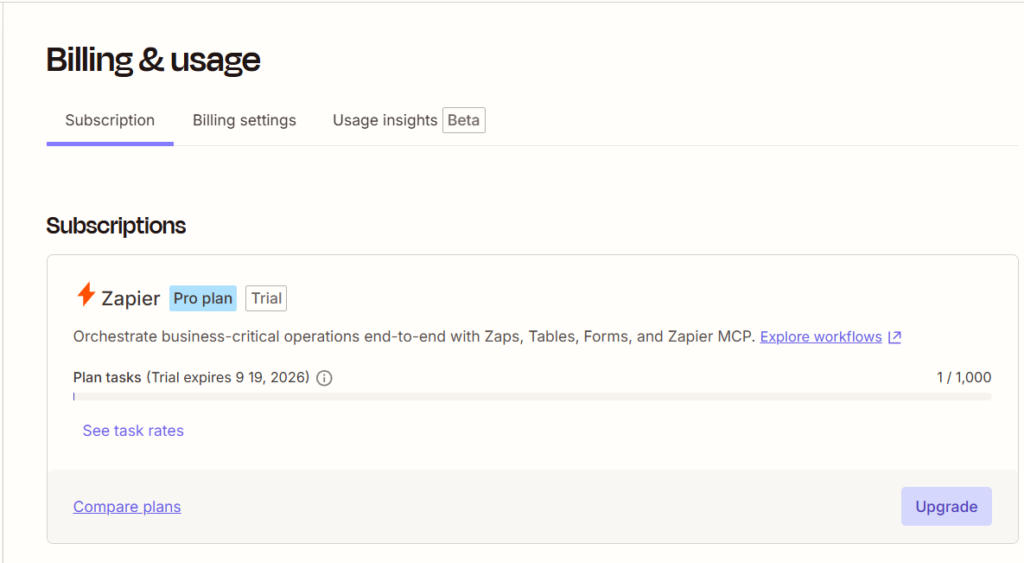
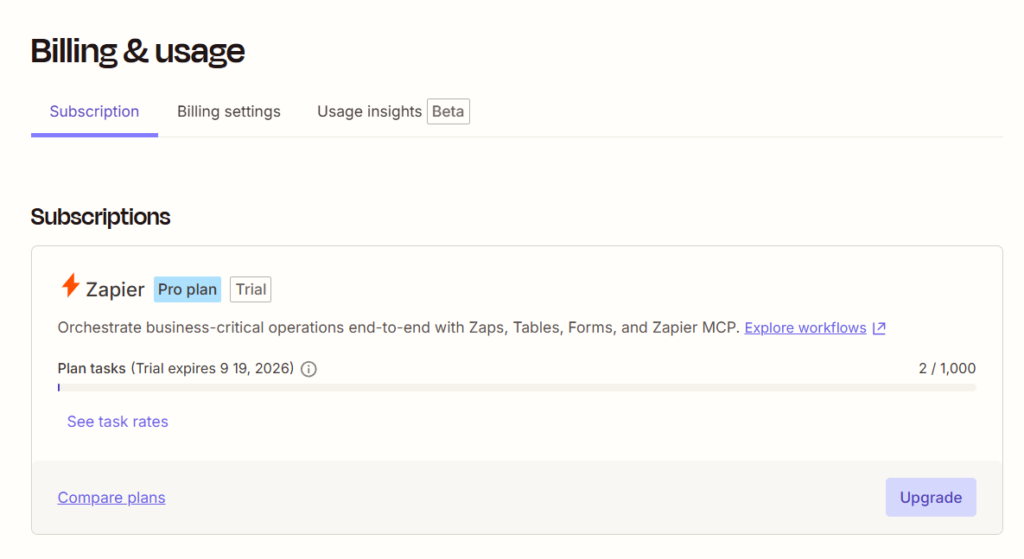
We have a measurement on one side of this and not the other. In Zapier we watched the counter move from 1 of 1,000 tasks used to 2 of 1,000 across one successful Google Sheets to Gmail run — exactly one task for one row. In Make we did not measure our credit consumption during testing, so we are not going to claim a figure for it.
Which Is Cheaper?
It depends on how often your automation fires versus how often it looks.
Work through the polling arithmetic on Make’s side. A scenario on the 15-minute minimum interval checks four times an hour. Run that around the clock and it is roughly 2,880 checks in a month — before a single row is processed. Per Make’s documentation each of those checks costs a credit, so a scenario left running at that interval would exceed the whole 1,000-credit Free plan on checking alone — before a single email is sent. We did not measure this. It is arithmetic from a documented rate, not something we watched happen, so treat it as the figure to model rather than a result. You can cut it by scheduling the scenario to run only during working hours, which is what the interval setting is for.
Now Zapier’s side. Polling is free, so an automation that watches all month and fires twice costs two tasks. Our two-step Google Sheets → Gmail Zap used one task per successful email action — that is the figure we measured. Tasks are counted across the whole account, so if nothing else consumes them, the 100-task Free allowance could cover up to 100 such emails a month; every other workflow you run draws on the same 100.
That inverts the usual advice:
- Low-frequency, watch-constantly workflows — a new client intake form that fires a few times a month — lean Zapier on the free tier, because you pay only for the firing.
- High-frequency workflows — anything processing rows in volume — are worth pricing on both once you are paying. Make’s entry tier lists 10,000 credits for $12/mo billed monthly ($9/mo annual) against Zapier’s 750 tasks for $29.99/mo ($19.99/mo annual). A credit and a task are not the same unit, and we did not measure Make’s credit consumption, so read that as a gap in allowance to model against your own workflow rather than as a cost saving.
- Multi-step workflows on no budget — Make, decisively, and the next section explains why.
The Free Plan Gap: Two Steps vs Multiple Modules
Everything above is a trade-off. This one is a wall.
Zapier’s Free plan documents two-step Zaps: one trigger, one action. That covers the workflow we built and very little else. The moment your automation needs to send the email and log the result to a sheet, or filter out the rows that shouldn’t trigger anything, you are on Professional — $29.99/mo billed monthly, or $19.99/mo on annual billing (researched — official).
Make’s Free plan doesn’t limit modules per scenario. It limits you to 2 active scenarios and 1,000 credits. Those are real limits — a freelancer running an intake automation, an invoice reminder, and a client-report workflow is on a paid plan by definition — but they are volume and count limits, not shape limits. A three-module scenario is available to you for free.
If you intend to evaluate seriously without paying, that difference is the whole comparison. On Zapier’s free tier you can prove that a two-step automation works. On Make’s free tier you can prove that your actual workflow works.
Features We Didn’t Test
One two-step automation in each tool is a narrow test, and the honest boundary matters more in a comparison than in a review, because it is tempting to let a result on one axis imply a winner on all of them. We did not test any of the following on either platform:
- Webhooks (on Zapier these require Professional, so the free evaluation path is closed for them)
- Filters, paths, and routers — the conditional logic both platforms bill differently
- Code steps and custom functions
- The AI builders: Zapier’s Copilot and Make’s Maia. We declined both deliberately
- Error handling and recovery when an API on the other end misbehaves
- Multi-step workflows of any depth
- Sustained reliability, behavior at volume, and support quality
Where these appear in the comparison above, we have labeled them as researched from official documentation.
Zapier Is Better If…
- You want to see your real data before you build. The trigger test pulling actual rows, named and populated, was the single best moment in either build.
- Your automations fire rarely but must watch constantly. Free polling is a genuine structural advantage, not a marketing line.
- Your stack is mainstream. Zapier publishes the larger app directory — 10,142+ apps against Make’s 3,000+ at the time of writing — so a niche tool in your stack is more likely to have a ready-made connector. We did not test connector quality or vendor support on either platform, so treat the count as coverage, not as a promise about how well any one connector works.
- You want to see the values that were actually sent. On our successful run, Zapier’s Run Details showed the resolved recipient, subject and body. What we recorded on the Make side is the canvas marking each module successful — we did not open Make’s execution detail, so this is a difference in what we looked at, not a claim about what each tool can show you.
- You are building your very first automation. One decision at a time, with testing enforced before publishing, is a forgiving way to start.
Make Is Better If…
- You need more than one action and aren’t paying yet. This is the decisive one. Zapier’s two-step free ceiling has no equivalent on Make.
- You process volume. Make’s paid tiers start lower — 10,000 credits for $12/mo billed monthly ($9/mo annual) against Zapier’s 750 tasks for $29.99/mo ($19.99/mo annual). The two units are counted differently and we did not measure Make’s credit consumption, so this is a difference in entry price and allowance, not a measured difference in what the same workload costs. Which one is cheaper for you depends on how many credits your scenario burns.
- You want to read the workflow later. The canvas explains itself in a way a vertical step list does not, which matters when you revisit an automation months on or hand it to a client.
- You think in branches. Routers and multiple paths are Make’s native shape, where Zapier’s model is a line.
- You want a real evaluation tier. No time limit, no credit card, and enough headroom to build something genuine — we proved that by building something genuine on it.
Zapier vs Make for Freelancers
For freelance work specifically, three things decide this, and none of them is the feature list.
What you can prove before paying. A freelancer evaluating a tool wants to know whether their real workflow runs, not whether a two-step demo runs. Make’s free tier answers that question and Zapier’s mostly doesn’t.
Which way your volume runs. If your automations sit quiet and fire occasionally, Zapier’s free polling can help conserve your task allowance. If they process steadily, compare the credit and task consumption of your actual workflow before choosing a paid plan.
Whether anyone else has to read it. Handing a client an automation they can look at and understand is easier on a canvas than in a step list. That is a client-facing consideration, not an aesthetic one.
What doesn’t decide it, on the evidence of our builds: ease of use. Both got a non-expert from a fresh account to a delivered email without documentation.
Final Verdict
Both platforms did what we asked of them. A row landed in a spreadsheet and an email arrived, in both tools, built by hand, without either of us reading a manual.
Where they separate is what happens next, and here we are reasoning from documented plan limits rather than from our builds. Make is the better starting point for most freelancers, because its free tier is documented to allow multi-module scenarios where Zapier’s caps a Zap at two steps — so you can prove your actual workflow before paying. Zapier is the better fit when your automations watch constantly and fire rarely, because its documentation is explicit that triggers and polling cost nothing. Its published app directory is also the larger of the two — 10,142+ apps against Make’s 3,000+ — though we did not test how well any individual connector works.
The one thing we would not do is choose between them on ease of use. That framing is the most common one in this matchup, and our builds don’t support it.
Try Zapier free → · Try Make free →
FAQ
Is Make cheaper than Zapier?
On headline price, yes — Make’s Core plan is $12/mo billed monthly ($9/mo on annual billing) with 10,000 credits, against Zapier’s Professional at $29.99/mo billed monthly ($19.99/mo annual) starting from 750 tasks. But the units differ, so the allowances are not directly comparable. A Zapier task is a successful action step, and polling is free; a Make credit covers module operations including trigger checks that return nothing. Which is cheaper depends on whether your automation fires often or just watches often.
Can you use Zapier for free?
Yes, with two limits that matter: 100 tasks per month, counted across your whole account rather than per Zap, and two-step Zaps — one trigger and one action. Unlimited Zaps, Tables, and Forms are included. Older articles claiming a five-Zap cap are out of date; the meaningful limits are task volume and step count.
Does Make have a free plan?
Yes — up to 1,000 credits a month, 2 active scenarios, and a 15-minute minimum interval between runs, with no time limit and no credit card. We ran our entire Make test on it.
Which is easier for beginners, Zapier or Make?
Neither, on our evidence. Both got us from a fresh account to a working automation without documentation. Zapier presents one decision at a time; Make shows the whole workflow at once. The only place we got stuck was a Make screen asking which existing row counts as the first new one.
Do Zapier and Make count usage the same way?
No, and they are close to opposites. Zapier charges for successful action steps and not for triggers, polling, filters, paths, or formatters. Make charges per module operation, and a trigger consumes a credit even when it finds nothing new.
Can Zapier or Make be self-hosted?
Neither. Both are hosted platforms. If keeping automation data on infrastructure you control is a requirement of your client work, this comparison is the wrong one — look at a self-hostable tool instead.
Did you test the same workflow in both?
Yes. The same Google Sheets columns (Name, Email, Message) into a Gmail send, on the same Google account, built by hand with no AI builder in either tool. The one difference we couldn’t control: our Zapier build ran on the Pro trial a new account starts on, while our Make build ran on the Free plan.
Sources & Verification
Hands-on tests: the Zapier build and the Make build described here are the ones documented in full in our Zapier review and our Make.com review. Zapier was tested on September 5, 2026, on the Pro trial a new account starts on. Make was tested on August 23, 2026, on the Free plan.
Official sources (pricing checked September 21, 2026):
- Zapier pricing page
- Make pricing page
- Zapier app directory — the published integration count
- Make integrations directory — the published integration count
- Zapier Help Center: How is task usage measured in Zapier? — which step types do and don’t count as tasks (page updated August 21, 2026)
- Make Academy: Credit consumption in Make — a trigger counting as one operation whether it returns 0 items or 50, and routers and filters consuming none

Comments