Updated: October 4, 2026
Originally tested: n8n August 23, 2026 · Latenode September 26, 2026
Pricing checked on: Latenode September 27, 2026 · n8n October 4, 2026
Testing status: Hands-on tested — Latenode on its free plan, n8n on the n8n Cloud free trial
Disclosure: SmartToolCompass may earn a commission if you sign up to Latenode through our link, at no extra cost to you. The n8n links on this page are ordinary links and earn us nothing. We paid for neither product, and the difference does not change what we report.
Latenode vs n8n: Quick Answer
These two are the technical end of this category. Both expose references rather than hiding the mapping, but n8n makes the source data and the resolved value far easier to see. If you came here expecting one of them to be the “easy” one, that is not the difference.
The difference that decides it for most freelancers is simpler and harder to work around:
Latenode has a free plan. n8n Cloud does not. n8n offers a 14-day trial and a free self-hosted Community Edition you run on your own server. There is no permanently free hosted tier. Latenode’s free plan is a hosted plan you can stay on: its pricing page lists 10,000 CPU seconds a month, and we ran a deployed automation on it.
The second difference is smaller but it is the one we felt while building. Both tools place a reference in the field; only n8n shows you what it resolves to. Under our n8n subject line the editor printed New message from Test User before we sent anything. Latenode gave us no equivalent.
Latenode vs n8n at a Glance
| Item | Latenode | n8n |
|---|---|---|
| Plan we tested on | Free plan | n8n Cloud free trial |
| Permanently free hosted plan | Yes | No — trial, or self-host the Community Edition |
| What we built | The same Google Sheets → Gmail automation, same account, same spreadsheet | |
| Field mapping | Click a value in the Data panel; the field fills with $1.data.event.row_parsed.B | Drag a value in; the field fills with {{ $json.Email }} |
| Does it show the resolved value? | No | Yes — previewed under the field before sending |
| Trigger in our build | Instant — pushed when the row appeared | Polling — a poll interval on the trigger node |
| Did the email arrive? | Yes, including from a deployed run | Yes, from a run we executed |
| Ran unattended? | Yes — deployed, set Active, ran with nothing pressed | Not tested |
| Branding on the delivered email | None seen | “This email was sent automatically with n8n” by default |
| What one run cost | 2 CPU seconds, read from the run history | 0 against the quota — our run was manual, which n8n’s documentation excludes; a production run of this workflow is 1 execution |
| Billing unit | CPU seconds of runtime | One execution per production run of the whole workflow, whatever its step count; manual runs and polls that find nothing are excluded |
| Entry paid price | No subscription tiers; pay as you go from $0.00012 per CPU second | Starter — 20€/mo billed annually (24€/mo billed monthly), 2.5K executions |
How We Tested Both
One spreadsheet called Automation Test Workflow, one sheet called test, three columns: Name, Email, Message. A new row sends an email. Same Google account in both tools, both built by hand, with both products’ AI assistants declined.
The full builds are in our Latenode review and our n8n review, and the same workflow across five tools is in our Google Sheets to Gmail guide.
The two tests were five weeks apart — n8n on August 23, Latenode on September 26 — and only Latenode was deployed and watched running unattended; the n8n runs were ones we started by hand.
The Free Plan Question: n8n Cloud Doesn’t Have One
This is the part that decides the choice for most freelancers, so it goes first rather than in the pricing section.
n8n Cloud has no permanently free tier. There is a 14-day trial — our account’s banner read 14 days left and 0/1000 Executions, which matches the 1,000-execution trial allowance n8n publishes. After that you either pay, starting at 20€/mo billed annually — 24€/mo billed monthly — for the Starter plan, or you move to the Community Edition, which is free and which you host yourself.
Self-hosting is a real answer rather than a footnote, but it is not free in the way the word usually implies. There is no licence fee; there is a server, updates, backups and security, all yours. For a freelancer already running infrastructure, that is fine. For one who is not, “free” here means “free if your time is free.”
Latenode’s free plan is a hosted plan you can stay on. Its pricing page lists 10,000 CPU seconds a month, 5 active workflows and a 3-day run history, and we ran a deployed, active automation on it without entering payment details.
Data Mapping: Both Write a Reference, Only n8n Previews It
In a click-based tool you pick a field from a list. In both of these you end up with a reference in the box, and the difference is what the editor tells you about it.
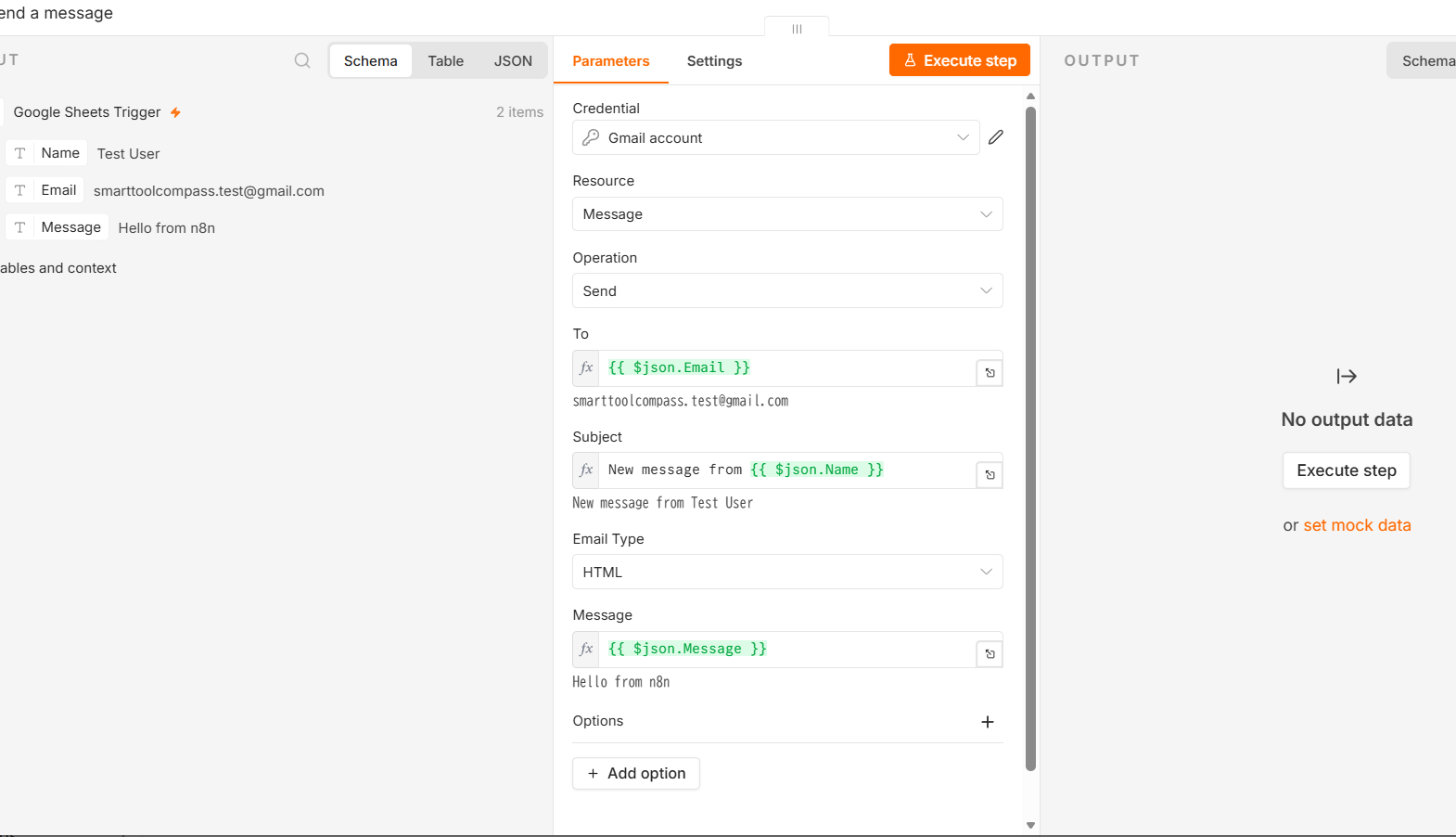
n8n: the recipient field takes {{ $json.Email }}. You do not type it — the previous node’s output sits in a panel beside the field and dragging a value in writes the reference for you. $json is the data item coming into this node and .Email is the column name. Then the useful part: n8n prints the resolved result directly under the field. Our subject expression showed New message from Test User before anything was sent.
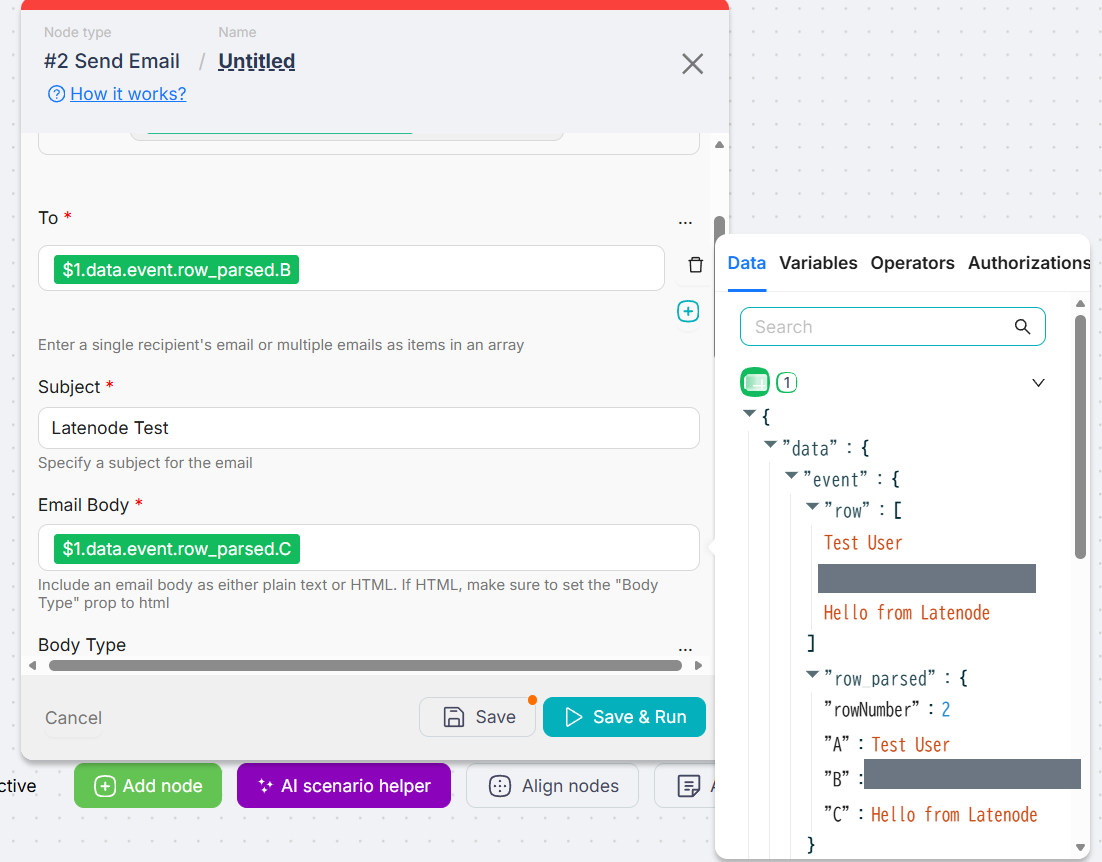
Latenode: the value comes from a Data panel on the right. You expand the earlier node’s output and click the value, and the field fills with $1.data.event.row_parsed.B. The logic is the same shape — first node, then the path down to the parsed column — but two things are missing. Nothing in the To field suggests the panel is where to look, and once the reference is in, there is no preview of what it will become.
That preview matters more than it sounds, and our own Latenode test is the argument for it. A deployed Latenode run failed because its recipient reference resolved to nothing — the kind of gap a resolved-value preview is built to surface — though it would not have caught this one, which may have involved data arriving before the row was complete rather than a reference written wrong.
One structural note on Latenode’s reference: it points at a column letter. Because the reference targets a letter, inserting a column could redirect the mapping. n8n’s {{ $json.Email }} points at the column name, which does not carry that dependency. This follows from how each reference is written, not from a column we moved.
Triggers: n8n Polled, Latenode Pushed
n8n’s Google Sheets Trigger came with a poll interval already set — it checks the sheet on a schedule. We used Latenode’s instant version of New Row Added, which its documentation describes as the external service pushing the event “the moment it happens.”
Latenode’s published 10-minute figure is a floor for polling triggers only; its pricing page says plainly that “webhooks still fire instantly.” So on the configurations we actually built, n8n waits for the next poll and Latenode does not.
That is the documented mechanism rather than a stopwatch reading, and n8n’s poll interval is adjustable rather than fixed.
Did Both Work? What Each Run Actually Showed
Both delivered a real email carrying the spreadsheet’s own values. Each run also showed us something the other did not.
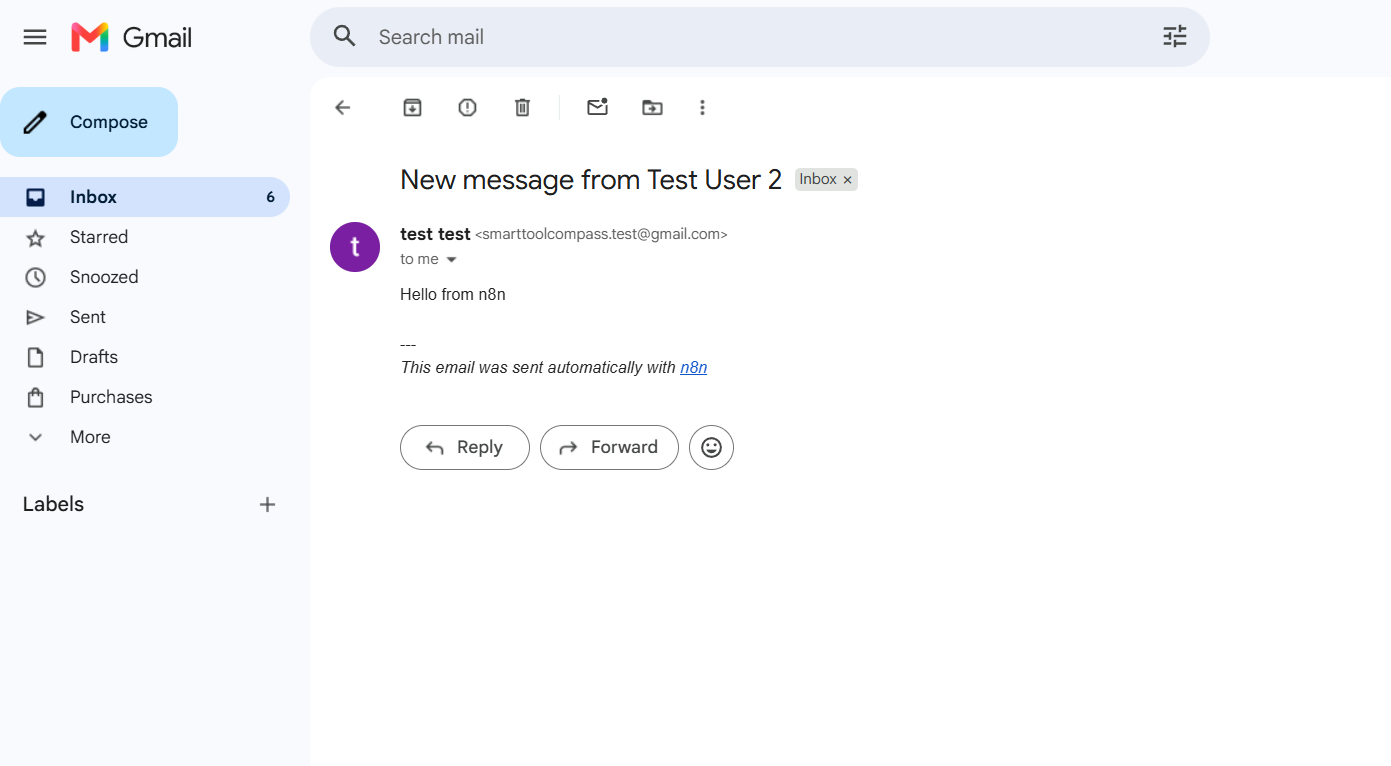
n8n ran end to end and both nodes reported success. Two things from that run are worth carrying into your own build. The execution processed two items — an earlier test row alongside the new one — which is a good reason to check what a trigger is holding before you point a send action at real recipients. And the delivered email carried the line This email was sent automatically with n8n under our message. It is documented and it is one toggle to turn off, but it is the default.
Latenode ran manually, then we deployed it, set it Active and added a row without pressing anything. It ran on its own — and the first production run failed. Gmail returned Recipient address required, because the recipient reference had resolved to nothing.
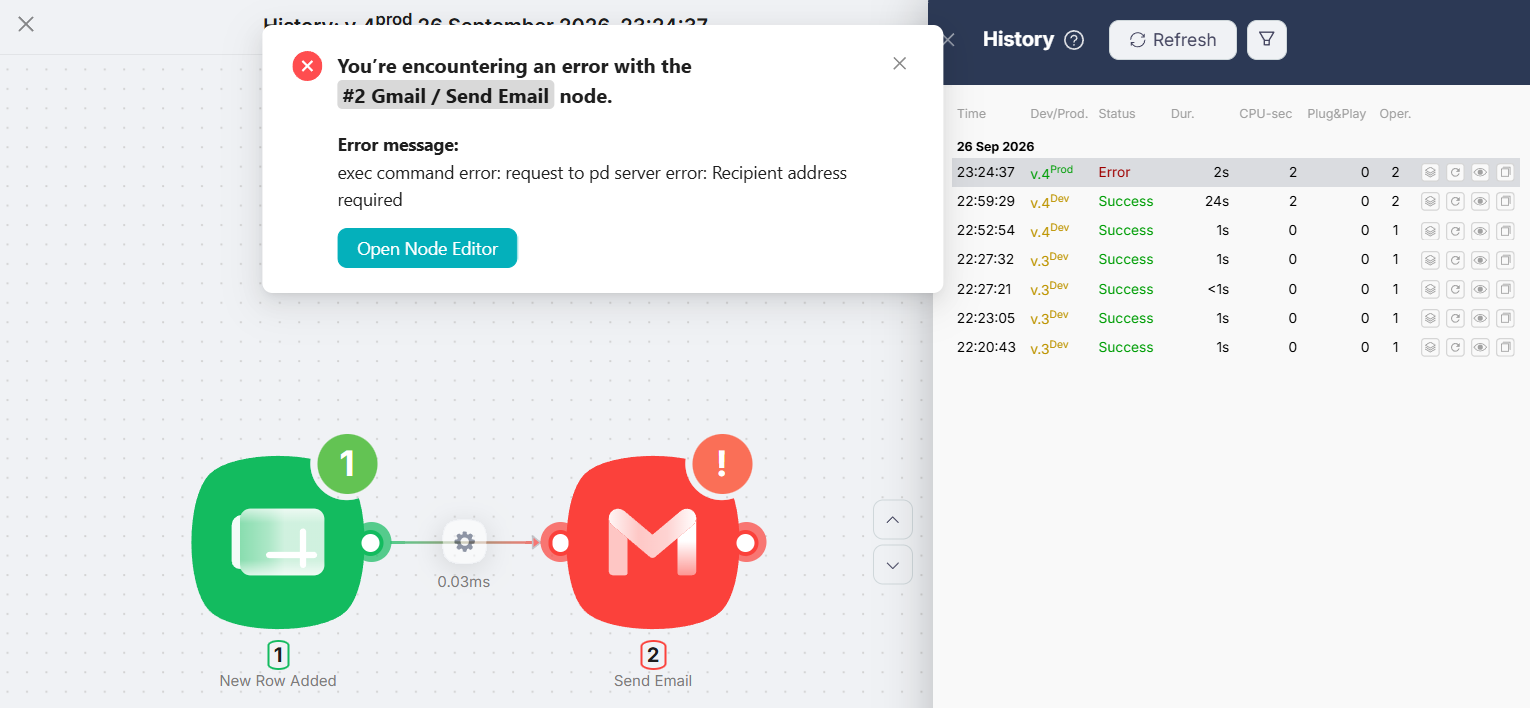
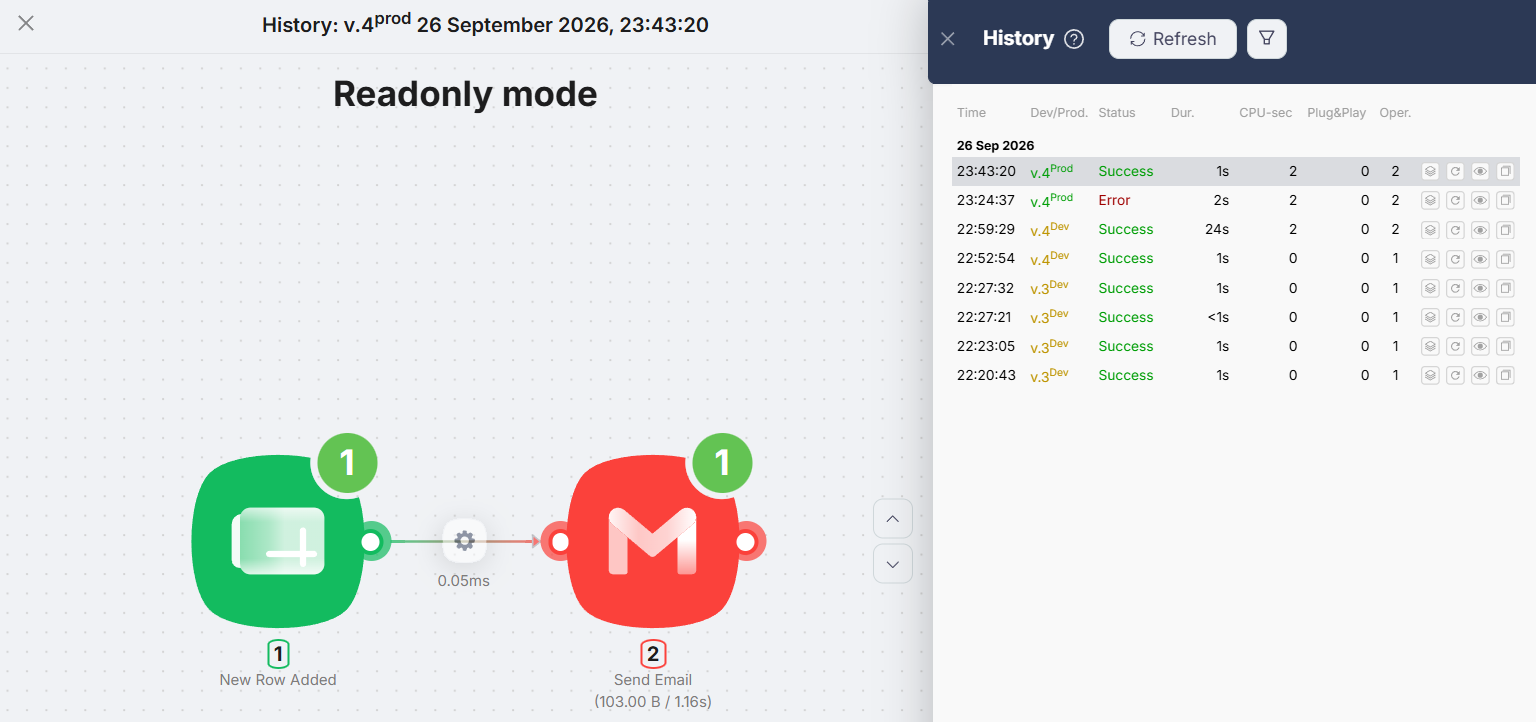
We had typed the row one cell at a time, and the reading that fits is that the instant trigger fired before the email column was filled. What happened next: pasting the whole row at once produced a successful production run at Duration 1s, CPU-sec 2, Operations 2.
What this does not settle: which tool handles errors better. We saw one error in Latenode and none in n8n, so there is no basis here for comparing error handling.
What a Run Costs: Runtime vs Whole-Workflow Runs
Here is the part where these two are more alike than they look, and then suddenly not.
Neither charges you per step. n8n counts one execution per run of the whole workflow, and its documentation is explicit that “it doesn’t matter how many steps are in the workflow or how much data it processes.” Latenode counts the runtime, so the number of nodes does not directly set the charge, total compute time does. Neither directly bills by step count.
Where they part company is what the meter follows. n8n counts the run; Latenode counts the compute time inside it. A workflow that fires very often burns n8n’s execution count regardless of how brief each run is. That follows from the two published billing models.
The two figures come from different places. Latenode’s successful production run was listed at 2 CPU seconds in its run history. For n8n, the rule depends on how the run starts: its documentation counts only production executions towards a plan’s quota, and a polling trigger counts one only when it finds new data. Our n8n run was manual, which its docs exclude from the quota.
Latenode vs n8n Pricing
Pricing below was checked on September 27, 2026 for Latenode and October 4, 2026 for n8n.
| Item | Latenode | n8n Cloud |
|---|---|---|
| Free hosted plan | 10,000 CPU seconds/mo, 5 active workflows, 10 connected authorisations, 3-day run history | None. 14-day trial with 1,000 executions |
| Free route without paying | The free plan | Self-hosted Community Edition, on your own server |
| Entry paid | No subscription tiers. Pay as you go, no base fee | Starter — 20€/mo billed annually (24€/mo billed monthly), 2.5K executions |
| Usage rate | $0.00012 per CPU second above the free 10,000, falling by tier to $0.00005 | Included in the tier |
| What you are billed for | Runtime | Runs of the whole workflow |
The shapes are different in a way the numbers hide. n8n sells you a tier with an execution count. Latenode sells you nothing until you exceed a free allowance, and then sells runtime. A euro figure and a per-CPU-second figure are not comparable, and neither is 2,500 executions against 10,000 CPU seconds.
Which Is Cheaper?
For a freelancer who has not decided to pay yet, this is not close: Latenode is free and hosted, n8n Cloud is not. That is the answer for the first month.
Our successful Latenode run used 2 CPU seconds from its 10,000-CPU-second monthly free allowance. n8n Starter includes 2,500 workflow executions at 20€/mo billed annually, or 24€/mo billed monthly. These are different billing units, so the allowances should not be compared as equivalent run counts.
If you are willing to self-host, the comparison changes shape: the Community Edition has no licence fee, and what it costs you is server time and maintenance.
What This Comparison Covers
- One two-step workflow. A new spreadsheet row sends one email — no branching, routers, filters or error handling.
- The free and trial tiers. Latenode’s free plan, and a 14-day trial of n8n Cloud. Paid plans are quoted from the vendors’ pricing pages.
- n8n Cloud, the hosted product. The self-hosted Community Edition is a separate route, priced in server time rather than licence fees.
- Latenode deployed and left running. The n8n runs were ones we started by hand, so the unattended result here is Latenode’s; we have no n8n reading to put beside it.
- Cost as each tool counts it. Latenode’s 2 CPU seconds come from its run history; for n8n we quote its published quota rules, under which our manual run counts as none.
- The builders themselves, by hand. Both products’ AI assistants were declined on purpose, as were the AI agents, code nodes, headless browser and database.
Latenode Is Better If…
You want a hosted tool you do not pay for. This is the whole argument. Latenode’s free plan ran a deployed automation for us; n8n Cloud’s free option is a fortnight.
Your automations fire often and finish fast. Frequency is what burns an execution count. On runtime billing a short run is cheap but not free: ours was billed 2 CPU seconds against a duration of 1 second, and Latenode documents a 1-CPU-second minimum per run.
You want it to react the moment something happens. The instant trigger we used pushed on the event rather than waiting for a poll.
n8n Is Better If…
You want the editor to show its work. The resolved-value preview under each field is the single best piece of feedback we saw in either tool, and it tells you what a reference produces before you send, which is the feedback we missed in Latenode — it does not protect you from a row that is still half-typed when the trigger fires.
You will run your own server. The Community Edition has no licence fee. That is a genuinely free route, but it is not the same bargain as Latenode’s free plan: here you pay in maintenance rather than in money.
Your workflows have many steps. By n8n’s published rule a production run is one execution, however many steps it contains. Latenode bills the compute time a run uses, so a workflow’s shape and its bill are tied together there in a way they are not on n8n.
You prefer name-based references. {{ $json.Email }} points at the column name; Latenode’s points at the letter.
Latenode vs n8n for Freelancers
If you are not ready to pay for automation and not ready to run a server, take Latenode. It is the only one of the two with a hosted plan you can stay on, and it handled a deployed automation on it.
If you already run infrastructure, or you are going to pay anyway and your workflows are long, n8n is the better tool to live in. Its editor explains more of itself than Latenode’s does, and its billing is based on workflow executions rather than runtime.
Either way, remember what neither of them is: a click-and-go builder. Both asked us to put a reference in a box and know what it meant.
Final Verdict
Both built and delivered the same automation. On the evidence we have: Latenode wins on cost of entry, because it has a free hosted plan and n8n Cloud does not, and n8n wins on feedback while you build, because it shows you what your reference resolves to before you send.
On n8n Cloud the trial is the whole of the free route, so the question is not whether you outgrow a free plan but what you do when the fortnight ends: pay, or host it yourself.
FAQ
Does n8n have a free plan?
Not on n8n Cloud. There is a 14-day trial — ours showed a 1,000-execution allowance, which matches what n8n publishes — and a free self-hosted Community Edition you run yourself. The paid entry point is Starter at 20€/mo billed annually, or 24€/mo billed monthly.
Which is easier to learn?
Neither is a click-and-go tool, and both put a reference in the field rather than a picked value. n8n gave us more help with it: the panel writes the expression for you and the editor previews what it resolves to. Latenode writes the reference for you too, but shows no preview and does not point you at the panel.
How does n8n count executions?
One execution is one run of the whole workflow, and n8n’s pricing page states that “it doesn’t matter how many steps are in the workflow or how much data it processes.” What counts towards the quota is narrower: production runs only, with a polling trigger counting one when it finds new data and manual runs not counting at all. So what drives the number is how often a workflow fires in production, not how complex it is.
How does Latenode count CPU seconds?
By how long the scenario runs, start to finish. Its documentation adds that running a single node while configuring is free, and that the minimum billable execution is 1 CPU second per run on the free plan. Our successful production run was listed at 2.
Does either add its own branding to the email?
n8n did, by default: our delivered test email carried This email was sent automatically with n8n below the message. It is documented and can be switched off. We saw no added branding on the email Latenode sent.
Can both run without me watching?
Latenode did: we deployed it, set it Active, and it ran in production with nothing pressed. Our n8n runs were ones we started by hand, so the unattended result in this comparison is Latenode’s.
Sources & Verification
Hands-on tests: the same Google Sheets to Gmail automation, built by hand on one Google account and one spreadsheet. n8n on the n8n Cloud free trial, August 23, 2026; the account banner read 14 days left and 0/1000 Executions; the run processed two items and the delivered email carried n8n’s default attribution line. Latenode on its free plan, September 26, 2026, taken through deploy: one failed production run, then a successful one at Duration 1s, CPU-sec 2, Operations 2. Latenode’s per-run figure is a counter reading; n8n’s is its published rule applied to our workflow.
Official sources (Latenode checked September 27, 2026; n8n checked October 4, 2026):
- n8n pricing — no free cloud plan, a 14-day trial with 1,000 executions, Starter at “20€/mo, billed annually” and “24€/mo, billed monthly” with 2.5K executions, the self-hosted Community Edition, and “An execution is a single run of your entire workflow. It doesn’t matter how many steps are in the workflow or how much data it processes”
- n8n docs: executions — “Only production executions count towards this quota”; manual runs and polls that return no results do not count, and a Schedule Trigger counts one execution every time it fires
- Latenode pricing — “10,000 CPU seconds every month”, “5 active workflows”, 10 connected authorisations, 3-day run history, the pay-as-you-go rates, and “The minimum polling frequency for scheduled and app-polling triggers. Webhooks still fire instantly”
- Latenode docs: CPU seconds — consumed “during a scenario execution (from start to finish of the run)”, “running a single node does not consume CPU seconds”, “minimum billable execution time is 1 CPU second per run”
- Latenode docs: how it works — instant triggers, where “the external service pushes the event to your scenario’s webhook the moment it happens”
What each figure rests on: Latenode’s per-run cost and its unattended production run are readings from its own interface. n8n’s execution figures are its published rules applied to our two-node workflow; our own n8n run was manual, which its documentation excludes from the quota. Pricing on both sides comes from the vendors’ pricing pages on the dates above. The two builds were five weeks apart, so interface details may have moved.


Comments