By the SmartToolCompass editorial team · Updated August 23, 2026 · Hands-on tested August 23, 2026
Disclosure:This article is independently researched and hands-on tested. Some links on this page may become affiliate links in the future.
Quick Verdict
n8n suits freelancers who want to see exactly what an automation is doing at every step, and who don’t mind that the interface talks to them like a developer. It bills per workflow execution rather than per step, which can make multi-step workflows more predictable under an execution-based pricing model. The trade-off shows up immediately in the vocabulary: credentials, polling, expressions, JSON.
We built the workflow manually. We created a new Cloud account, told the signup form we had no technical background, skipped the AI assistant, and assembled a Google Sheets to Gmail workflow node by node. It ran end to end and the email arrived. In that first build, n8n gave us more detail about each step than we expected — and asked us to read more unfamiliar terms than we expected. Both of those are the same design decision.
n8n at a Glance
| Best for | Freelancers who want visibility into each automation step and expect to grow into APIs or self-hosting |
| Free trial | Yes — Starter and Pro trials, no credit card required; our account showed a 14-day counter |
| Starting price | €20/month for 2,500 executions (Starter, annual billing) |
| Cloud / self-hosted | Both — managed Cloud plans, plus a free self-hosted Community Edition |
| No-code / low-code | Low-code — visual builder with expression-based mapping and optional JS/Python steps |
| Main strength | Per-node input/output inspection, and execution-based billing that doesn’t charge more simply because a workflow has more steps |
| Main drawback | Technical terminology and expression syntax appear in the very first workflow |
| Testing status | Hands-on tested — n8n Cloud trial, first-workflow scope |
What Is n8n?
n8n is a workflow automation platform built around a node-based editor. You add nodes to a canvas, connect them, and data flows from one to the next. A trigger node starts the workflow; action nodes do the work.
It comes in two forms. n8n Cloud is the managed version — n8n runs the infrastructure, and cloud data is stored on servers in Frankfurt, Germany. The Community Edition is the self-hosted version, published on GitHub under n8n’s fair-code license, which you run on your own server.
Every plan includes every integration and unlimited workflows; what you pay for is execution volume. n8n also ships code steps in JavaScript and Python, an HTTP Request node for any API without a native integration, webhook triggers, and a set of AI features including an AI Assistant currently in early preview.
What We Tested
We created a new n8n Cloud account and started a Starter free trial. No credit card was requested. The banner across the top of our account read 14 days left and 0/1000 Executions. Worth flagging, because n8n’s own sources don’t agree here: the current pricing page lists Starter and Pro trials at 2,500 executions, while the Help Center separately describes trial customers as having 1,000. We’re reporting the number our account actually displayed. During signup we selected “Executive / Owner” as our role, and when the form asked about technical experience we chose “None of the above” — we wanted the account n8n would set up for someone who isn’t a developer.
n8n offered its AI assistant. We declined it and built the workflow by hand:
New row added in Google Sheets
        ↓
Google Sheets Trigger ("On row added")
        ↓
Gmail node ("Send a message")
        ↓
{{ $json.Email }}   → recipient
{{ $json.Name }}    → subject line
{{ $json.Message }} → email body
We used the same Google account and the same spreadsheet we used when we tested Make, so the two builds are directly comparable.
This was intentionally a first-workflow test. It tells us how n8n handles onboarding, credentials, trigger configuration, field mapping, per-node testing, execution, and basic result checking. It does not tell us about self-hosting, AI agents, the Code node, webhooks, HTTP requests, branching logic, error handling, high-volume processing, or long-term reliability. We didn’t touch any of those, and we’ll say so again wherever it matters.
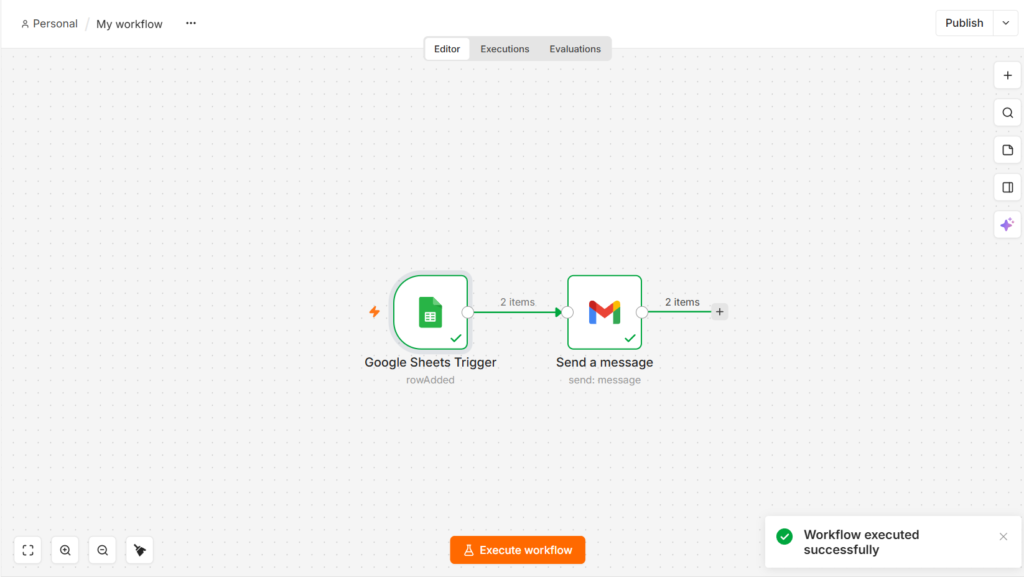
Our n8n test workflow connected Google Sheets to Gmail and successfully processed two items during the final workflow run.
Setup and Ease of Use
Signup asks who you are before it shows you anything: role, company size, technical experience. Then the editor opens with an option to describe what you want and let the AI assistant build it. We ignored that and clicked into the canvas.
Adding the Google Sheets Trigger was the first real step. n8n asks you to create a credential before the node will do anything — a saved, reusable Google connection. The Google OAuth flow itself was ordinary. The word “credential” is not: most people setting up their first automation would call this “connecting my Google account,” and the label is the first small tax n8n charges for being built by engineers.
From there we picked the document and the sheet, set Trigger On to On row added, and noticed Poll Times was already set to Every Minute. That’s n8n telling you how the trigger works — it checks the sheet on a schedule rather than being notified — but you have to know what polling means to read it that way.
Then came the part we liked. Fetch Test Event pulled a real row out of our spreadsheet and displayed it, so we were configuring the Gmail node against actual data instead of guessing at field names. Each node shows INPUT on the left and OUTPUT on the right, and Execute step runs that one node on its own. We ran the Gmail node by itself and confirmed it worked before running anything end to end.
That’s a meaningful pattern for freelance work. When a client automation misbehaves, the question is always which step broke and what did it receive. n8n answers that by default, in the same panel where you build.
We’ve built this exact Google Sheets to Gmail workflow in Make as well. In that first build, Make’s mapping was click-based and its terminology stayed out of the way; n8n’s was expression-based and put credentials, polling, and JSON in front of us early. Neither observation settles which tool is better — they’re different bets about who’s using the product. We’ll break that comparison down properly in a dedicated Make vs n8n review.
Building a Simple Automation in n8n
The spreadsheet was deliberately plain — three columns: Name, Email, Message. Close to a real freelancer intake sheet.
The Google Sheets Trigger watches for a new row. The Gmail node sends the message. Two nodes, one connection, no branching.
Mapping data in n8n
This is where n8n differs most from click-only tools. To send the email to the address in the spreadsheet, the recipient field gets:
{{ $json.Email }}
It looks like code. It isn’t, in the sense that matters: you don’t write it from memory. n8n shows the previous node’s output in a panel beside the field, and dragging a value in generates the reference for you. $json means “the data item coming into this node,” and .Email is the column name from the sheet.
Our subject line combined static text with a value the same way:
New message from {{ $json.Name }}
Once we’d done it three times, the pattern was obvious. It also helped that n8n previews the result directly beneath each field — under our subject expression it showed New message from Test User, so we could confirm the mapping was correct before sending anything. But we’ll be straight about the first impression: expression-style mapping reads as more technical than picking a field from a list, and someone building their first automation has to absorb that syntax before anything sends. The upside arrives later — the same syntax is what lets you combine, reformat, or conditionally set values without leaving the field.
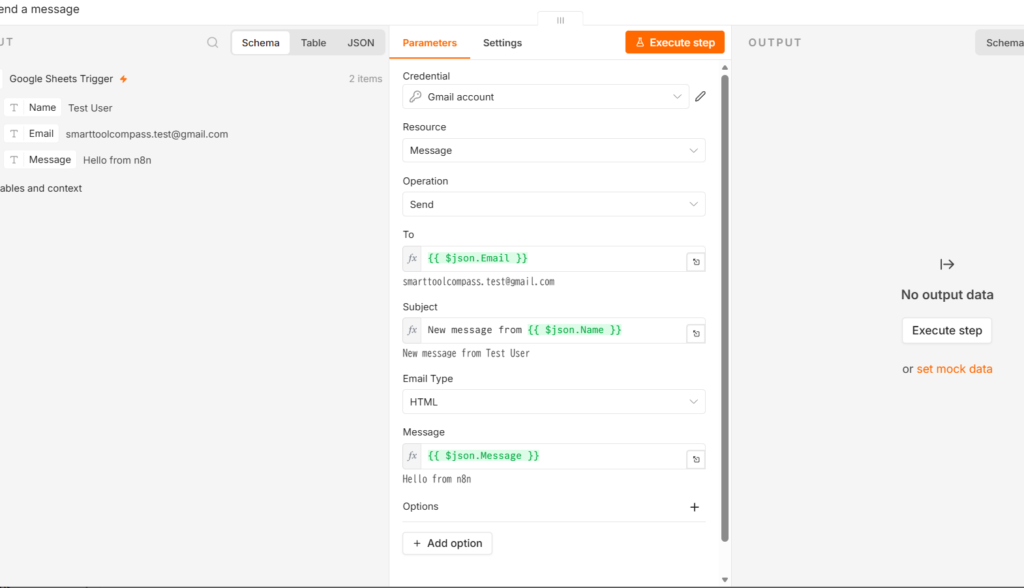
n8n showed the incoming spreadsheet values on the left while we mapped them into Gmail, with each expression’s resolved result displayed under the field.
Did It Work?
Yes.
For the end-to-end run we added a fresh row to the spreadsheet — name Test User 2, message Hello from n8n — and executed the workflow.
The Google Sheets Trigger returned data and the Gmail node reported success. The email arrived in our test inbox with the subject New message from Test User 2 and the body Hello from n8n, exactly as mapped.
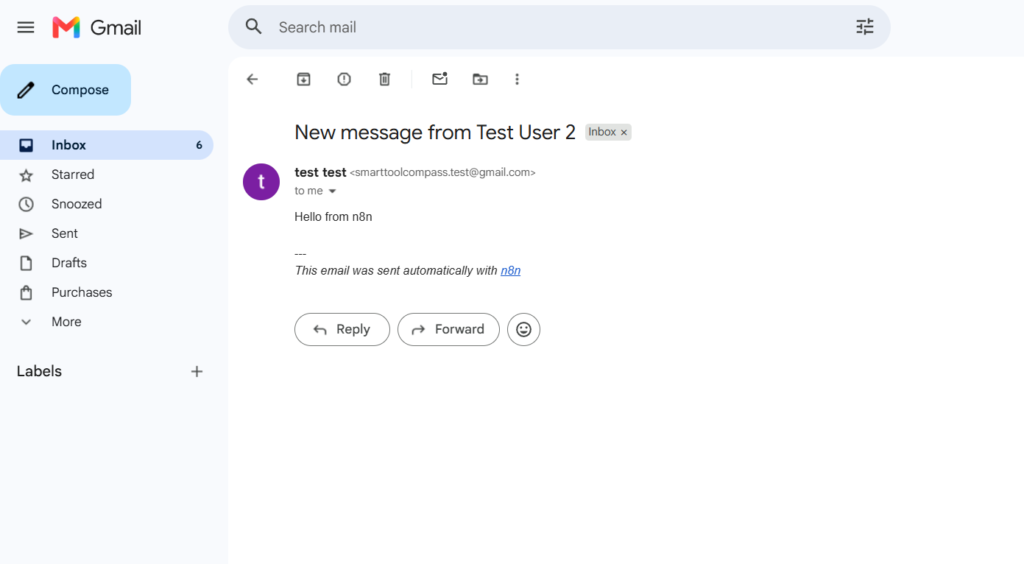
The end-to-end workflow completed successfully, and Gmail received the message generated from the new spreadsheet row.
Two observations from that run are worth recording precisely.
The run processed two items. Both nodes show 2 items — our earlier test row alongside the newly added one. That’s what happened in our test environment. We didn’t investigate the trigger-state behavior behind it, so we’re recording it as an observation rather than explaining it. The practical takeaway for anyone testing: check what the trigger is actually holding before you point a send action at real recipients.
The email carried an n8n line. Below our message body, the delivered email included This email was sent automatically with n8n. That matches n8n’s documentation: the Gmail node appends that statement by default, and there’s an Append n8n attribution option in the node’s Options section to turn it off. Worth knowing before you automate anything client-facing — we saw it on the Cloud trial with the Gmail node, and we’d check the setting on any node that sends messages.
What this test establishes: in our non-technical test setup, we were able to create a Cloud account, connect a credential, configure a polling trigger, map fields with expressions, test individual nodes, run a complete workflow, and receive a real email. What it doesn’t establish: anything about self-hosting, AI agents, code steps, webhooks, complex branching, error recovery, volume, or reliability over time.
Key Features That Matter for Freelancers
Per-node testing and inspection. Execute step, INPUT/OUTPUT panels, and per-node results. The thing we used most, and the thing that would make a broken client workflow debuggable.
Every integration on every plan. n8n doesn’t gate connectors behind tiers — the paid plans differ on execution volume and team features, not on which apps you can reach.
HTTP Request node. Gives you another option when a tool has an API but no native node. We didn’t test it.
Code steps in JavaScript and Python. Available from Starter upward, per n8n’s plan comparison. They provide a path to extend workflows beyond visual configuration. Untested here.
Webhooks and queue triggers. Listed as available across plans. A webhook fires when an event happens instead of polling on a schedule. Untested here.
AI features. n8n’s AI Assistant is in early preview and included on all Cloud plans, with a monthly AI credit allowance — 2,300 on Starter and up to 13,700 on Pro. Free trials include 800 credits that expire with the trial. On self-hosted, the assistant is listed as coming soon with your own API key. We deliberately didn’t use it, so we can’t judge its output quality.
Templates. n8n publishes a large template library. We built from scratch and can’t comment on it.
n8n Pricing
Pricing checked on August 23, 2026, on n8n’s official pricing page. n8n lists prices in euros. Figures below are annual billing; n8n states annual saves 17% versus monthly.
| Plan | Price | Executions/mo | Notable limits and additions |
|---|---|---|---|
| Starter | €20/mo | 2,500 | 1 shared project · 5 concurrent executions · 7-day execution log retention · 2,300 AI credits · forum support |
| Pro | €50/mo | 10,000 | 3 shared projects · 20 concurrent · 30-day max execution log retention (per n8n’s pricing page) · workflow history · execution search · admin roles · global variables |
| Business | €667/mo | 40,000 | Self-hosted · SSO/SAML/LDAP · Git version control · separate environments |
| Enterprise | Custom | Custom | 200+ concurrent · extended retention · dedicated support with SLA |
| Community Edition | Free | Self-managed | Self-hosted from GitHub under n8n’s fair-code license |
The execution model is the headline. Per n8n’s own definition, one execution is a single run of your entire workflow — the step count and the amount of data processed don’t change the number. Our final run pushed two items through two nodes; under that published rule, that’s one execution. (That’s arithmetic from n8n’s stated policy, not something we measured in the billing dashboard.)
For a freelancer with multi-step workflows, that’s the whole argument. A twelve-step client onboarding sequence costs the same per run as a two-step notification.
Where the math turns against you. Executions are counted by runs, so frequency is what burns the allowance, not complexity. n8n’s own guidance on estimating usage says a workflow on a five-minute schedule works out to roughly 8,600–8,900 executions a month — well past Starter’s 2,500. Anything triggered often needs the Pro tier or a rethink of the trigger.
Our test trigger polled every minute. We did not verify how a poll that finds no new rows is counted, and we’re not going to guess — it’s the first thing we’ll measure next.
No free Cloud tier. There’s a free trial (Starter and Pro trials need no credit card; the Business trial does), and there’s the free self-hosted Community Edition. There is no permanently free hosted plan. On the trial allowance, n8n’s sources conflict: the pricing page lists 2,500 executions for Starter and Pro trials, the Help Center refers to trial customers as having 1,000, and our own account displayed a 14-day counter with 1,000. Either way, plan to build your actual workflow during the trial rather than a throwaway one.
n8n Cloud vs Self-Hosted
This is the fork in the road for most freelancers considering n8n, so here it is plainly.
n8n Cloud is the managed product. n8n handles servers, updates, and uptime; data sits in Frankfurt. You pay monthly and your execution allowance is capped by plan.
Community Edition is a free, self-hosted version of n8n. You provide and manage the infrastructure yourself — no license fee, but self-hosting shifts more responsibility to you, including infrastructure, updates, backups, and security. Business features like SSO, Git version control, and separate environments are not part of it; those sit on the paid Business plan.
For most solo freelancers, the question isn’t the license fee — it’s whether you want to take on that maintenance. If running your own server is already part of how you work, self-hosting may be economically attractive. If it isn’t, Cloud is the product you’re actually evaluating.
We tested Cloud only. Everything we say about self-hosting comes from n8n’s documentation and pricing page, not from experience.
What We Liked
You can test one node at a time. Execute step let us run the Gmail node alone and confirm it worked before touching the full workflow. On a client automation, that’s the difference between finding a problem and finding it fast.
Fetch Test Event removes the guesswork. Pulling a real row from the sheet before configuring Gmail meant we mapped against actual values and actual column names, not a schema we assumed.
Input and output are visible per node. Every node shows what came in and what went out. This is the feature we’d point to if someone asked why anyone tolerates the terminology.
The canvas stays readable. Two nodes and one connection made the data path obvious at a glance, and it’s clear how that scales to a longer chain.
Execution-based billing is genuinely different. Paying per workflow run rather than per step means adding a fifth or fifteenth node doesn’t change your bill. For freelancers whose automations grow over time, that’s a structural advantage, not a marketing line.
Where n8n Falls Short
Technical vocabulary arrives on the first screen. Credentials, triggers, poll times, expressions, JSON — all of it appeared before we’d sent a single email. Every one of those words is the correct term for what it describes. That’s exactly the problem: n8n names things accurately for people who already know the names.
Expression mapping has a learning moment. {{ $json.Email }} worked without trouble and the UI helps you build it. But it looks like code to someone who has never automated anything, and there’s a beat where you have to trust that you understand what you just inserted.
The Gmail node attributes itself by default. Our delivered test email included This email was sent automatically with n8n. It’s documented and it’s one toggle to disable, but the default means an unwary freelancer’s first client-facing automation announces the tooling. We observed this on the Cloud trial with the Gmail node and haven’t checked every node or configuration.
Trigger state can surprise you during testing. Our final run processed two items rather than one — our earlier test row alongside the new one. We didn’t verify what drove that, so we’re not calling it a defect. But if you’re testing against live recipients, you want to know what the trigger is holding before you hit execute.
Third-party feedback is consistent on one point. On G2, n8n averages 4.8 across roughly 225 reviews, with about 80% from small businesses — strong numbers. Yet the most-tagged criticism in those same reviews is the learning curve, and it’s the dominant theme on Capterra too. Some users report that debugging is hard once workflows get complex, that error messages can be vague, and that documentation has gaps. We hit none of that in a two-node build, which is what you’d expect — these are reported at a scale we haven’t tested.
Who n8n Is Best For
- Freelancers who want to see inside their automations — per-node input/output is the reason to choose this tool
- Solopreneurs comfortable with slightly technical terminology, or willing to spend the first session learning five new words
- Anyone with multi-step workflows — execution-based billing can be attractive for exactly this kind of automation
- Freelancers who expect to hit an API eventually — the HTTP Request node and code steps provide options to extend workflows beyond visual configuration
- People considering self-hosting later, even if they start on Cloud
Who Should Skip n8n
- You want the least technical-looking interface available. n8n is not trying to hide the machinery, and you’ll meet the vocabulary early in your first workflow.
- You strongly prefer click-only configuration. Expression mapping is central here, not an advanced option.
- You need one basic connection between two apps. The flexibility is overhead you won’t use.
- You want a permanently free hosted plan. That doesn’t exist — it’s a trial, a subscription, or your own server.
- You need guaranteed support response times on a critical workflow. Starter comes with forum support; dedicated support with an SLA sits on Enterprise.
n8n Alternatives
Make — hands-on tested. We built the same Google Sheets to Gmail workflow in Make. In that first build the mapping was click-based rather than expression-based, and the terminology stayed lighter. Make bills per module action rather than per workflow run, which flips the cost math for multi-step automations. Full side-by-side comparison coming in a dedicated Make vs n8n review.
Zapier — research only. The largest app catalog of the three and generally rated well on setup speed in third-party reviews. It bills per task, so cost scales with the number of steps in your workflows. We haven’t tested it — this is published information, not our experience.
Pabbly Connect — research only. Usually shortlisted for its pricing model rather than its depth. We haven’t tested it, so treat this as a pointer for your own comparison.
Is n8n Worth It for Freelancers?
Yes — for a specific type of freelancer.
It’s worth it if you regularly build multi-step workflows, if you’d rather understand a tool than be shielded from it, and if you can absorb a handful of technical terms in your first session. Under those conditions, execution-based pricing and per-node visibility are real advantages that compound as your workflows grow.
It’s not worth it if you want the shortest possible path from signup to working automation, if expression syntax is a wall rather than a speed bump, or if you only need one simple connection.
Our non-technical test setup got a real automation running on the Cloud trial. It also exposed us to unfamiliar terminology along the way. Both things were true in the same build.
Final Verdict
Choose n8n if you want visibility into every step of your automations, you’re running multi-step workflows where per-step billing gets expensive, and you’re comfortable with an interface that uses developer vocabulary without apology.
Consider an alternative if you want click-only setup with minimal new terminology, you need a permanently free hosted plan, or your automation needs stop at connecting two apps once.
The trial is the right way to settle it. No credit card on Starter or Pro, and enough runway to build something real — which is exactly what we did.


Comments