Updated: October 4, 2026
Originally tested: Zapier September 5, 2026 · Latenode September 26, 2026
Pricing checked on: October 4, 2026
Testing status: Hands-on tested (Zapier on a Pro trial, Latenode on its free plan — not the same tier)
Disclosure: The Latenode sign-up button on this page is an affiliate link: if you sign up through it and later pay Latenode, SmartToolCompass may earn a commission at no extra cost to you. Every other link here — including the ones to Latenode’s own pricing and documentation, and every Zapier link — is a plain link that pays us nothing. We paid nothing for either account used below, and it did not change any figure on this page.
Zapier vs Latenode: Quick Answer
We built the same two-step automation in both — a new row in Google Sheets sends an email through Gmail — on the same Google account and the same spreadsheet. Both delivered. Both ran with nobody watching. The difference that outlasts the build is what each one counts.
Zapier counts actions. Latenode counts time. One run of our workflow cost Zapier exactly one task — we watched its counter move from 1 to 2. The equivalent Latenode run was metered at 2 CPU seconds in its run history, against a duration of one second. Latenode bills runtime rather than steps, and its documentation explains the gap: the run history’s Duration column is wall-clock time while the CPU seconds column is the compute time billed, and “these numbers are often not the same”. Two is what the meter recorded; one second is how long it looked. Either way, the two figures are not in the same unit — and because they are not, the two free plans suit very different shapes of work.
Both have free plans, but they limit usage in completely different ways. Zapier limits tasks; Latenode limits compute time. Zapier’s free tier documents 100 tasks a month and caps a Zap at two steps — which is exactly the shape we built, and the ceiling of it. Latenode’s free tier documents 10,000 CPU seconds a month and caps you at five active workflows instead. Zapier is the one that teaches you faster.
Zapier vs Latenode at a Glance
| Item | Our take | Status |
|---|---|---|
| Plan we tested on | Zapier on a Pro trial; Latenode on its free plan. Not the same tier, and three weeks apart | Hands-on tested |
| Free plan | Zapier: 100 tasks a month for the whole account, two-step Zaps only, 15-minute update interval. Latenode: “$0/month forever”, 10,000 CPU seconds a month, 5 active workflows | Researched |
| What one run of this workflow used | Zapier: 1 task — we watched the counter move from 1 to 2. Latenode: 2 CPU seconds — the figure its run history listed for the successful production run | Hands-on tested |
| Billing unit | Zapier counts tasks — one for the Gmail action in our Zap, though its page notes that rates vary by the kind of step. Latenode counts CPU seconds of runtime, and says the bill follows compute time rather than the number of nodes | Researched |
| Field mapping | Zapier: pick the field from the previous step and drop it into the input, mixed with static text. Latenode: open the Data panel, click the value, and $1.data.event.row_parsed.B lands in the field |
Hands-on tested |
| Confirmed running unattended | Both. Zapier’s published Zap fired on a new row; Latenode’s deployed workflow ran in production with nothing pressed | Hands-on tested |
| Did anything fail? | Latenode’s first production run errored with Recipient address required; the next one succeeded. Zapier did not fail — but it was never given a row entered the same way. We engineered no failures in either | Hands-on tested |
| Trigger in our builds | Zapier polled. Latenode used the instant trigger, which its docs describe as the service pushing the event. We did not test a Latenode polling trigger | Hands-on tested / Researched |
| What waiting costs | Zapier: nothing — its Help Center states that triggers and polls never use tasks. Latenode: not measured. Its docs say that “unlike some other platforms, polling does not cost extra”, which rules out a surcharge but does not say what a check that finds nothing consumes. Our build used a pushed trigger | Researched |
| Entry paid price | Zapier Professional: “Starting from 750 tasks for $19.99/month” on yearly billing, $29.99/month billed monthly. Latenode: no subscription tier — $0.00012 per CPU second after the free 10,000, with no base fee | Researched |
| Easier first build | Zapier (editorial judgment, from these two builds) | Editorial judgment |
How We Tested Zapier and Latenode
One workflow, built by hand in both: a new row in a Google Sheet called Automation Test Workflow sends an email through Gmail, with the recipient taken from column B and the body from column C. Same Google account, same spreadsheet, two mainstream apps, no branching. We declined both products’ AI builders and selected every app, event, and field ourselves.
The conditions were not identical, and that matters more here than usual. Zapier was tested on September 5, 2026 on a 14-day Pro trial, not on its free plan. Latenode was tested on September 26, 2026 on the free plan, with no payment details attached. So nothing below is a free-plan-to-free-plan comparison of the building experience; where we quote free-plan limits, they come from the vendors’ pricing pages rather than from an account we ran on. The longer write-ups are in our Zapier review and our Latenode review, and the same workflow across five tools is in our Google Sheets to Gmail guide.
What it covers: building a trigger, connecting Google by OAuth twice in each tool, mapping values between steps, publishing or deploying, and watching a real run happen without pressing anything.
Setup: Zapier Ordered the Steps, Latenode Handed Us a Canvas
Zapier presents a Zap as a vertical stack. You finish one step before the next becomes configurable, which enforces an order on the build: trigger app, trigger event, account connection, spreadsheet and worksheet from dropdowns, then a test. The test is the part worth describing, because it does real work. When we ran it, Zapier pulled an actual row out of our sheet and showed each column as a named field carrying our real values — Test User, our test address, Hello from Zapier. You are not asked to imagine the data before you build on top of it.
Latenode starts from a canvas and lets you place nodes where you like. The Google Sheets trigger has two forms, and the list marks which is which: we chose New Row Added in its instant form, which Latenode’s documentation describes as the external service pushing the event the moment it happens, rather than Latenode checking on a schedule. Connecting Google was the same OAuth round trip as in Zapier — no API keys, no service-account files — and the spreadsheet and sheet arrived as dropdowns populated from Drive. Testing the node showed what it would hand downstream, each column as its own field rather than one string to split.
Both needed the Google account authorised twice, once for Sheets and once for Gmail, even though it was one account. On Latenode that is worth counting: its free plan documents a ceiling of 10 connected authorisations, and a two-app build spends two of them.
Data Mapping: A Field You Pick vs a Reference You Go Find
This is where the two tools stop resembling each other.
In Zapier, the Gmail step exposes its fields and you insert values from the trigger directly into them. The subject line is the useful example: we wrote Thanks, as literal text and dropped the Name field in beside it, in the same input, with no formatting step in between. Static text and mapped data share one box.
In Latenode, our instinct was to type something into the To field and wait for an autocomplete. That is not how it works. Values come from a Data panel on the right: you expand the earlier node’s output, find the field, click it, and Latenode inserts a reference into whichever field has focus. After doing that twice, our two fields read $1.data.event.row_parsed.B and $1.data.event.row_parsed.C.
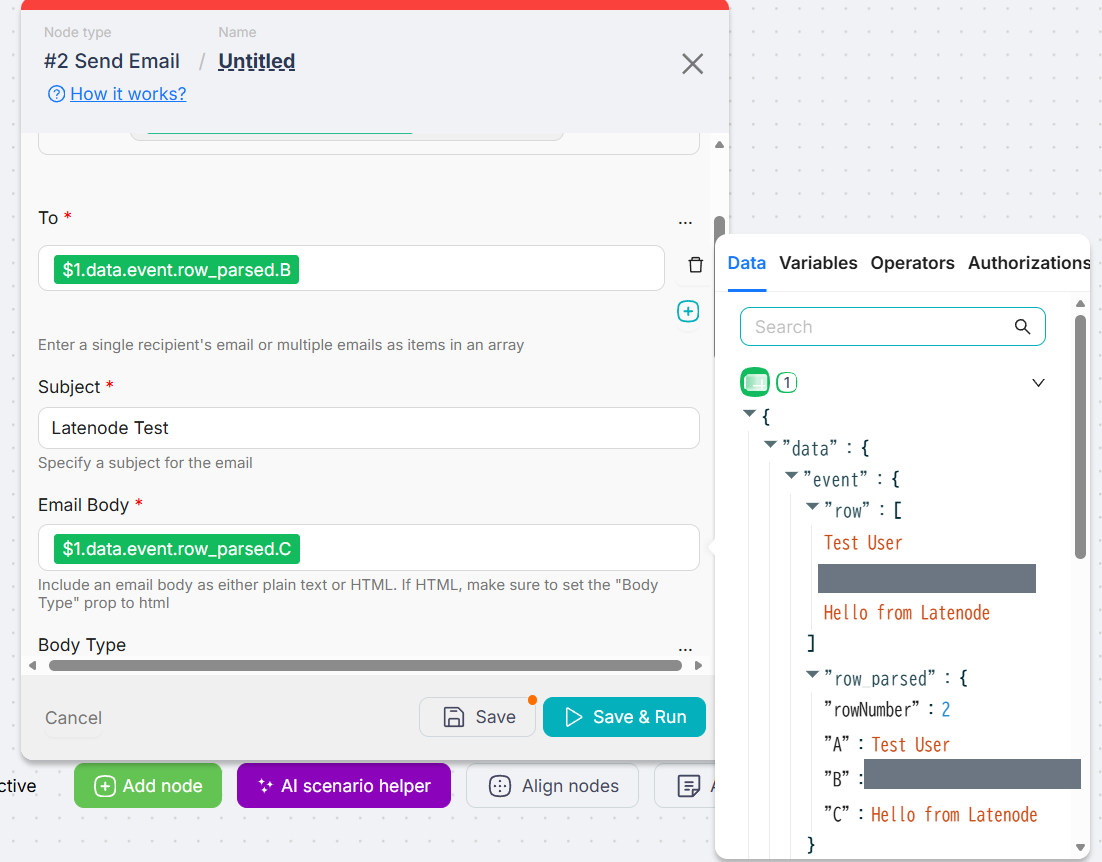
$1.data.event.row_parsed.B into the To field. The grey bars cover our test address.Read that reference and it is perfectly logical — the first node’s output, walked down to the parsed value in column B. Mapping a third field would have taken seconds. All of the cost is in the first time: nothing in the To field suggested the answer lived in a panel elsewhere on the screen. This was the one place in the whole build where we would have been stuck if we had not gone looking.
Latenode’s reference used a column letter. Zapier’s trigger handed us each column as a named field, and its mapping carried that name.
Did Both Work? Latenode Needed a Second Production Run
Zapier worked twice. The editor test on the Gmail step sent a real message rather than simulating one, which let us confirm the mapping before publishing: the subject arrived as Thanks, Test User, the body as Hello from Zapier. We then published the Zap, added a row, and Zapier’s run details reported the Google Sheets step finding one new row and the Gmail step sending one message. The email arrived. Nothing was pressed between the row and the delivery.
Latenode worked too, but not on the first production attempt. Its Run once button armed the workflow for a single execution and that run delivered correctly. We then pressed Deploy, switched the workflow to Active, and added a row with nothing else open. The trigger picked it up and the run failed: status Error, duration 2s, CPU-sec 2, with the error on the Gmail node reading Recipient address required. Gmail had been handed an empty To.
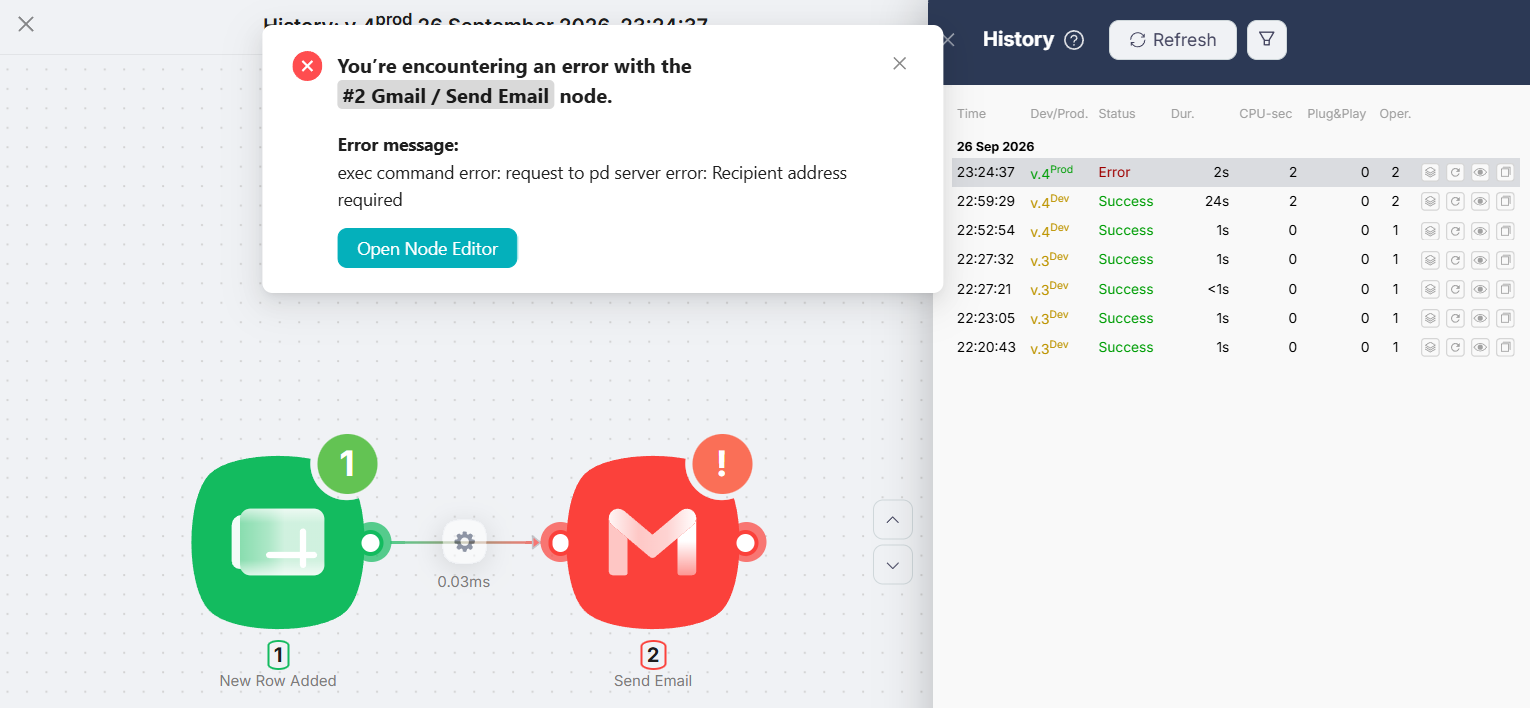
The mapping had not changed since the manual run, so the reference was resolving to nothing rather than to the wrong thing. What we had done differently was type the row cell by cell. An explanation that fits is that the instant trigger fired as soon as the row existed and before column B was filled. We did not confirm that, because we did not go back and reproduce the failure. We did test the fix: on the next row we pasted all three cells at once, and the production run succeeded — Prod, Success, duration 1s, CPU-sec 2 — with the email arriving from a workflow we were not watching.
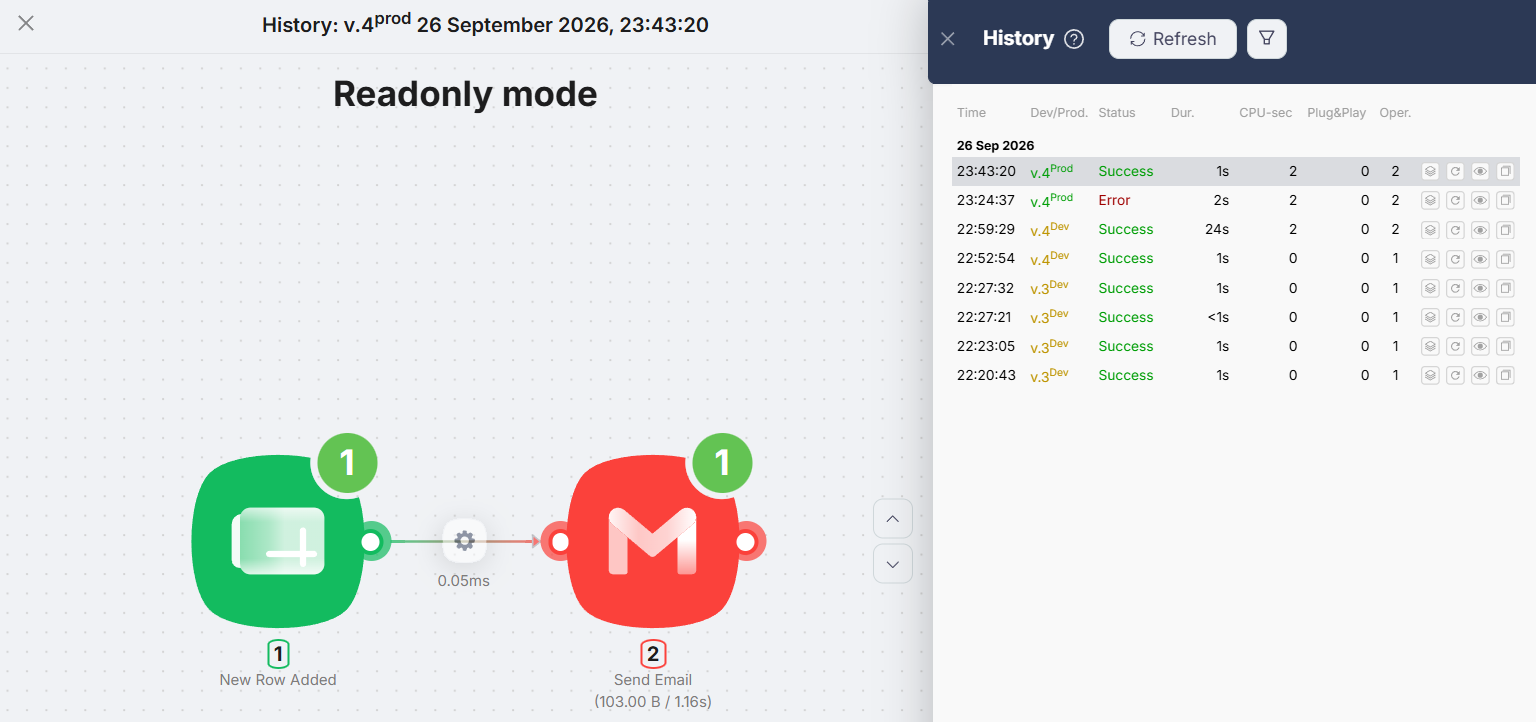
This is not a reliability comparison, and we are not going to let it read as one. We engineered no failures in either tool. The failed run happened after we entered the row cell by cell, and we never put a row entered that way in front of Zapier. What the episode does show is a real difference in trigger model, and that is worth a paragraph of its own.
Zapier vs Latenode: Ease of Use
For a first automation, Zapier was easier, and the reason is narrower than “better design”: the build has one path through it. That is a constraint, and for a two-step workflow the constraint is a help.
Latenode asks more of you in exchange for showing more. The canvas does not tell you what to do next, the mapping lives in a panel you have to discover, and the Deploy step introduces a distinction — the version you are editing versus the version that runs — that Zapier does not put in front of a beginner at all. We liked that split once we understood it: the interface showed Prod v.4 and Dev v.4, so what is running is never a guess. In our test the two never diverged, so we have not seen what happens when an edit sits in Dev while an older version serves production.
This is an editorial judgment from two builds of the simplest possible shape, not a usability study. A build with branching, reformatting, or a code step would be a different test. One more boundary: our Zapier build ran on a Pro trial. The workflow is two steps, which is inside the free plan’s shape limit, but we have not confirmed that the editor behaves identically on Free — so read this as a finding about Zapier’s editor, not about Zapier’s free tier.
Zapier vs Latenode Pricing
Both pricing pages — Zapier’s and Latenode’s — were read on October 4, 2026.
| Item | Zapier | Latenode |
|---|---|---|
| Free plan | “100 tasks per month”, two-step Zaps, 15-minute update interval, “Unlimited Zaps, Tables, and Forms” — so the 100 tasks are the account’s allowance, not an allowance per Zap | “$0/month forever”, 10,000 CPU seconds a month, 5 active workflows, 1 worker, 3-minute run limit, 3-day history, 10 connected authorisations, and a 10-minute minimum interval for scheduled and app-polling triggers |
| What you are billed for | Tasks. Our Gmail action cost one; Zapier’s page notes that rates vary by the kind of step | CPU seconds of runtime. “Unlimited workflow steps do not multiply your bill” |
| What waiting costs | Nothing. Zapier’s Help Center states that “Zap triggers never use tasks” and that polls “never use tasks” | Not measured. Latenode’s docs state that “unlike some other platforms, polling does not cost extra” — a statement about surcharges, not about what a check consumes. Our own build used a pushed trigger |
| Entry paid plan | Professional: “Starting from 750 tasks for $19.99/month” on yearly billing; $29.99/month billed monthly, under a toggle labelled “Pay yearly (Save 33%)”. Update interval 2 min | No subscription tier. Pay as you go has no base fee: the first 10,000 CPU seconds are free, then $0.00012 per CPU second, falling by bracket to $0.00005 |
| If you outgrow the free plan | Team: “Starting from 2,000 tasks for $69/month”, read with the same “Pay yearly (Save 33%)” toggle on as the $19.99 figure | Nothing to buy. The same meter continues at the published rates, and the paid column lists unlimited active scenarios, 5 workers, 10-minute runs, and 30-day history |
Zapier’s paid prices are chosen on a slider: you set the tasks you need and the plan prices follow. The $19.99 figure is what Professional shows at the lowest setting, and the card names the allowance that comes with it.
Latenode’s page has no equivalent, because there is no tier to buy. The published rates bill each bracket of runtime separately, which means there is no monthly floor to compare against Zapier’s — and no plan name to put next to “Professional” either.
Which Is Cheaper? Tasks vs CPU Seconds
Not from one run each, and not across units that do not convert. What we can say is where each free plan runs out, and the gap is wide enough to decide something.
On Zapier, this workflow runs free about 100 times a month. That is arithmetic from a measured figure and a documented allowance — one task per run, which we watched, against 100 tasks a month, which the pricing page prints — not a counter we watched climb to 100. Those 100 come with “Unlimited Zaps”, so they are the account’s allowance rather than each Zap’s: a second automation draws on the same pool. The division holds because of what Zapier does not charge for: its Help Center states that triggers and polls never use tasks, so the 15-minute checks on the free plan are not billed. Two steps is also the free plan’s ceiling on Zap shape, so our workflow fits exactly and anything you add moves you to a paid plan.
On Latenode, the ceiling is set by compute time rather than by a count of runs. Our successful production run was metered at 2 CPU seconds against the 10,000 a month its pricing page includes. That meter covers the run’s compute time; some paid provider nodes can add separate PnP token charges on top, though this two-step workflow uses none. Our build was pushed by an instant trigger rather than scheduled, so there was no interval to pay for in the shape we ran. Latenode’s documentation says that “unlike some other platforms, polling does not cost extra”, but it does not say what a scheduled check that finds nothing consumes. A polling build would certainly change the latency: the free plan sets a 10-minute minimum interval for scheduled and app-polling triggers.
Put the paid tiers beside that and the picture sharpens. Zapier’s entry plan buys 750 runs of this workflow for $19.99 a month on yearly billing. Latenode’s free plan is metered in compute time instead of actions, and the run we measured took 2 of its 10,000 CPU seconds. That is not a verdict that Latenode is the cheaper tool. It is a statement about one two-step workflow that finishes in about a second, which is precisely the kind of work the CPU-second meter is built to favour. A workflow that consumes more compute time would use more CPU seconds, while Zapier’s task count would not move at all. Both runs we have readings for were metered at 2 CPU seconds whether their duration showed one second or two.
And $19.99 on Zapier is not only buying runs. It is buying multi-step Zaps, premium apps, a two-minute update interval instead of fifteen, and a support channel.
Zapier Is Better If…
- This is your first automation. The enforced order and the per-step test are what made our build straightforward, and they are a beginner’s scaffolding.
- You want to see your real data while you map. Zapier’s trigger test returned an actual row, named by column, before we built anything on it.
- You prefer named-field mapping. Zapier’s mapping carried the field’s name; Latenode’s carried the column letter.
Latenode Is Better If…
- You expect to run the same small job a lot. Zapier’s free plan is counted in actions and runs out at 100 a month across the account; Latenode’s is counted in compute time, and our run used 2 seconds of the 10,000 it includes.
- Your workflow wants more than two steps and you do not want to pay per step. Zapier’s free tier stops at two; Latenode’s page states that step count does not multiply the bill.
- You want to know exactly what is running. The Prod and Dev version numbers sit side by side, so the deployed version is never inferred.
- You are comfortable reading a reference like
$1.data.event.row_parsed.Band would rather have the engine’s own path than a friendly label.
Zapier vs Latenode for Freelancers
The freelance version of this decision is usually not about features. It is about what happens in month three, when the automation you set up in an afternoon is still running and you have stopped thinking about it.
If your account stays around three task-using runs a day in total, this workflow fits inside Zapier’s 100-task free allowance — those 100 are shared across every Zap on the account rather than granted to each. If the job is the same automation firing all day, 100 tasks is about three runs a day, and the next stop is $19.99 a month on yearly billing, or $29.99 month to month. Latenode’s free tier does not have that cliff for work of this shape. Its free plan does set a 10-minute minimum interval for scheduled and app-polling triggers, so a polling build would be slower to react. What Latenode has instead is a canvas whose mapping panel is the one thing you have to go looking for, and a mapping syntax tied to column letters that you will want to remember before you reorganise a spreadsheet.
None of that settles it either way. They are two different meters, and which one is kind to you depends entirely on whether your work looks like many short runs or few long ones.
Final Verdict
Start on Zapier if you have never built an automation; settle on Latenode if the same small job is going to run all month. Our build was easier in Zapier, for reasons we can point at: the step order, the per-step test, and a trigger test that handed back our own data. Our build ran further in Latenode, for a reason we can show: one run of this workflow was listed at 2 CPU seconds in its run history, against the 10,000 a month its pricing page includes on the free plan.
What we will not tell you is which is more reliable. Latenode failed once in front of us and recovered; Zapier did not fail — but it was never given a row entered the same way, so the two are not on the same footing there. We engineered no failure in either tool, and one accident is not a reliability finding. What we will tell you is that both delivered a real email from a workflow nobody was watching, which is the thing most people actually want to know before they start.
FAQ
Is Latenode free?
Yes. Its pricing page prints “$0/month forever” for a plan that includes 10,000 CPU seconds a month and 5 active workflows, with no credit card required to start. We built and ran our test on that plan.
Is Zapier’s free plan enough for a Google Sheets to Gmail automation?
For the shape, yes — it is a two-step Zap and two steps is the free plan’s limit. For the volume, it depends on the documented 100-task allowance against the one task per run we measured, and that allowance is shared across every Zap on the account. Our own test ran on a Pro trial rather than the free plan.
What is a CPU second, and how does it compare to a task?
A CPU second is time your workflow spends running. A Zapier task is one action a Zap performs. They do not convert: our two-step workflow cost 1 task and 2 CPU seconds for the same run. A ten-step workflow would cost Zapier more tasks, while Latenode’s page states that step count does not multiply the bill.
Which is easier for a beginner?
Zapier, on these two builds. It orders the steps, refuses to continue until each one is tested, and shows your real spreadsheet data before you map anything. Latenode’s mapping lives in a side panel that nothing on screen points you to, which is where our build lost the most time.
Why did the Latenode automation fail the first time in production?
Gmail was handed an empty recipient. We had typed the row one cell at a time, and the instant trigger fires when the row appears, so the likely explanation is that it read the row before the email column was filled. We did not reproduce it deliberately, so that is the explanation consistent with what we saw rather than a confirmed cause. The next run, with all three cells pasted at once, succeeded. We never entered a row that way in front of Zapier, so this says nothing about which tool handles it better.
Does Latenode charge while a workflow waits for something to happen?
Zapier’s Help Center says polls never use tasks, so its 15-minute checks are not billed. Latenode’s docs say polling “does not cost extra”, which is a statement about surcharges rather than about what a check consumes. Our Latenode build used a pushed trigger, so we have no reading of our own to put beside it.
Can I move a Zap to Latenode later?
Not as a file. Latenode’s own comparison page states that “there is no direct ‘import’ button” and points you at its AI Copilot to reconstruct a Zap from a description of what it did. Its pricing page offers a migration calculator, but that compares cost rather than moving anything. We rebuilt this two-step workflow by hand in each tool.
Sources & Verification
Hands-on tests: the same Google Sheets to Gmail automation, built by hand on one Google account and one spreadsheet. Zapier on September 5, 2026 on a 14-day Pro trial: the Zap was published, a new row produced a delivered email with nothing pressed, and a further deliberate run moved the task counter from 1 to 2. Latenode on September 26, 2026 on its free plan: the workflow was deployed and set Active, the first production run failed with Recipient address required, and the next one succeeded at CPU-sec 2 with the email delivered. The two tests were three weeks apart and on different tiers, which is why the plan row sits at the top of the table above.
Official sources (checked October 4, 2026):
- Zapier pricing — “100 tasks per month”, “Two-step Zaps” and “Unlimited Zaps, Tables, and Forms” on the free plan; a 15-minute update interval on Free against 2 minutes on Professional; Professional “Starting from 750 tasks for $19.99/month” and Team “Starting from 2,000 tasks for $69/month” — both figures appear once the page’s task slider is set to its lowest position, and both were read with the toggle on “Pay yearly (Save 33%)”; Professional reads $29.99/month with the toggle on “Pay monthly”
- Zapier Help Center: what counts as a task — “Zap triggers never use tasks”, and that polling triggers’ checks “never use tasks”
- Latenode pricing — “$0/month forever” with “10,000 CPU seconds every month” and “5 active workflows”; the plan comparison listing, on Free, 1 worker, a 3-minute execution limit, 3-day history, a 10-minute trigger interval and 10 connected authorisations, and, on Pay as you go, unlimited active scenarios, 5 workers, 10-minute runs and 30-day history; “Unlimited workflow steps do not multiply your bill”; pay-as-you-go rates of $0.00012 per CPU second from 10,001, falling by bracket to $0.00005, with no base fee; and a migration calculator for comparing a Zapier, Make, or n8n bill against CPU-second pricing
- Latenode documentation: how Latenode works — instant triggers described as the external service pushing the event to the scenario’s webhook the moment it happens, and polling described as scheduled checks where “unlike some other platforms, polling does not cost extra”
- Latenode documentation: what are CPU seconds — “Billing is based on total compute time for the run, not on the number of nodes or operations”; a minimum billable execution of 1 CPU second per run on the free plan; running a single node on the canvas consuming none; and the note that the Duration and CPU seconds columns in Execution History “are often not the same” because of queue time and platform overhead
What each figure rests on: Zapier’s one task per run is a counter reading. Latenode’s two CPU seconds per run is the figure its run history listed against the successful production run; its documentation notes that the Duration and CPU seconds columns often differ, so we quote the billed figure rather than a rate per second. Zapier’s free-plan run figure is arithmetic from our measured one-task run and its documented 100-task allowance. Latenode’s 10,000-CPU-second monthly allowance comes from its pricing page. Our Zapier test ran on a Pro trial rather than the free plan; our Latenode test ran on its free plan. Neither tool was used on a paid plan, and where this page says Latenode’s polling costs nothing extra, that is its documentation rather than a reading of ours.

Comments